Camerafarm product archive #39167
| Image |
Date |
Product description |
Price |
Buy |
|
28/03
|
Acces DVD-R 4.7GB/16X - 50 Pack Spindle, Inkjet Printable DVD-R 4.7GB/16X - 50 Pack Spindle, Inkjet Printable
|


|
|
|
28/03
|
Corel Painter X - Education Version, Win 2000/XP/Vista, OSX 10.3.9 To purchase education versions of shrink-wrapped software, purchasers must be: accredited schools, faculties, full- or part-time registered students, academic supervisory organizations, hospitals, libraries, museums, and nonprofit charitable and religious organizations.


New Corel Painter X - the world's most powerful Natural-Media painting and illustration softwarefeatures unique digital brushes, art materials and textures that mirror the look and feel of their traditional counterparts. Setting the standard for digital painting and illustration, the Corel Painter X digital art studio introduces new composition tools, unparalleled performance, and the all-new RealBristle painting systemthatmodels traditional brushes like never beforeright down the individual bristles on the brush!
Designed for Artists, Designers, and Photographers
and the next generation of Creative Professionals!
Commercial Designers
Commercial designers require powerful tools for their craft. That's why many of the world's foremost illustrators, automotive concept designers, industrial designers, architects, and graphic designers use Corel Painter. Corel Painter X enables commercial designers to vividly capture their creative vision and handcraft distinctive designs, illustrations, and logos for their clients.

Entertainment Artists
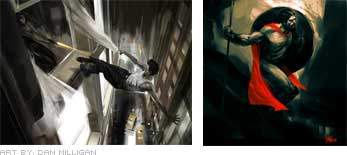
Leading artists in the entertainment industry use Corel Painter to produce some of the world's best-known movies, comic books and video games. Professional entertainment artists can speed their production time by using Corel Painter X-leveraging their natural talents and techniques-to create astounding scenes, characters, vehicles, and textures.
Professional Photographers
In recent years, Corel Painter has sparked a new trend in the professional photography market as photographers explore the creative possibilities of turning their photographs into paintings. Corel Painter X offers photographers new revenue streams by making it easier than ever to create breathtaking, hand-painted works of art from their photographs.

Fine Artists
Many fine artists use Corel Painter as their primary art medium. Their works appear in galleries around the world, demonstrating that digitally-created art has become an accepted medium on the world's art scene. Corel Painter X enables artists to experiment with new techniques, without investing the time and money that would ordinarily be required with analog mediums, and achieve results that emulate those of their traditional counterparts.

Students
Educators around the world are harnessing the power and ease-of-use of Corel Painter to help enhance the learning experience and provide students with the skills they need to succeed as leading creative professionals.
|
Product Highlights and New Features
Corel Painter X offers a broad range of tools and features that inspire creativity, increase performance, and further extend compatibility with other industry-standard tools and applications. It delivers an impressive array of new features that provide unprecedented power to replicate traditional art mediaright down to the individual bristles on the brush.
Increased Performance: Corel Painter X has been optimized to provide artists with the fastest version of Painterever! Depending on system hardware, brushes perform up to 35% fasterand file opening and saving is up to two times faster!
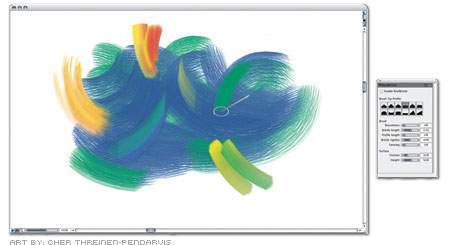
New RealBristle Painting System: The new RealBristle Painting System heightens the responsiveness of the brush and represents a major milestone for digital painting. Artists can now faithfully replicate the sensation of the interaction between the paint, the canvas, and the brush.
See it in action.
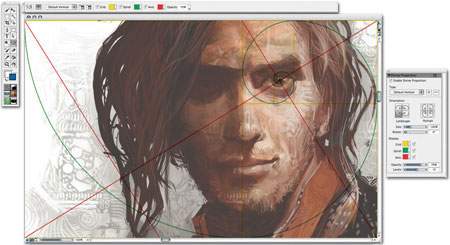
New Composition Tools: New composition tools help artists and photographers visually arrange a blank canvas prior to sketching or painting, or create an aesthetically pleasing composition from a photo using the Divine Proportion tool and the Rule of Thirds. Used throughout history by artists, designers, and architects alike, the Divine Proportion will help you compose your paintings like the masters! Similarly, professional photographers often use the Rule of Thirds to compose their photographs.
See it in action.
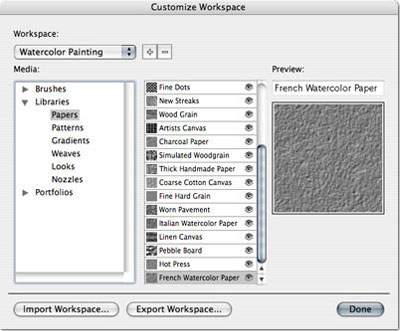
New Workspace Manager: Corel Painter X allows you to easily customize and back up your workspaces as well as export and share them with your friends and colleagues.
See it in action.
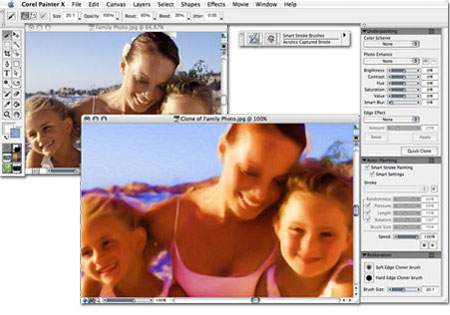
Enhanced Photo-Painting System: It's now easier than ever for photographers to create stunning paintings from photographs! Major improvements offer greater control when Underpainting, and the new Smart Strokes technology adds more intelligence during Auto-painting.
See it in action.
- The Underpainting palette includes color schemes based on various artistic styles, such as Impressionist, Classical, Modern, Watercolor, Sketchbook, and Chalk Drawing. You can also match your Underpainting's palette to that of any open image
- The Auto-Painting Palette transforms a photograph into a painting by automatically applying brushstrokes while intelligently changing stroke size and direction using new Smart StrokeTM technology.
New Downloadable Training Videos: Getting up and running quickly with the new training videos by Painter Master Jeremy Sutton!
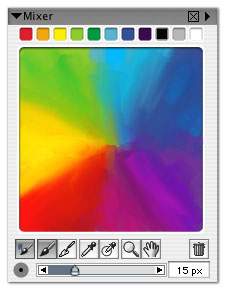
New Universal Mixer palette: For multicolor selection, the new Universal Mixer palette gives you better control over color blending between the Mixer palette and the canvas.
See it in action.
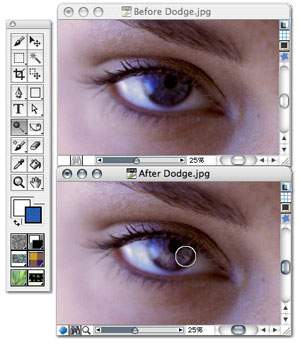
Dodge and Burn Tools: Dodge and burn capabilities have been improved with the addition of two new image enhancement tools to the toolbox. Now preparing photos for paintings is easier than ever!
Enhanced Adobe Photoshop support: With improved layer grouping and combining, and enhanced support for layer merge modes, artists can more efficiently work between Corel Painter X and Adobe Photoshop.
Enhanced Wacom Support: Artists can use the entire Wacom product lineincluding the Cintiq 21 UX interactive pen display, the Intuos3 pen tablet, and the Wacom 6D Art Pen.
New Printed User Guide: Full and Upgrade customers receive a color printed User Guide which provides useful reference information and fast solutions. Also includes a 16-page art gallery.
New Match Palette effect: The new Match Palette effect lets you match the color and intensity between two images. Just open an image that features your desired color scheme and use the Match Palette effect to bring the desired color scheme to the image you want to change.
Windows Vista Support: Corel Painter X is compatible with Microsoft's latest operating system - Windows Vista.

Intel-based Mac Support: With support for Universal binary specifications, Corel Painter X is optimized for use on Intel-based Mac computers.
|
|
|
|
28/03
|
Corel Painter X - Full Version, Win 2000/XP/Vista, OSX 10.3.9
New Corel Painter X - the world's most powerful Natural-Media painting and illustration softwarefeatures unique digital brushes, art materials and textures that mirror the look and feel of their traditional counterparts. Setting the standard for digital painting and illustration, the Corel Painter X digital art studio introduces new composition tools, unparalleled performance, and the all-new RealBristle painting systemthatmodels traditional brushes like never beforeright down the individual bristles on the brush!
Designed for Artists, Designers, and Photographers
and the next generation of Creative Professionals!
Commercial Designers
Commercial designers require powerful tools for their craft. That's why many of the world's foremost illustrators, automotive concept designers, industrial designers, architects, and graphic designers use Corel Painter. Corel Painter X enables commercial designers to vividly capture their creative vision and handcraft distinctive designs, illustrations, and logos for their clients.
Entertainment Artists
Leading artists in the entertainment industry use Corel Painter to produce some of the world's best-known movies, comic books and video games. Professional entertainment artists can speed their production time by using Corel Painter X-leveraging their natural talents and techniques-to create astounding scenes, characters, vehicles, and textures.
Professional Photographers
In recent years, Corel Painter has sparked a new trend in the professional photography market as photographers explore the creative possibilities of turning their photographs into paintings. Corel Painter X offers photographers new revenue streams by making it easier than ever to create breathtaking, hand-painted works of art from their photographs.
Fine Artists
Many fine artists use Corel Painter as their primary art medium. Their works appear in galleries around the world, demonstrating that digitally-created art has become an accepted medium on the world's art scene. Corel Painter X enables artists to experiment with new techniques, without investing the time and money that would ordinarily be required with analog mediums, and achieve results that emulate those of their traditional counterparts.
Students
Educators around the world are harnessing the power and ease-of-use of Corel Painter to help enhance the learning experience and provide students with the skills they need to succeed as leading creative professionals.
|
Product Highlights and New Features
Corel Painter X offers a broad range of tools and features that inspire creativity, increase performance, and further extend compatibility with other industry-standard tools and applications. It delivers an impressive array of new features that provide unprecedented power to replicate traditional art mediaright down to the individual bristles on the brush.
Increased Performance: Corel Painter X has been optimized to provide artists with the fastest version of Painterever! Depending on system hardware, brushes perform up to 35% fasterand file opening and saving is up to two times faster!
New RealBristle Painting System: The new RealBristle Painting System heightens the responsiveness of the brush and represents a major milestone for digital painting. Artists can now faithfully replicate the sensation of the interaction between the paint, the canvas, and the brush.
See it in action.
New Composition Tools: New composition tools help artists and photographers visually arrange a blank canvas prior to sketching or painting, or create an aesthetically pleasing composition from a photo using the Divine Proportion tool and the Rule of Thirds. Used throughout history by artists, designers, and architects alike, the Divine Proportion will help you compose your paintings like the masters! Similarly, professional photographers often use the Rule of Thirds to compose their photographs.
See it in action.
New Workspace Manager: Corel Painter X allows you to easily customize and back up your workspaces as well as export and share them with your friends and colleagues.
See it in action.
Enhanced Photo-Painting System: It's now easier than ever for photographers to create stunning paintings from photographs! Major improvements offer greater control when Underpainting, and the new Smart Strokes technology adds more intelligence during Auto-painting.
See it in action.
- The Underpainting palette includes color schemes based on various artistic styles, such as Impressionist, Classical, Modern, Watercolor, Sketchbook, and Chalk Drawing. You can also match your Underpainting's palette to that of any open image
- The Auto-Painting Palette transforms a photograph into a painting by automatically applying brushstrokes while intelligently changing stroke size and direction using new Smart StrokeTM technology.
New Downloadable Training Videos: Getting up and running quickly with the new training videos by Painter Master Jeremy Sutton!
New Universal Mixer palette: For multicolor selection, the new Universal Mixer palette gives you better control over color blending between the Mixer palette and the canvas.
See it in action.
Dodge and Burn Tools: Dodge and burn capabilities have been improved with the addition of two new image enhancement tools to the toolbox. Now preparing photos for paintings is easier than ever!
Enhanced Adobe Photoshop support: With improved layer grouping and combining, and enhanced support for layer merge modes, artists can more efficiently work between Corel Painter X and Adobe Photoshop.
Enhanced Wacom Support: Artists can use the entire Wacom product lineincluding the Cintiq 21 UX interactive pen display, the Intuos3 pen tablet, and the Wacom 6D Art Pen.
New Printed User Guide: Full and Upgrade customers receive a color printed User Guide which provides useful reference information and fast solutions. Also includes a 16-page art gallery.
New Match Palette effect: The new Match Palette effect lets you match the color and intensity between two images. Just open an image that features your desired color scheme and use the Match Palette effect to bring the desired color scheme to the image you want to change.
Windows Vista Support: Corel Painter X is compatible with Microsoft's latest operating system - Windows Vista.
Intel-based Mac Support: With support for Universal binary specifications, Corel Painter X is optimized for use on Intel-based Mac computers.
|
|
|
|
28/03
|
Corel Painter Essentials 3 - Win 2000/XP, OSX 10.2.8
|
|
|
|
Previous Page
|
Next Page
|
|