Camerafarm product archive #39348
| Image |
Date |
Product description |
Price |
Buy |
|
25/09
|
Adobe Premiere Elements 4 - Windows, Retail Adobe Premiere Elements 4
Enjoy easier video editing and more ways to show your finished movies with new Adobe Premiere Elements 4 software. Get started faster with all your media at your fingertips in the new Organizer. Impress your audience with animated titles and new effects and transitions. And easily share your movies on YouTube, Blu-ray Disc, mobile phones, and many more ways.
Features
Create and share great-looking movies in minutes with Adobe Premiere Elements 4 software. Get started quickly with easy moviemaking options; show your style with amazing audio and video effects; and share your movies virtually anywhere.
Create
Get started quickly with all your video clips and photos at your fingertips and easy options for transforming them into polished movies.
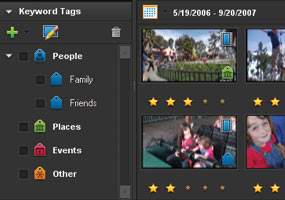
Start quickly with all your media at your fingertips (New)
Find what you need faster using the same Organizer that's included with Adobe Photoshop Elements software. Visually tag video clips and photos to categorize by people, places, or events. Then you can view, search, and sort your assets in a variety of ways including by filename, tag, date, and time and quickly start making your movie.

Jump-start your editing with Movie Themes (New)
Turn a sequence of scenes into a polished movie in just a few clicks! Choose from event-based themes like Wedding and Birthday or style-based themes such as Silent Film and Music Video. Adobe Premiere Elements automatically applies coordinated transitions, music, and professionally designed layouts for titles, credits, and disc menus.
Customize
Show your personal style by enhancing your movies with dazzling visual effects and transitions, rich audio, and interactive disc menus.
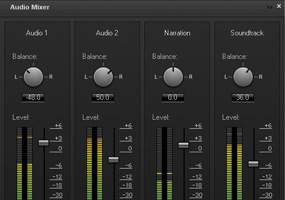
Mix and refine your audio for greater impact (New)
Use background music and sound effects to underscore emotions, add emphasis, or create a mood. The new Audio Mixer works just like a mixing board in a recording studio, letting you adjust relative volumes with sliders so, for example, dialogue can be heard clearly over music.

Animate titles to fit your movie's personality (Enhanced)
Choose from a set of world-class Adobe fonts designed to look great on video, and customize them with shadows, glows, and other effects. Then animate your titles to make them bounce, spin, or zoom across your scenes.
Share
Broadcast far and wide by uploading your movies directly to YouTube or your personal sharing site; share with family and friends on DVD, mobile phones, and portable media devices; and even enjoy movies in high definition, including on Blu-ray Disc.
Share your stories on the web (Enhanced)
Easily upload your movies to YouTube or your personal sharing page. Adobe Premiere Elements 4 takes care of optimizing and formatting for the specific destination so your movies always look great.
Share movies in HD for the highest quality (New)
Take advantage of the latest technology and enjoy your movies in high definition, including on Blu-ray Disc.
System requirements
Windows
- Intel Pentium 4 or Celeron 1.7GHz (or compatible) processor; Pentium 4 3GHz processor required for HD or Blu-ray
- Microsoft Windows XP with Service Pack 2 or Windows Vista
- For Windows XP: 512MB of RAM (1GB required for HD or Blu-ray)
- For Windows Vista: 1GB of RAM (2GB required for HD or Blu-ray)
- 4.5GB of available hard-disk space
- Color monitor with 16-bit color video card
- 1,024x768 monitor resolution at 96dpi or less
- Microsoft DirectX 9 or 10 compatible sound and display driver
- DVD-ROM drive (compatible DVD burner required to burn DVDs; compatible Blu-ray burner required to burn Blu-ray Discs)
- DV/i.LINK/FireWire/IEEE 1394 interface to connect a Digital 8 or DV camcorder, or a USB2 interface to connect a DV-via-USB-compatible DV camcorder (other video devices supported via the Media Downloader)
Supported import/export formats include:
MPEG-1, MPEG-2, MPEG-4, H.264, DV, AVI, Windows Media, QuickTime, JVC Everio MOD (import only), 3GP, ASF (import only), WAV, WMA (import only), Dolby Digital Stereo, PSD (import only), JPEG, PNG (import only), DVD, Blu-ray Disc (export only)
Import/export of some formats including DVD, Blu-ray, MPEG-2, MPEG-4, H.264, and Dolby Digital Stereo may require activation via an Internet connection. Activation is fast, easy, and free. Import/export of 3GP, 3GP2, and MPEG-4 requires QuickTime software.
|


|
|
|
25/09
|
Adobe Photoshop Elements 6 + Premiere Elements 4 - Windows, Retail
Adobe Photoshop Elements 6 & Adobe Premiere Elements 4
The Adobe Photoshop Elements 6 & Adobe Premiere Elements 4 software bundle makes it easier than ever to edit your photos and videos and combine them in exciting ways. Access and use photos and video clips in either product as you create cinematic slide shows, dramatic freeze-frame effects, and more.
Features
Adobe Photoshop Elements 6 & Adobe Premiere Elements 4 software combines two powerful yet easy-to-use products to deliver the most complete photo- and video-editing solution at a great value. Easily share photos and video clips between applications as you create cinematic slide shows, dramatic freeze-frame effects, and more. Then show off your finished projects on personalized discs or on the web.
- Tell stories with photos and videos
- Bring out the best in your photos
- Create fun movies in as little as 15 minutes
Tell stories with photos and videos
With the Adobe Photoshop Elements 6 & Adobe Premiere Elements 4 software bundle, you can easily access and use photos and video clips in either product and then combine them in entertaining ways.

Put photo slide shows in motion
Create a photo slide show, and then add video-style effects and transitions and add motion to your text. Preview the slide show in full screen and then burn it to disc or upload it to YouTube or your personal web page to share with family and friends.
Bring out the best in your photos
Adobe Photoshop Elements 6 software combines power and simplicity so you can make your photos look their best, share them in imaginative ways, and easily find and view all your photos and video clips.

Make your photos look their best
Take advantage of one-click fixes or step-by-step assistance that makes editing easier than ever. Then explore advanced options for making finer adjustments, add artistic effects, and experiment with easy-to-use compositing tools. Organize, edit, create, and share your digital photos with powerful yet easy-to-use tools.
Create fun movies in as little as 15 minutes
Adobe Premiere Elements 4 software lets you get started quickly with easy moviemaking options; show your style with amazing effects; and share your movies on YouTube, Blu-ray Disc, and virtually anywhere else.

Create your first movie in minutes
Get started quickly with all your video clips and photos at your fingertips and easy options for making movies. Move footage from camera to disc in a few simple steps, quickly transform a sequence of scenes into a polished movie by adding a Movie Theme, or create your story with drag-and-drop ease in the Sceneline.
System requirements
Adobe Photoshop Elements
- Intel Pentium 4, Pentium M, or Intel Centrino 1.3GHz (or compatible) processor
- Microsoft Windows XP with Service Pack 2 or Windows Vista
- 256MB of RAM (512MB recommended)
- 1.5GB of available hard-disk space
- Color monitor with 16-bit color video card
- 1,024x768 monitor resolution at 96dpi or less
- Microsoft DirectX 9 compatible display driver
- CD-ROM drive
- Web features require Microsoft Internet Explorer 6, Netscape Navigator 7.0, or Mozilla Firefox 1.5
Adobe Premiere Elements
- Intel Pentium 4 or Celeron 1.7GHz (or compatible) processor; Pentium 4 3GHz processor required for HD or Blu-ray
- Microsoft Windows XP with Service Pack 2 or Windows Vista
- For Windows XP: 512MB of RAM (1GB required for HD or Blu-ray)
- For Windows Vista: 1GB of RAM (2GB required for HD or Blu-ray)
- 4.5GB of available hard-disk space
- Color monitor with 16-bit color video card
- 1,024x768 monitor resolution at 96dpi or less
- Microsoft DirectX 9 or 10 compatible sound and display driver
- DVD-ROM drive (compatible DVD burner required to burn DVDs; compatible Blu-ray burner required to burn Blu-ray Discs)
- DV/i.LINK/FireWire/IEEE 1394 interface to connect a Digital 8 or DV camcorder, or a USB2 interface to connect a DV-via-USB-compatible DV camcorder (other video devices supported via the Media Downloader)
Adobe Premiere Elements supported import/export formats include:
MPEG-1, MPEG-2, MPEG-4, H.264, DV, AVI, Windows Media, QuickTime, JVC Everio MOD (import only), 3GP, ASF (import only), WAV, WMA (import only), Dolby Digital Stereo, PSD (import only), JPEG, PNG (import only), DVD, Blu-ray Disc (export only)
Import/export of some formats including DVD, Blu-ray, MPEG-2, MPEG-4, H.264, and Dolby Digital Stereo may require activation via an Internet connection. Activation is fast, easy, and free. Import/export of 3GP, 3GP2, and MPEG-4 requires QuickTime software.
|
|
|
|
25/09
|
Adobe Photoshop Elements 6 - Windows, Retail Adobe Photoshop Elements 6
Telling your stories with photos is now a whole lot easier thanks to new Adobe Photoshop Elements 6 software. Step-by-step assistance makes it a breeze to enhance and create with your photos. New compositing capabilities let you create perfect group photos. New web gallery themes give you exciting ways to share your photos. And improved performance helps you find and view your photos and video clips faster.
Features
Adobe Photoshop Elements 6 software combines power and simplicity so you can make your photos look their best, share them in imaginative ways, and easily find and view all your photos and video clips.
Organize
See all of your photos in one convenient place, and find photos using visual keyword tags and a variety of viewing options. Experience improved performance that helps you find what you need faster, even when your library grows to include thousands of photos.
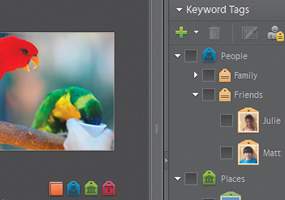
Categorize by tagging
Easily tag photos with keywords that represent people, places, or events. You can instantly view every photo you've ever taken of your dog, for example, by simply clicking on its tag.
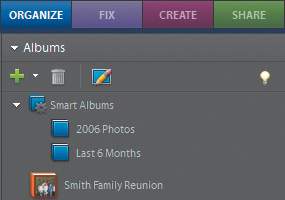
See just the photos you want to see (New)
Focus on just the photos you want to see with new Smart Albums, which automatically bring together photos based on the criteria most important to you. Choose up to 10 search criteria such as all photos taken with a certain camera, taken since the beginning of the year, and of a particular file size and then click on your Smart Album to instantly see the matching set of photos.
Edit
Take advantage of options that make it easy for you to edit your photos your way. You can perform one-click fixes, count on step-by-step editing assistance to learn how to improve your photos, or explore advanced options for finer adjustments.

Create the perfect group shot (New)
Never let a frown or a closed pair of eyes ruin a group photo again. New photo-blending technology lets you easily combine the best facial expressions and body language from a series of group shots to create a single, perfect composite.
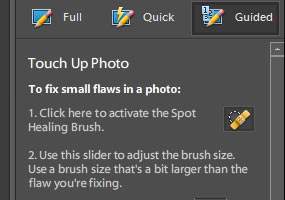
Count on step-by-step assistance (Enhanced)
Need to touch up a scratch or blemish but not sure how to begin? Photoshop Elements 6 walks you through each editing step to make improving your photos easier than ever.
Create
Show off your photos and your creativity in entertaining ways, including photo books, scrapbook pages, slide shows, and more. Count on step-by-step assistance if you're just starting out, or feel free to experiment on your own.
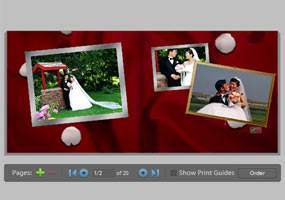
Start creating quickly no experience necessary (Enhanced)
Get step-by-step assistance for making photo creations like scrapbook pages, cards, and CD/DVD labels. Simply choose the type of creation you'd like to make, and the appropriate tools and instructions appear at your fingertips.

Create exactly the look you envision
Customize all the elements of your chosen layout: Adjust layout colors to better complement your photos; add new graphical elements to enhance or personalize the theme; and add text or effects such as drop shadows and glows.
Share
Once you've perfected your photos and creations, easily share them with family and friends. Display them in eye-catching, interactive web galleries; show them on your TV or mobile devices; and more.

Provide an interactive sharing experience (Enhanced)
Go beyond traditional slide shows by sharing photos in your choice of animated web galleries. Adobe Flash technology lets family and friends interact with your photos for an entertaining experience.

Share with family and friends using integrated online offerings
Easily order prints, share photos and photo creations on the web, share on CEIVA Digital Photo Frames, and more from within Photoshop Elements. With all your photos at your fingertips, you can quickly select the ones you want and upload them to a variety of online offerings.
System requirements
Windows
- Intel Pentium 4, Pentium M, or Intel Centrino 1.3GHz (or compatible) processor
- Microsoft Windows XP with Service Pack 2 or Windows Vista
- 256MB of RAM (512MB recommended)
- 1.5GB of available hard-disk space
- Color monitor with 16-bit color video card
- 1,024x768 monitor resolution at 96dpi or less
- Microsoft DirectX 9 compatible display driver
- CD-ROM drive
- Web features require Microsoft Internet Explorer 6, Netscape Navigator 7.0, or Mozilla Firefox 1.5
|
|
|
|
25/09
|
Lexmark 18Y0143A #43 Ink Cartridge - Colour
| Product Information |
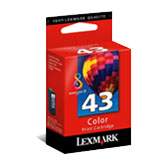 |
#43 Color Print Cartridge
Part#: 18Y0143
|
Lexmark evercolor2 ink is a unique formulation of pigment based color ink that combine exceptional resilience with improved archivability. Lexmark evercolor2 ink is water-resistant, and has increased resistance against fading and the smudging associated with highlighter pens. When evercolor2 inks are printed on Lexmark PerfectFinish paper your photos last 100 years in normal display conditions or stored in photo albums.* * Based on accelerated fade resistance testing of photos printed on PerfectFinish paper and displayed indoors under glass or in an album.
|
|
|
|
25/09
|
Lexmark 18Y0340A #40 Ink Cartridge - Photo Colour
| Product Information |
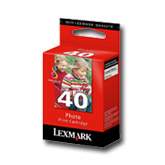 |
#40 Photo Print Cartridge
Part#: 18Y0340
|
Lexmark evercolor2 ink is a unique formulation of pigment based color ink that combine exceptional resilience with improved archivability. Lexmark evercolor2 ink is water-resistant, and has increased resistance against fading and the smudging associated with highlighter pens. When evercolor2 inks are printed on Lexmark PerfectFinish paper your photos last 100 years in normal display conditions or stored in photo albums.
* Based on accelerated fade resistance testing of photos printed on PerfectFinish paper and displayed indoors under glass or in an album. Actual resistance to fading will vary.
|
|
|
|
25/09
|
Lexmark 18Y0144A #44 Ink Cartridge - Black, High Yield Lexmark #44 High Yield Black Cartridge
#44 Black Print Cartridge
Part#: 18Y0144
|
|
|
|
25/09
|
Lexmark TPANZ05 #82 Black Ink Cartridge - 2 Pack
| Product Information |
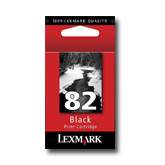 |
#82 Black Print Cartridge
Part#: 18L0032
|
Genuine Lexmark cartridges generate optimum print quality two in-line nozzles for reliable coverage and a large print swath to provide superior print speed performance.
|
|
|
|
25/09
|
Lexmark TPANZ03 #17 Black Ink Cartridge - 2 Pack
| Product Information |
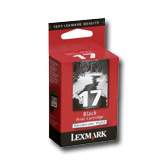 |
#17 Moderate Use Black Print Cartridge
Part#: 10N0217
|
#17 Black Print Cartridges are ideal for printer owners who print occasionally or who want to adapt the cartridges they buy to the kind of printing they do. #17 Cartridges provide occasional users with the capacity and yield best adapted to their occasional printing needs.
|
|
|
|
25/09
|
Lexmark TPANZ02 #17 Black/#27 Colour Ink Cartridge - 2 Pack
| Product Information |
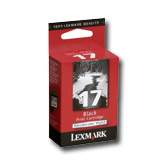 |
#17 Moderate Use Black Print Cartridge
Part#: 10N0217
|
#17 Black Print Cartridges are ideal for printer owners who print occasionally or who want to adapt the cartridges they buy to the kind of printing they do. #17 Cartridges provide occasional users with the capacity and yield best adapted to their occasional printing needs.
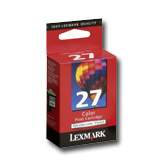 |
#27 Moderate Use Color Print Cartridge
Part#: 10N0227
|
#27 Color Print Cartridges are ideal for printer owners who print occasionally or who want to adapt the cartridges they buy to the kind of printing they do. #27 Cartridges provide occasional users with the capacity and yield best adapted to their occasional printing needs.
|
|
|
|
Previous Page
|
Next Page
|
|


