Camerafarm product archive #39371
| Image |
Date |
Product description |
Price |
Buy |
|
18/10
|
HP Photosmart A826 (Q8550A) Photo Printer - PictBridge, USB, Card Reader, 7" Touchscreen LCD
Overview
|
 |
|
Photo takers who want to easily add their own creative touch to photos, and to effortlessly print entire orders of lab-quality photos at home.
Features
|
|
|
| |
Share your photos your wayprint up to 100 at a timeusing a PC-free home photo center.
|
| |
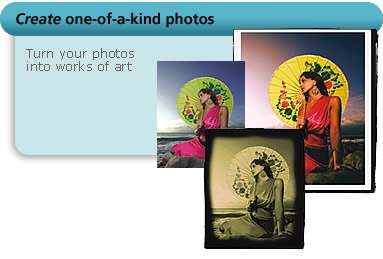
Create one-of-a-kind photosa 7.0-inch color touchscreen and stylus make it a breeze.
|
| |
Easy photo printing without a PCeffortlessly print photos in a few, simple steps. |
|
|
| Printing system |
Print quality (colour, best quality)
|
Up to 4800 x 1200 optimised dpi when printing from a computer and 1200 input dpi
|
Print speed (colour photo, best quality on photo paper, 10x15)
|
As fast as 79 sec (with border, direct connect)
|
Print speed (colour photo, draft quality on photo paper, 10x15)
|
As fast as 39 sec (with border, direct connect)
|
Print speed footnote
|
Dependent upon type, print mode and approximate figures. Exact speed will vary depending on the system configuration, software program and photo density.
|
Page yield footnote
|
For page and photo yields and other cartridge options, see http://www.hp.com/go/pageyield
|
| Photo printing and smart features |
Standard paper trays
|
1
|
Recommended media
|
HP Advanced Photo Paper: 10 x 15 cm
|
Custom media sizes
|
10 x 15 cm, 13 x 18 cm, 10 x 30 cm
|
Standard media sizes
|
10 x 15 cm, 13 x 18 cm, 10 x 30 cm
|
Recommended media weight
|
HP photo papers up to 280 g/m
|
Maximum input capacity (sheets)
|
Up to 100
|
Maximum input capacity (cards)
|
Up to 100
|
Standard output capacity (sheets)
|
Up to 100
|
Duplex print options
|
None (not supported)
|
Standard memory
|
64 MB
|
| Other technical information |
Compatible operating systems
|
Windows XP Home, Windows XP Professional, Windows Vista Ready, Mac OS X v10.3.9, Mac OS X v10.4, Intel Mac
|
Standard connectivity
|
USB - compatible with USB 2.0 specifications, PictBridge, memory card slots
|
Optional connectivity
|
HP bt450 Bluetooth Wireless Printer Adapter (Q6398A), HP bt500 Bluetooth USB 2.0 Adapter (Q6273A), HP Wireless Printing Upgrade Kit (Q6259A)
|
Minimum system requirements
|
900 MB hard disk space (Windows Vista), for all other systems: 350 MB available hard disk space for software installation, CD-ROM or DVD-ROM drive, Internet access recommended, SVGA 800 x 600 monitor with 16-bit colour (32-bit colour recommended), USB port and USB cable, Adobe Acrobat Reader 5 or higher, Internet Explorer 6.0 or higher; Windows Vista: 800 MHz 32-bit (x86) or 64-bit (x64) processor (1 GHz processor, 1 GB memory or higher recommended); Windows XP (Home, Professional): any Intel Pentium II, Celeron or compatible processor, 233 MHz (Pentium III 300 MHz or higher recommended); Windows XP Professional x64: any AMD Athlon 64, AMD Opteron, Intel Xeon with Intel EM64T support, Intel Pentium 4 with Intel EM64T support, 256 MB RAM (512 MB or higher recommended), Internet Explorer
|
Standard printer languages
|
HP PCL 3 GUI
|
Acoustic power emissions
|
5.5 B(A)
|
Dimensions (W x D x H)
|
263 x 244 x 275 mm
|
Package dimensions (W x D x H)
|
294 x 244 x 327 mm
|
Weight
|
2.63 kg
|
Power consumption
|
4.3 watts maximum (off), 6.7 watts maximum (ready), 16 watts maximum (active, printing), 24 watts maximum
|
Power supply type
|
External power supply module
|
Power requirements
|
Input voltage 100 to 240 VAC (+/- 10%), 50/60 Hz (+/- 3 Hz)
|
Operating humidity range
|
5 to 95% RH
|
Recommended operating temperature range
|
15 to 35 C
|
Non-operating humidity
|
5 to 95% RH
|
Recommended humidity operating range
|
20 to 80% RH
|
Electromagnetic compatibility
|
CISPR 22:1997 / EN 55022:1998 + A1:2000 + A2:2003 Class B, CISPR 24:1997 / EN 55024:1998 + A1:2001 + A2:2003, IEC 61000-3-2: 2000 + A1:2000 + A2:2004, IEC61000-3-3:1994 + A1:2001, CFR 47 Part 15 Class B, ICES-003 Issue 4 - 2003
|
Energy Star certified
|
No |
|
|


|
|
|
18/10
|
Kodak EasyShare C813 Zoom - 8.2MP, 3x Optical Zoom, 36-108mm Equivalent, 2.4" LCD Sensor: 1/2.5 in CCD
CCD Total Pixels: 8.3 MP (3320 x 2496)
CCD Effective Pixels: 8.2 MP (3312 x 2488)
Lens: 36-108 mm (35 mm equiv.) f/2.7-4.8, 2 step aperture
Zoom: 3X optical, 5X continuous digital with LCD preview, 0.2X increments, starting at 3X optical zoom
Image Stabiliser: digital
Shutter Speed: 1/2 - 1/1400 sec
LCD: 2.4" (6.1cm) indoor/outdoor color display, 480x240 (115k pixels)
Storage: 16 MB internal mem available, SD/MMC card exp slot
Interface: KODAK Camera Dock/Printer Dock i/face, digital (USB 2.0) conn
Dimensions (W x H x D): 91.0 x 65.7 x 37.3 mm
Weight: 137 g
- Print up to 76 x 102 cm (30" x 40") with 8.2 MP
- 3X optical zoom lens
- Large 6.1 cm (2.4") indoor/outdoor color display
- Digital image stabilization
- High ISO (up to 1250)
- HD still capture
- VGA video with sound
- 16 scene and 3 colour modes
- Kodak Perfect Touch technology
- On-camera picture enhancing features
- Internal memory plus feature
- Exclusive on-camera Share button
- Favorites feature
- Kodak color science
- Works with optional Kodak EasyShare printer docks, photo printers, and camera docks
- However users may choose to print, Kodak provides quality that's truly exceptional and pictures that will last
|
|
|
|
18/10
|
Epson T038 Black Ink Cartridge, for C41SX/C41US/C43SX/C43UX/C45/CX1500 For: EPSON Stylus C41SX / Stylus C41UX /Stylus C43SX/ Stylus C43UX /EPSON Stylus C45 /EPSON Stylus CX1500
Colour: Black
Capacity:
330 pages, comparable with 3.5% EMCA (ISO 10561) text @ 360dpi
210 pages, 5% in calculation
- Engineered for the highest resolution and colour saturation possible
- Quick-drying ink which prevents bleeding and offers optimum performance
|

|
|
|
18/10
|
Corel Painter Essentials 4 - PC
The Easy-to-Use Home Art Studio
Corel Painter Essentials 4 is the simple-to-use home art studio that makes it easy for you to sketch, paint and turn your photos into paintings. Two new workspaces put the tools you need at your fingertips, whether you're turning a photo into a painting, or sketching and painting on a blank canvas. Based on the world's most powerful painting and illustration software, Corel Painter, it's the ideal way to get started with digital art!
Turn Photos into Paintings 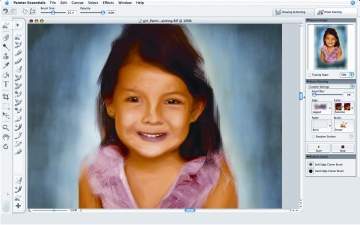
You can create a painting from a photo in just three steps:
 |
Open the photo you want to paint in the Source Image palette. Your photo will be saved with the Painter Essentials file format, so it's easy to return to a project later |
|
Choose one of the preset painting styles from the menus on the Auto-Painting Palette to get the look you want |
|
Let new Smart Stroke technology create stunning paintingswith brush strokes that follow the form of your photo! |
Discover an Expressive and Natural painting experience 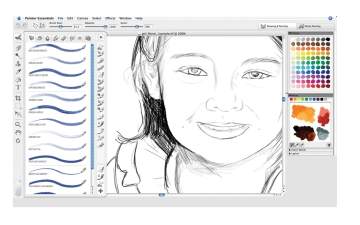
The Drawing and Painting workspace is designed to put the tools you need at your finger tips.
|
Identify and choose brushes easily with the New Brush Drawer |
|
Go back to recently used brushes quickly with Brush History |
|
Organize your favorite brushes in one spot for easy access |
|
Select paint colors with a single click on the New Colors palette |
|
Create new colors easily with the convenient New Mixer palette |
Explore Learning Materials 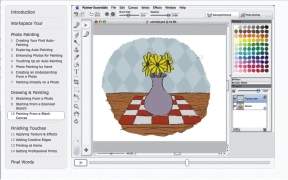
Free video tutorials by Painter master John Derry, combined with the tutorials printed in the user guide, make it easier than ever to get startedand get the results you want.
System Requirements
Windows version:
|
 |
Windows Vista or Windows XP (with latest Service Pack) |
|
Pentium III, 700 MHz or greater |
|
256 MB RAM |
|
Mouse or tablet |
|
24-bit color display |
|
1024 x 768 screen resolution |
|
CD-ROM |
|
1 GB of HD space for installation |
Mac OS version:
|
|
Mac OS X 10.4.x (with latest revision) |
|
Power Macintosh G4, 700 MHz or greater |
|
256 MB RAM |
|
Mouse or tablet |
|
24-bit color display |
|
1024 x 768 screen resolution |
|
CD-ROM |
|
1 GB of HD space for installation |
Adobe Acrobat Reader are required for components of Corel Painter Essentials 4
Safari web browser on the Macintosh and Microsoft Internet Explorer 6 (or greater) on Windows are required for components of Corel Painter Essentials 4.
Training Videos
AdobeFlash Player version 7 or higher is required to play the Corel Painter Essentials 4 training videos.
|
|
|
|
18/10
|
Corel Paint Shop Pro Photo x2 - PC
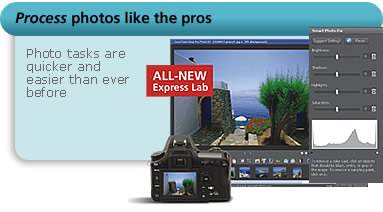
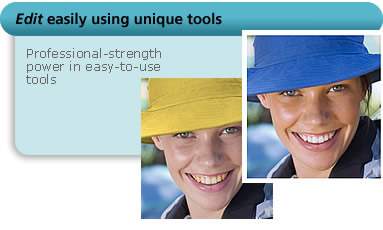
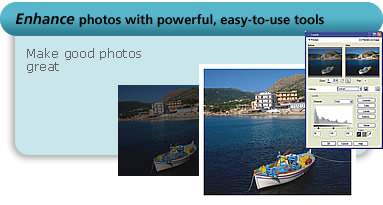
New Corel Paint Shop Pro Photo X2 is the ideal choice for any aspiring photographer's digital darkroom. It's filled with everything from easy automatic photo fixes to precision editing tools. It even includes a built-in Learning Center to help new users get started right away!
     |
 |
System Requirements
- Microsoft Windows Vista or Windows XP, with latest service packs installed
- 512 MB RAM (768 MB recommended)
- 768 MB RAM required if using Windows Vista
- 1 GHz processor (2 GHz recommended)
- 500 MB hard disk space
- 24-bit color display, 1024x768 resolution
- Microsoft DirectX 9.0c or higher (included in Windows Vista and XP)
Additional Requirements for selected features
- Microsoft Outlook, Outlook Express, WordPerfect MAIL or other MAPI-compliant email software (to email from the product)
- Apple QuickTime 7 or higher (to play .mov movie files)
|
|
|
|
Previous Page
|
Next Page
|
|