Camerafarm product archive #39460
| Image |
Date |
Product description |
Price |
Buy |
|
15/01
|
Sony CSS-PC1 CyberShot Station - PC Docking ConnectionCYBERSHOT STATION FOR PC CONNECTION CSSPC1
- Just place your camera on this compact and attractive Cyber-shot Station to transfer photos to PC
- Allows easy transfer of pictures to PCs via USB port
- Power adaptor AC-LS5 and USB cable supplied
- Allows for quick recharge of Cyber-shot batteries (approx. 30% faster than supplied charger)
- Approx. Size (mm): W 124 x H 45 x D 65
General
- Dimension approx.: W 124 x H 45 x D 65mm
- Weight approx.: 85g
- Colour: Black
- Operating Temperature: 0 to +40C
- Storage Temperature: -20 to +60C
Charging Specification
- Output Voltage: 4.2V, 1.8A
- Quick Charge: No
- Intelligent Display(LCD): No
- DC Charge: No
- Charging Time on NPBG1 (Full/ Normal): 230min./170min
Input/ Output connections
- connector 1: USB cable
- connector 2: DC IN jack
- connector 3: Multi connector
|


|
|
|
15/01
|
Primera Bravo II DVD Publisher
- Automatically burns and prints up to 50 CDs or DVDs at a time
The World's Best-Selling Automated CD / DVD Duplicator
Bravo II is Primera's newest and most advanced "all-in-one" disc publishing system. It combines fast, automated robotic CD/DVD duplication along with full-color, 4800 dpi direct-to-disc printing - all in one compact, desktop unit.
Bravo II is ideal for producing either one at a time, unique discs or jobs of up to 50 discs at a time. Models include both Windows-based PC and Mac duplication software.
Burn and Print - Automatically!
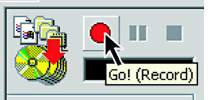 Bravo II is the easiest to use and most advanced CD/DVD publishing system ever. With its built-in burn and print capabilities, it produces up to 50 discs at a time. Best of all, the entire process is automatic. Simply specify the files you wish to burn and print, select how many discs you'd like, and press "Go!" from your Windows PC or Mac. CD/DVD Model Available 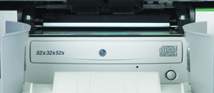 The Bravo II DVD/CD Publisher produces both CD-Rs and DVDRs in the same drive. Bravo II incorporates the very latest, state-of-the-art recordable DVD drives from Pioneer.
If you only need to print, the Bravo II AutoPrinter produces gorgeous, full-color CDs and DVDs in jobs of up to 50 discs at a time. It automatically feeds discs into and out of the printer and is the perfect companion to the tower-style duplicator you may already own - all for a price that's about the same as other manual disc printers!
Integrated 4800 DPI Printing
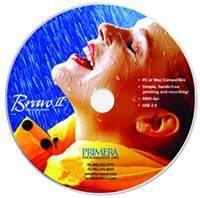 Bravo II incorporates stunning, full-color printing at up to 4800 dpi - the best in the industry. You'll be able to produce discs that look as professional as any you've ever seen using high-resolution text, graphics and even photos. Printing times are fast. It took just 54 seconds to print the disc shown here at 600 x 600 dpi resolution.
Exclusive AccuDisc Technology
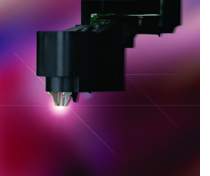 With Bravo II, you'll also benefit from Primera's new patent-pending AccuDisc Technology. This suite of hardware and firmware enhancements provides the most accurate and precise disc picking available today. Utilizing advanced LED optics instead of mechanical components, AccuDisc eliminates misalignment of the picking mechanism. It also prevents the feeding of double discs into the recordable drive - a common problem with other picking systems.
Many Choices of Media
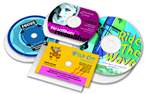 Bravo II produces not only standard 120mm discs, but also several of the popular business card shaped and mini CD/DVD formats. An optional media adapter kit is required.
Get Up and Running Quickly
From initial set-up to full operation, Bravo II is easy to use. PTPublisher professional burning software is included for Windows and CharisMac Engineering's Discribe is included for Mac users. Both burning software packages allow virtually any digital information to be duplicated. View software tutorials. Primera also provides the best disc design software. SureThing CD Labeler Primera Edition Software is included for 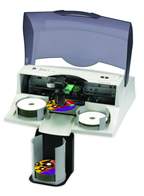 Windows users while Mac users will find design templates for Adobe PhotoShop and Illustrator.
Large Disc Capacity
Bravo II can burn and print up to 50 discs per job with the included Kiosk Mode Kit. In kiosk mode, finished discs are dispensed out the center of the machine. Kiosk Mode Kit is mailed after product registration. Need More Capacity?
Introducing the new ADL-MAX Autoloader. Simply place a Bravo II Disc Publisher onto the platform of the ADL-MAX Autoloader. In just minutes, youll be able to increase the capacity of your Bravo II to 325 discs. Increases the capacity of a BravoPro Disc Publisher to 350 discs.
 The Price/Performance Leader
Primera manufactures more automated disc publishing and duplication systems than any other company in the world. So, no matter what you need to duplicate - audio, video, music, software, photos, images, presentations and more - you can feel confident with the Bravo II's performance and reliability. Best of all, Bravo II delivers truly professional results at an affordable price!
Network Capability with PTBurn Network Software PTBurn Network Software allows multiple users to send CD or DVD recording and label printing jobs to a Bravo II remotely from client PCs. The software includes a range of useful features for the office environment such as job status, job queue priority management, type of disc (CD/DVD), multiple copies, replacement fields and more. The optional single license enables one server PC and 5 client PCs. Additional clients can be purchased in blocks of five. For the most demanding environments, an SDK is available for your developers to create custom applications and specialized job interfaces to the PTBurn Server and operate the Bravo II Disc Publisher. PTBurn Network Software Brochure.
Bravo II Disc Publisher Specifications
Models
Bravo II DVD Publisher (DVDR & CD-R)
Bravo II AutoPrinter (No drives, for printing only)
Disc Capacity
50 discs with included Kiosk Mode Kit
Recording Speeds
DVDR/CD-R: Latest Pioneer drive
Recordable Formats
CD: CD-R, CD-RW, CD-Audio (CD-DA), Video-CD, MP3 to CD-Audio, most other industry-standard CD formats
DVD: DVDR, DVDRW, DVD+R Dual Layer; other formats to be added as they become standardized
Number of Drives
One Pioneer DVDR/CD-R drive
Print Method
Inkjet
Print Resolutions
4800 dpi x 1200 dpi, 2400 x 1200 dpi, 1200 x 1200 dpi and 600 x 600 dpi
Maximum Print Width
4.724" (120mm)
Ink Cartridges
Dual CMY color and black monochrome
Colors
16.7 million and black monochrome
Color Matching
PrimaColor ICC-compliant color matching software included
Label Software
SureThing CD Labeler Primera Edition for Windows users and Adobe PhotoShop and Illustrator design templates for Mac and Windows users.
Media Types
Printable-surface CDs and DVDs
Minimum System Requirements for PC
Pentium III processor at 700 MHz or higher, 512MB or more RAM, available USB 2.0 port or open PCI slot for optional USB 2.0 adapter card (combo cards not recommended), Desktop PC (laptops not recommended), Windows 2000 with Service Pack 4, or Windows XP with Service Pack 1, User account with Local Administrator equivalent rights, 2GB free Hard Drive space, at least 5GB free for DVD Disc Image
Note: For DVDR system you must have Windows 2000 or XP with a NTFS drive partition.
Minimum System Requirements for Mac Computers
700 MHz PowerPC or Intel G4 processor or higher, capable of running Mac OS X v10.2 or higher, 256 MB RAM, one available USB 2.0 port, 1.5 GB free hard drive space (6 GB for DVD version)
Operating Systems
Windows XP/2000 and Vista for PC
OS X, v.10.2 or higher for Mac
Electrical Rating
12 VDC, 5A
Certifications
Safety: UL, UL-C, CE
Emissions: FCC Class B, CE
Power Requirements
100-240 VAC, 50/60Hz, 60 watts (12vdc)
Weight
18 lbs. (8.2kg)
Dimensions
17.25"W x 7.25"H x 16"D (438mmW x 184mmH x 406mmD)
Data Interfaces
USB 2.0
Warranty
One year
Included
Software for Mac and PC platforms
Kiosk Mode Kit (mailed separately after product registration)
Options
USB 2.0 PCI Adapter Card
Bravo II Business Card Adapter Kit - includes templates and input trays for:
- 80mm mini-CDs
- 59mm x 85mm rectangular business card CDs
- 63mm x 80mm rounded ("hockey rink") business card CDs
(The manufacturers of Bravo II's CD-R and DVDR Recordable drives recommend using only 120mm round CD-Rs and DVDRs. You may void your warranty if other sizes and shapes of media are used).
PTBurn Network Software (5 user blocks)
PTBurn Software Developer's Kit (SDK) for custom
configuration to 3rd party software applications
(available at no charge to qualified developers)
|
|
|
|
15/01
|
Primera Bravo Pro Auto Printer Inc Kiosk Mode
- Automatically prints full colour CDs & DVDs in jobs of up to 100 discs at a time
Professional, High-Performance CD Printing
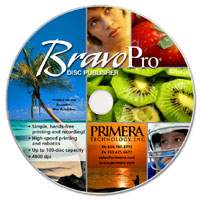 BravoPro is Primeras newest and highest-performance disc auto printer ever. It automatically prints up to 100 CDs or DVDs at a time all in a compact, attractive unit. With unparalleled durability, dependability and reliability, BravoPro is the best choice for businesses and organizations that demand solid performance and value.
As the big brother to our Bravo II AutoPrinter the worlds best-selling CD/DVD auto printer BravoPro sets new standards for quality, speed and reliability. Just a few of its features and benefits include:
- The industrys fastest throughput
- Direct-to-disc printing with stunning 4800 dpi print resolution
- The smallest ink droplet size available just 3 picoliters for superb graphics, photo and text quality
- Primeras exclusive AccuDisc Technology for precise, reliable disc transport
- Windows network software included for sharing BravoPro among multiple users
- Software for both PC and Mac burning and printing included
 Print Automatically
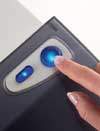
BravoPro is designed for unattended, hands-free, direct-to-disc printing. Just add a print file if desired, select a quantity and click on the Go! button.
A new wizard-driven software interface helps you to produce discs quickly and easily. Even if youve never printed a disc before, the software will lead you effortlessly through each step.
The Fastest Throughput
BravoPros robotics, printing and even tray-in/tray-out speeds have been carefully designed and optimized for maximum throughput.
Afterburner Print Technology
BravoPros high-speed color printing is the fastest youll find. Thats why we call it Afterburner Print Technology (APT). APT uses an all-new print head technology from Lexmark that doubles the width of the print swath. This means that youll be able to print more discs in less time. APT also has sophisticated firmware control to precisely maintain the outstanding print quality youd expect from a printer with 4800 dpi print resolution and an industry-leading 3 picoliter droplet size. Weve even made replacement ink cartridge alignment easy by making the process completely automatic.
No Assembly Required
BravoPro is fast and easy to set up because everythings built-in. Just take it out of the box. Plug in a single high-speed USB 2.0 interface cable. Turn on the power and install one software program. Total set-up time is less than five minutes. The attractive, transparent hinged cover ensures that the robotic mechanism, drives and recordable media are not accidentally bumped. It also protects against dust, spills and other possible contaminants.
Many Choices of Media 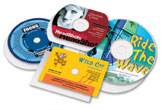
BravoPro prints not only standard 120mm CDs and DVDs, but also several of the popular business-card shaped discs and mini CD/DVD formats. An optional media adapter kit is required.
 Need More Capacity?
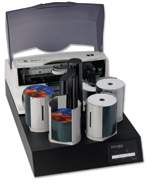
Introducing the new ADL-MAX Autoloader. Simply place a BravoPro Disc Publisher onto the platform of the ADL-MAX Autoloader. In just minutes, youll be able to increase the capacity of your BravoPro Disc Publisher to 350 discs. Increases the capacity of a Bravo II Disc Publisher to 325 discs.
AccuDisc Technology
Youll appreciate BravoPros exclusive AccuDisc Technology. This patent-pending suite of hardware and firmware enhancements provides the most accurate and precise disc picking available. It utilizes advanced optics instead of mechanical components to completely eliminate misalignment of the pick mechanism.
Free, Around the Clock Assistance
Just ask our customers and check out our product reviews. Youll find that Primeras Technical Support is consistently rated the best in our industry.
Knowledgeable, friendly support is available during regular business hours and around the clock via e-mail and our comprehensive online Knowledge Base. All technical support is provided at no extra charge.
The Price/Performance Leader
Its a fact Primera now manufactures more automated CD / DVD duplication, printing and publishing systems than all of our competitors combined. So, no matter what you need to produce discs with audio, music, video, software, photos, data and more you can feel confident about BravoPros performance and reliability. Weve built well over a million printers and duplicators in our 32-year history. No other company in our industry even comes close!
| BravoPro AutoPrinter Specifications |
 |
|
Models
BravoPro AutoPrinter (no drives; for printing only)
Disc Capacity
Up to 50 discs in standard input/output mode; up to 100 discs using kiosk adapter (included)
Print Method
Inkjet
Print Resolution
Up to 4800 dpi; printer driver selectable
Max. Print Width
4.724" (120mm)
Ink Cartridges
Dual CMY and black monochrome
Colors
16.7 million and black monochrome
Color Matching
Primeras new Z-Color Color Matching for bright,
vibrant and the most accurate colors on a variety of media surfaces
Media Types
Printable-surface CD-Rs and DVDRs
Data Interface
High-speed USB 2.0
Operating Systems
Windows XP/2000 or Vista and Mac OS X v10.2 or better;
software for both platforms is included
Recommended System Requirements
PC
Pentium IV processor at 2 GHz or higher, at least
500MB RAM, USB 2.0 port, 7200 RPM Hard Drive
Mac
G3 or better Power Mac capable of running
Mac OS X v10.2 or better, at least 500MB RAM,
USB 2.0 port
Power
Switch-selectable 100-120 VAC @ 1A or
220-240VAC @ 1A, 50/60 Hz
Certifications
Safety: UL, UL-C, CE
Emissions
FCC Class B, CE
Weight
26 lbs. (11.8 kg)
Dimensions
17.8"W x 11"H x 17.5"D
(452mmW x 279mmH x 445mmD)
Warranty
One year parts and labor; optional extended warranty available
Included
Software for Mac and PC platforms
Kiosk mode kit
PTBurn Network Software (5 user blocks)
| Options |
- Business Card Adapter Kit;
includes templates and input trays for
- 80mm mini-CDs
- 59mm x 85mm rectangular business card CDs
- 63mm x 80mm rounded hockey rink CDs
|
|
|
|
|
|
15/01
|
Primera Bravo Pro Colour Ink CartridgePRIMERA BRAVOPRO COLOUR INK CARTRIDGE - (053335)
|
|
|
|
15/01
|
Primera Bravo Pro Black Ink CartridgePRIMERA BRAVOPRO BLACK INK CARTRIDGE -(053336)
|
|
|
|
15/01
|
Primera Bravo Pro DVD Publisher
- Automatically burns and prints up to 100 CDs or DVDs at a time Professional, High-Performance CD/DVD Publishing
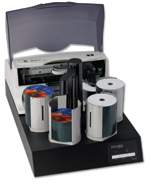
BravoPro is Primeras newest and highest-performance disc publisher ever. It automatically burns and prints up to 100 CDs or DVDs at a time all in a compact, attractive unit. With unparalleled durability, dependability and reliability, BravoPro is the best choice for businesses and organizations that demand solid performance and value.
As the big brother to our Bravo II Disc Publisher the worlds best-selling CD/DVD disc publisher BravoPro sets new standards for quality, speed and reliability. Just a few of its features and benefits include:
- The industrys fastest throughput
- Two high-speed DVDR drives for volume production
- Direct-to-disc printing with stunning 4800 dpi print resolution
- The smallest ink droplet size available just 3 picoliters for superb graphics, photo and text quality
- Primeras exclusive AccuDisc Technology for precise, reliable disc transport
- Windows network software included for sharing BravoPro among multiple users
- Software for both PC and Mac burning and printing included
Burn and Print Automatically
 BravoPro is designed for unattended, hands-free burning and direct-to-disc printing. Just specify the files you wish to duplicate, add a print file if desired, select a quantity and click on the Go! button.
A new wizard-driven software interface helps you to produce discs quickly and easily. Even if youve never burned and printed a disc before, the software will lead you effortlessly through each step. An Advanced User Interface allows experienced users to access powerful features such as disc streaming, data format conversion, and much more.
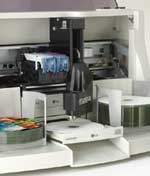 The Fastest Throughput
When deciding upon a disc publishing system, one of the most important factors youll likely consider is the number of discs youll be able to produce per hour. BravoPros robotics, printing and even tray-in/tray-out speeds have been carefully designed and optimized for maximum throughput.
In standardized testing, BravoPro burns, prints and transports up to 50 discs per hour* about 22% faster than our closest competitor!
Afterburner Print Technology
BravoPros high-speed color printing is the fastest youll find. Thats why we call it Afterburner Print Technology (APT). APT uses an all-new print head technology from Lexmark that doubles the width of the print swath. This means that youll be able to print more discs in less time. APT also has sophisticated firmware control to precisely maintain the outstanding print quality youd expect from a printer with 4800 dpi print resolution and an industry-leading 3 picoliter droplet size. Weve even made replacement ink cartridge alignment easy by making the process completely automatic.
No Assembly Required
BravoPro is fast and easy to set up because everythings built-in. Just take it out of the box. Plug in a single high-speed USB 2.0 interface cable. Turn on the power and install one software program. Total set-up time is less than five minutes. The attractive, transparent hinged cover ensures that the robotic mechanism, drives and recordable media are not accidentally bumped. It also protects against dust, spills and other possible contaminants.
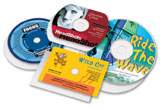 Many Choices of Media
BravoPro produces not only standard 120mm CDs and DVDs, but also several of the popular business-card shaped discs and mini CD/DVD formats. An optional media adapter kit is required.
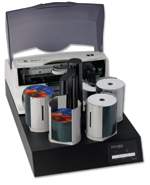 Need More Capacity?
Introducing the new ADL-MAX Autoloader. Simply place a BravoPro Disc Publisher onto the platform of the ADL-MAX Autoloader. In just minutes, youll be able to increase the capacity of your BravoPro Disc Publisher to 350 discs. Increases the capacity of a Bravo II Disc Publisher to 325 discs.
The Most Powerful Software
Included PrimoDVD mastering and duplication software for Windows is provided by Sonic, the worlds leading manufacturer of CD/DVD burning software. This is the same burn engine software selected by Microsoft for inclusion in Windows XP Media Center and by Adobe Systems for use in Photoshop Elements 3.0. Theres no better or more robust burning software available. View software tutorials.
For the Mac, we include CharisMac Discribe Mastering Software. This award-winning software makes burning and printing on the Mac platform fast and easy, while including many advanced features utilized by video, audio and graphics professionals. Disc layout templates for Adobe Illustrator and Photoshop are included. View software tutorials.
For customized applications, we provide a Software Developers Kit (SDK) with easy to integrate APIs based upon the same award-winning Sonic burn engine. Also included with every unit is our powerful Windows-based network software package called PTBurn Network Software. It allows multiple users in your organization to access BravoPro from client PCs across the enterprise.
AccuDisc Technology
Youll appreciate BravoPros exclusive AccuDisc Technology. This patent-pending suite of hardware and firmware enhancements provides the most accurate and precise disc picking available. It utilizes advanced optics instead of mechanical components to completely eliminate misalignment of the pick mechanism. It also prevents the feeding of two discs into the recordable drive a common problem with other, less advanced picking systems.
Free, Around the Clock Assistance
Just ask our customers and check out our product reviews. Youll find that Primeras Technical Support is consistently rated the best in our industry.
Knowledgeable, friendly support is available during regular business hours and around the clock via e-mail and our comprehensive online Knowledge Base. All technical support is provided at no extra charge.
The Price/Performance Leader
It's a fact - Primera now manufactures more automated CD / DVD burn and print systems than all of our competitors combined. So, no matter what you need to produce - discs with audio, music, video, software, photos, data and more - you can feel confident about BravoPro's performance and reliability. We've built well over a million printers and duplicators in our 32-year history. No other company in our industry even comes close!
* 15MB file, 40% print coverage on CD-Rs using the same print and data files.
| BravoPro Disc Publisher Specifications |
 |
|
Models
BravoPro DVD Publisher
BravoPro AutoPrinter (no drives; for printing only)
Disc Capacity
Up to 50 discs in standard input/output mode; up to 100 discs using kiosk adapter (included)
Recording Speeds
DVDR/CD-R: Latest Pioneer drive
DVD+R Double Layer: Latest Pioneer drive
Recordable Formats
CD: CD-R, CD-RW, CD-Audio (CD-DA), Video-CD, MP3 to CD-Audio, most other industry-standard CD formats
DVD: DVDR, DVDRW, DVD+R Dual Layer; other formats to be added as they become standardized
Number of Drives
Two Pioneer DVDR/CD-R Dual-Layer drives
Print Method
Inkjet
Print Resolution
Up to 4800 dpi; printer driver selectable
Max. Print Width
4.724" (120mm)
Ink Cartridges
Dual CMY and black monochrome
Colors
16.7 million and black monochrome
Color Matching
Primeras new Z-Color Color Matching for bright,
vibrant and the most accurate colors on a variety of media surfaces
Media Types
Printable-surface CD-Rs and DVDRs
Data Interface
High-speed USB 2.0
Operating Systems
Windows XP/2000 and Vista and Mac OS X v10.2 or better;
software for both platforms is included
Recommended System Requirements
PC
Pentium IV processor at 2 GHz or higher, at least
512MB RAM, USB 2.0 port, 7200 RPM Hard Drive
Mac
G4 or better Power Mac capable of running
Mac OS X v10.2 or better, at least 512MB RAM,
USB 2.0 port
Power
Switch-selectable 100-120 VAC @ 1A or
220-240VAC @ 1A, 50/60 Hz
Certifications
Safety: UL, UL-C, CE
Emissions
FCC Class B, CE
Weight
26 lbs. (11.8 kg)
Dimensions
17.8"W x 11"H x 17.5"D
(452mmW x 279mmH x 445mmD)
Warranty
One year parts and labor; optional extended warranty available
Included
Software for Mac and PC platforms
Kiosk mode kit
PTBurn Network Software (5 user blocks)
| Options |
- Business Card Adapter Kit;
includes templates and input trays for
- 80mm mini-CDs
- 59mm x 85mm rectangular business card CDs
- 63mm x 80mm rounded hockey rink CDs
- PTBurn Software Developer's Kit (SDK) for custom
configuration to 3rd party software applications
(available at no charge to qualified developers)
|
|
|
|
|
|
15/01
|
Primera Bravo Colour Ink CartridgePRIMERA BRAVO CARTRIDGE -(FAR280-53330)
|
|
|
|
15/01
|
Primera Bravo Black Ink CartridgePRIMERA BRAVO BLACK CARTRIDGE -(FAR281-53331)
|
|
|
|
15/01
|
Primera Bravo II Auto Printer
- Automatically prints full colour CDs & DVDs in jobs of up to 50 discs at a time Print CDs & DVDs Automatically Professional Automated Printing On Your Desktop!
The Bravo II AutoPrinter is Primera's newest and most advanced all-in-one disc printing system. Bravo II automatically prints full-color, 4800 dpi images directly onto the surface of CDs and DVDs. The Bravo II AutoPrinter produces gorgeous, full-color CDs and DVDs in jobs of up to 50 discs at a time. It automatically feeds discs into and out of the printer and is the perfect companion to the tower-style duplicator you may already own - all for a price that's about the same as other manual disc printers! Bravo II is ideal for printing either one at a time, unique discs or jobs of up to 50 discs at a time. Models include both Windows-based PC and Mac software in every box.
Integrated 4800 DPI Printing
Bravo II incorporates stunning, full-color printing at up to 4800 dpi - the best in the industry. You'll be able to produce discs that look as professional as any you've ever seen using high-resolution text, graphics and even photos. Printing times are fast. It took just 54 seconds to print the disc shown here at 600 x 600 dpi resolution.
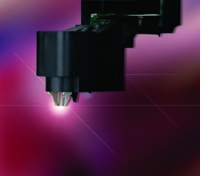 Exclusive AccuDisc Technology
With Bravo II, you'll also benefit from Primera's new patent-pending AccuDisc Technology. This suite of hardware and firmware enhancements provides the most accurate and precise disc picking available today. Utilizing advanced LED optics instead of mechanical components, AccuDisc eliminates misalignment of the picking mechanism. It also prevents the feeding of double discs into the printer tray- a common problem with other picking systems.
Many Choices of Media
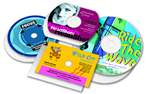 Bravo II produces not only standard 120mm discs, but also several of the popular business card shaped and mini CD/DVD formats. An optional media adapter kit is required.
Get Up and Running Quickly
From initial set-up to full operation, Bravo II is easy to use. SureThing CD Labeler Primera Edition for Windows users is included. This program makes professional looking disc printing a snap with full-color backgrounds and templates. Mac and Windows users can also choose from Adobe PhotoShop and Illustrator templates for disc design. 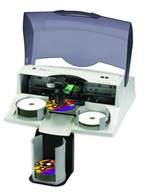 Large Disc Capacity
Bravo II can print up to 50 discs per job with the included Kiosk Mode Kit. Finished discs are dispensed out the center of the machine. 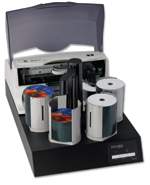 Need More Capacity?
Introducing the new ADL-MAX Autoloader. Simply place a Bravo II Disc Publisher onto the platform of the ADL-MAX Autoloader. In just minutes, youll be able to increase the capacity of your Bravo II to 325 discs. Increases the capacity of a BravoPro Disc Publisher to 350 discs.
The Price/Performance Leader
Primera manufactures more automated disc publishing and duplication systems than any other company in the world. So, no matter what you need to print on your CDs/DVDs- you can feel confident with the Bravo II's performance and reliability. Best of all, Bravo II delivers professional results at an affordable price!
Bravo II AutoPrinter Specifications
Models
Bravo II AutoPrinter (No drives, for printing only)
Disc Capacity
25 disc input/output
50 discs with Kiosk Mode
Print Method
Inkjet
Print Resolutions
4800 x 1200 dpi, 2400 dpi x 1200 dpi, 1200 x 1200 dpi and 600 x 600 dpi
Maximum Print Width
4.724" (120mm)
Ink Cartridges
Dual CMY color and black monochrome
Colors
16.7 million and black monochrome
Color Matching
PrimaColor ICC-compliant color matching software included
Label Software
SureThing CD Labeler Primera Edition for Windows users and Adobe PhotoShop and Illustrator design templates for Mac and Windows users
Kiosk Mode Kit
Bravo II Kiosk Mode Kit (includes 50-disc output bin, metal tray, software and instructions), Kiosk Mode Kit is mailed after product registration
Media Types
Printable-surface CDs and DVDs
Minimum System Requirements for PC
Pentium III based processor at 700 MHz or higher, 512MB RAM minimum, available USB 2.0 port or open PCI slot for optional USB 2.0 adapter card
Minimum System Requirements for Mac Computers
700 MHz PowerPC, G4 processor running Mac OS X v10.2 or later, 256 MB RAM, one available USB 2.0 port
Operating Systems
Windows XP/2000 and Vista
Mac OS X, v.10.2 or later
Electrical Rating
12 VDC, 5A
Certifications
Safety: UL, UL-C, CE
Emissions: FCC Class B, CE
Power Requirements
100-240 VAC, 50/60Hz, 60 watts (12vdc)
Weight
18 lbs. (8.2kg)
Dimensions 17.25"W x 7.25"H x 16"D (438mmW x 184mmH x 406mmD)
Interfaces
USB 2.0
Included
Software for Mac and PC platforms
Kiosk Mode Kit (mailed separately after product registration)
Options
USB 2.0 PCI Adapter Card
Bravo II Business Card Adapter Kit - includes templates and input trays for:
- 80mm mini-CDs
- 59mm x 85mm rectangular business card CDs
- 63mm x 80mm rounded ("hockey rink") business card CDs
Warranty
One year
|
|
|
|
Previous Page
|
Next Page
|
|


