Camerafarm product archive #39586
| Image |
Date |
Product description |
Price |
Buy |
|
20/05
|
Creative Live! Cam Video IM Pro Hassle-free video chat with cool effects
The all new Creative Live! Cam Video IM Pro (VF0410) does not require any driver installations and now comes with High Speed USB 2.0 support. Enjoy ultra smooth videos at up to 800 x 600 resolution1 and up to 1.3-megapixels resolution1 for still images! Besides having great visuals, the Live! Cam Video IM Pro also features a built-in microphone that allows you to chat away conveniently without fumbling with separate parts.
 |
Get up and running in no time!
Get all the convenience of Plug & Play2 with this USB Video Class3 webcam. It does not require any driver installation at all! |
 |
High quality 640x480 VGA sensor with Live View technology
Take 1.3-megapixel1 pictures and record videos at up to 800 x 6001 resolution. You can look your best the easy way. Creative Auto Tuning automatically adjusts for the best lighting and brightness level to give you the clearest possible picture while you video chat. |
 |
Smooth videos, uninterrupted chats
Experience smooth, full motion 30fps digital video streams and top quality images with High Speed USB 2.0 throughput. Live! Cam Video IM Pro is also backward compatible and works with any USB 1.1 connection. |
 |
Sound Your Best
Featuring built in microphones, you can get right to video chatting easily without the hassle of a separate headset and mouth piece. Let our revolutionary Noise Cancellation technology reduce unwanted background noise from your video chat and leave just crystal clear speech of yours. Should the need for privacy arises, simply switch to our included mono headset with microphone. |
 |
Live! Cam Avatar
Personalize your online identity with dynamic avatars! Select from an Avatar library or create one-of-a-kind originals! |
 |
Have fun with audio and video effects
There is just no better way to express yourself online, use our Advanced Video FX and Advanced Audio FX to experiment with the many face morphs, voice over and more to enhance your video chat experience. |
 |
Create your own special effects and Avatars!
Write and draw creatively with Live! Cam Doodling while video chatting on any instant messaging software or create your very own custom Avatar with Live! Cam Avatar Creator. You can also let your imagination run wild by creating your very own special effects with Live! Cam FX Creator! |
 |
Say goodbye to mounting woes
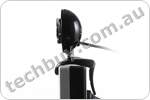
Live! Cam Video IM Pro features a Multi-attach Base with rubber grip and will fit easily and securely to almost anything - notebook displays, CRT monitors and flat panel displays. Or simply let it rest comfortably on a table or other flat surface. |
 |
Bundled Creative Handsfree Stereo Headset
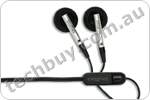
The Live! Cam Video IM Pro (VF0410) comes with an external stereo headset with microphone to meet your privacy needs. You can start chatting instantly, privately! |
 |
Parental Control
The Parental Control feature enables you to secure the camera with a password. Every time you activate your Live! Cam, you will be prompted for a password. |
 |
Edit, organize and create, for a complete photo experience
Do more with Creative Live! Cam Suite! Edit and organise your photos easily, create fun photo calendars - the possibilities are virtually endless. Do all this and more with the included software suite. |
 |
Be your own director, producer and star!
A companion software for your Live! Cam, muveeNow features a wizard-guided interface that introduces muvee-making in just 3 easy steps. |
 |
More than just a webcam
Maximize your webcam experience with SightSpeed, included at no extra charge. Turn your PC into a video phone, make multi-party video calls4, and even stream photos and videos to web-enabled devices like laptops, PDAs and mobile phones. |
 |
Enhance your Instant Messaging with video!
Works with Skype, Windows Live Messenger, Yahoo! Messenger and other compatible instant messaging services. |
1Software enhanced.
2Plug & Play functions include video chats with built-in mic, and video/photo capture at VGA resolution.
3 Applicable to Microsoft Windows XP Service Pack 2 (SP2) and above.
4 This feature is available only with paid SightSpeed plans.
| Feature |
Description |
| Sensor: |
VGA Sensor |
| Microphone: |
Built-in microphone |
| Highest Still Image Resolution: |
1.3 Megapixel 1280 x 960 (software enhanced) |
| Highest Video Resolution: |
800x600@30fps (software enhanced) |
| Focus: |
Adjustable manual focus ring |
| Interface: |
High-Speed USB 2.0 (backward compatible with USB 1.1) |
|
|


|
|
|
20/05
|
Canon HV30 DV Camera - HD CMOS, 43mm HD Lens, 10x Optical Zoom, 2.7" LCD, DiG!C DV II, Image Stabilisation
True Progressive HD Style
- True Progressive HD CMOS sensor (1920 x 1080)
- 10x Canon HD Video Lens 43mm diameter
- DiG!C DV II image processor
- Best image stability and focus with Super Range Optical Image Stabilzation and Instant AF (Auto Focus)
- 13 programmed AE modes, including 25PF Cinema Mode
- Stunning digital photography with simultaneous shooting
- HDMI output, and accessory shoe
The Canon HV30 builds on the success of the most awarded High Definition video camera, the HV20. The HV30 is a fully specified HD video camera, featuring native progressive HD CMOS sensor (1920 x 1080), genuine Canon HD video lens, DiG!C DV II, 10x Super Range Optical Image Stabilizer and Instant AF. It also has 13 programmed AE modes, including 25P Cine mode; enhanced low light performance and breathtaking imagery.
Complete High Definition Video Camera
True progressive HD CMOS (1920 x 1080) utilising Canon's 20 years of EOS technology and development.
Fully specified HD video camera with progressive HD CMOS, HD video lens and DiG!C DV II processor with exceptional processing capabilities enabling high speed processing of progressive HD, a specification for digital HDTV broadcasting.
HDMI output for connection to HDTV and HDV output for HD streaming.
High definition images deserve complementary audio of Stereo Sound. With manual audio control and four channel audio playback.
Canon High Definition Image Quality
Canon is a world-renowned leader in lens technology, the basis of all great image capture. The genuine Canon HD lens of the HV30 is a testament to this brilliant image quality.
The HD CMOS sensor incorporates several advanced technologies supporting high quality video including On-Chip Noise Reduction and an RGB Bayer filter to achieve realistic and brilliant colour reproduction.
Exceptional sensitivity for low light conditions with gapless micro lens technology on CMOS sensor.
43mm diameter HD video lens, compatible with teleconverter & wide angle lens
3.1 Megapixel photographic functions include selectable 9-point AF, selectable metering modes, white balance, Auto Exposure Bracketing and continuous shooting up to 4 frames/second.
Built in video LED light and built in flash with red eye reduction.
Superior Technology to Ensure Optimum HD Footage
Super Range OIS, a feature of professional video cameras, has all the benefits of OIS but also compensates for rhythmic movement such as hand held sway and breathing.
Increased resolution of HD demands higher focus accuracy. Instant AF, is a triangulation metering method for fast and sharp focusing on demand.
Additional Features for Creative Control
13 AE Modes from simple auto filming to Cinematic 25PF for cinematic filming or shutter priority (Tv) shutter mode for motion filming
Simultaneous photo shooting to Mini SD while movie recording
Focus dial for creative control and ability to create preset zoom effects
Back Light Correction button to minimise underexposure issues such as silhouetting
Advanced accessory shoe to support video light, flash unit
Microphone and headphone jacks
HDV/DV in/out, HDMI output, Full Speed USB, component output, AV in/out
Joystick to control focus, exposure, auto exposure and white balance
Zebra function to highlight on display the overexposed areas of footage while filming
Multi-angle vivid 2.7" LCD display for wider viewing
|
Video System:
|
|
Standard:
|
HDV 1080i / DV
|
|
Sensor:
|
1/2.7 inch Canon progressive HD CMOS sensor
|
|
Filter Array:
|
Primary Colour Filter (RGB Bayer)
|
|
Image Processor:
|
DiG!C DV II
|
|
Image Pixels:
|
|
Total:
|
2,9600,000 (1994 H x 1484 V)
|
|
Movie:
|
2.07MP (HD/DV 16:9)
|
|
Still Image:
|
2.76MP (4:3)
|
|
Widescreen Capability:
|
High Resolution Real Widescreen 16:9
|
|
Lens:
|
|
Type:
|
Canon High Definition Video Lens
|
|
Focal Length:
|
6.1 - 61mm
|
|
Maximum Aperture:
|
f/1.8-3.0 (tape)
|
|
Minimum Focusing Distance:
|
10mm
|
|
Shutter Speed:
|
Tape: 1/6 - 1/2000 sec / Card: 1/2 - 1/500 sec
|
|
Optical Zoom / Digital Zoom:
|
10x / 40x/200x (tape)
|
|
Image Stabilizer:
|
Super Range Optical Image Stabilization
|
|
Focusing :
|
|
AF System:
|
Hi-Speed Instant Auto Focus (Instant AF) / Normal AF
|
|
Focusing Range:
|
Auto / Manual / Forced Infinity / Dedicated switch and focus dial
|
|
Control/Balance:
|
|
Light Metering Method:
|
Evaluative / Centre-weighted average / Spot metering
|
|
Exposure Compensation:
|
11 Levels
|
|
White Balance Mode:
|
Auto, TTL, 6 Presets (Daylight / Shade / Cloudy / Tungsten / Fluorescent / Fluorescent H)
|
|
Back Light Correction:
|
Dedicated BLC button
|
|
Illumination:
|
|
Minimum Illumination:
|
0.2 lux (Night Mode) / Advanced illumination with gapless micro lens technology on CMOS
|
|
Flash:
|
Built in (Auto / On / Off / Slow-synchro / Red eye reduction is available)/Other flash supported via accessory shoe
|
|
Video Light:
|
Built in low luminance AF auxiliary video LED light with manual switch / Other video light supported via accessory shoe
|
|
Further Support:
|
Accessory shoe supports attachable flash (VFL-1) & video light (VL-3)
|
|
LCD Monitor/Viewfinder:
|
|
LCD:
|
Multi-angle vivid 2.7" LCD display for wider viewing
|
|
Viewfinder :
|
0.27 inch Real Widescreen & colour / 123,000 pixel / Filming Modes & Controls
|
|
AE Modes / Scene Modes (SCN):
|
13 modes. AUTO, [P], (P / Av / Tv / SCN / CINE (progressive HDV 25PF)) / Portrait / Sports / Night / Snow / Beach / Sunset / Spotlight / Fireworks
|
|
Image Quality Adjustment:
|
8 adjustments. Vidid / Neutral / Low Sharpening / Soft Skin Detail / Brightness / Contrast / Sharpness / Colour Depth
|
|
Effects:
|
Tape: Black & White, Sepia, Art / Card: Black & White, Sepia
|
|
Fades:
|
Auto Fade, Wipe Fade
|
|
Recording Formats:
|
|
Video Data:
|
HDV 1080/50i, 1080/25P, DV (PAL)
|
|
Recording Modes:
|
SP / LP (DV only)
|
|
Audio:
|
|
Audio Data:
|
HDV: MPEG1 Audio Layer II (16 - bit) / DV: PCM 16 bit 2 channels (48 kHz) or 12-bit 4 channels (32 kHz)
|
|
Audio Level Metering:
|
Manual audio level VR metering and control with adjustment via LCD / Four channel audio playback
|
|
Wind Screen:
|
Available
|
|
Still Image Recording:
|
|
Capture Sizes:
|
3.15 megapixel (2048 x 1536 4:3) / 2.07 megapixel (1920 x 1080 16:9)
|
|
Memory Card:
|
Mini SD (photo recording only)
|
|
Still Shooting Functions :
|
Simultaneous Photo Recording to Mini SD / Auto Exposure Bracketing / High Speed Continuous Shooting (x frames/sec) / 9-point AiAF
|
|
Still image file transfer:
|
USB
|
|
Direct Printing:
|
PictBridge and dedicated Direct Print/Print Share button
|
|
Interface:
|
|
Accessory Shoe:
|
Advanced Accessory Shoe for flash and guide light /
|
|
Terminals:
|
HDV/DV in/out / AV in/out / Component out / HDMI output / Headphone and Microphone terminals / USB Full Speed
|
|
Streaming:
|
IEEE1394 (MPEG2-TS/DV) / Analogue to Digital Converter
|
|
Down Converting:
|
Yes. Both analogue and digital
|
|
Included Accessories:
|
|
Wireless controller :
|
WL-D87 (Remote battery CR2025)
|
|
Battery Pack:
|
BP-2L13
|
|
Compact Power Adaptor :
|
CA-570
|
|
Stereo Video Cable :
|
STV-250N
|
|
Component Cable :
|
CTC-100/S
|
|
Software:
|
Digital Video Solutions Disk / USB Cable & AC Cable
|
|
Other:
|
|
Self Timer:
|
10 sec/Remote Controller: 2 sec.
|
|
Search:
|
Date search, END search
|
|
Power Supply:
|
7.4V DC (battery pack), 8.4V (DC IN)
|
|
Power Save:
|
Power shutoff after recording continuously paused for 5 minutes
|
|
Dimensions:
|
88 x 80 x 138 mm (W x H x D)
|
|
Weight:
|
535 g (body only)
|
|
Operating Platforms:
|
PC: Windows 98SE, ME, 2000 (SP4), XP (SP1 & SP2) / Mac: OS X (v10.2 - v10.4)
|
|
*All data based on Canon's Standard Test Method:
|
|
*Subject to change without notice:
|
|
|
|
|
20/05
|
HP Q8668A Glossy Professional Paper, for Edgeline Technology, 180gsm - 250 Sheets, A4 HP Q8668A Glossy Professional Paper, for Edgeline Technology, 180gsm - 250 Sheets, A4
Edgeline Technology combines advancements in printheads, ink cartridges and ink formulation into a versatile MFP architecture designed to meet the diverse needs of the typical corporate department with ease. The technology can produce high-quality color prints for customer-facing documents; everyday quality color prints for internal reports; and fast, inexpensive black-and-white prints for the countless reports, letters and other communications produced by department employees on any given day. In addition to printing, MFPs with Edgeline Technology copy in color, scan in color, and feature e-mail and optional analog fax capabilities.
|
|
|
|
20/05
|
A-Data 16GB My Flash RB19 - Waterproof, Readyboost, USB2.0 Orange
|
|
|
|
20/05
|
InFocus XS1 DLP Short Throw Projector - XGA, 2200 Lumens, 1800;1
Display
|
| Native Aspect Ratio: |
4x3 |
| Supported Aspect Ratio: |
16:9, 4:3, 5:4 |
| Brightness: (max ANSI lumens) |
Whisper: 1760 max ANSI lumens
High Bright: 2200 max ANSI lumens max ANSI lumens |
| Contrast Ratio: |
1800 : 1Full On/Full Off |
| Display Technology: |
DLP by Texas Instruments: 0.55" SVGA LVDS with Brilliant Color |
| Data Compatibility: |
VGA (640x480), SVGA (800x600), XGA (1024x768), SXGA (1280x1024), SXGA Plus (1400x1050) |
| Video Compatibility: |
Full NTSC, PAL, SECAM, 480i, 576i, 480p, 576p, 720p, 1080i |
| Color Wheel (DLP Only): |
5-segment |
| Native Resolution: |
XGA |
| Projector Placement: |
Ceiling Projection, Front Projection, Rear Projection |
| SMPTE Brightness: |
Not Available |
| Lamp Wattage: |
Whisper: 170 Watts
High Bright: 200 Watts |
| Lamp Life: |
Whisper: 3000 Hours
High Bright: 2000 Hours |
| Minimum Image Size: |
5.58 ft (1.7 m) |
| Maximum Image Size: |
9.91 ft (3.02 m) |
| Standard Lens Zoom: |
: 1 |
| Standard Lens Throw Ratio: |
0.67 (Distance/Width) |
| Standard Lens Image Offset Ratio: |
120% |
| Standard Lens Projection Distance: |
2.95 - 9.90 ft (0.9 - 3.02 m) |
| Digital Keystone Correction (Vertical): |
+25/-25 |
| Digital Keystone Correction (Horizontal): |
Not Available |
| Lens Shift: |
Not Available |
Inputs and Outputs
|
| DVI: |
Number of Inputs:1
DVI-I |
| M1: |
Not Available |
| HDMI: |
Not Available |
| BNC: |
Not Available |
| Component (RCA): |
Number of Inputs:0
480i/480p/576i/720p/1080i requires VGA to Component adapter cable |
| VESA (HD15): |
Number of Inputs:1
15-pin analog |
| S-Video: |
Number of Inputs:1
4-pin mini-DIN |
| Composite (RCA): |
Number of Inputs:1 |
| Standard Definition TV: |
Composite RCA, S-Video |
| Enhanced Definition TV: |
VGA, DVI |
| High Definition TV: |
VGA, DVI |
| Computer: |
VGA, DVI |
| HDCP Support: |
Yes |
| Stereo RCA Jacks Inputs: |
No |
| Stereo 3.5 mm Mini-jack Inputs: |
Yes |
| 12v trigger for motorized screens (3.5 mm mini-jack): |
Yes |
| Projector Control: |
Projector Keypad, Remote, RS-232, USB |
| Speakers: |
2.0 Watt mono speaker |
| Monitor Output: |
Yes |
| Audio Output: |
Not Available |
Compatibility
|
| Data Compatibility: |
VGA (640x480), SVGA (800x600), XGA (1024x768), SXGA (1280x1024), SXGA Plus (1400x1050) |
| H-Sync Range: |
30 - 100kHz |
| V-Sync Range: |
50 - 87Hz |
| Video Compatibility: |
Full NTSC, PAL, SECAM, 480i, 576i, 480p, 576p, 720p, 1080i |
General
|
| Audible Noise: |
30 dB |
| Actual Dimensions: |
Height: 5 in (12.7 cm)
Length: 12.1 in (30.73 cm)
Width: 10.8 in (27.43 cm)
|
| Actual Weight: |
8 lbs (3.63 kg) |
| Shipping Dimensions: |
Height: 16.69 in (42.39 cm)
Length: 13.8 in (35.05 cm)
Width: 8.14 in (20.68 cm)
|
| Shipping Weight: |
11.9 lbs (5.4 kg) |
Operating temperature:
(at sea level) |
41 - 95 F (5 - 35 C) |
| Maximum Altitude Supported: |
9800 ft (2987.04 m) |
| Typical Power Consumption: |
285 Watts |
| Maximum Power Consumption: |
300 Watts |
| Power Supply: |
100 - 240 Volts at 50 - 60 Hz |
| Menu Languages: |
English, French, German, Italian, Norwegian, Portuguese, Simplified Chinese, Spanish, Danish, Finnish, Turkish, Swedish, Russian, Polish, Traditional Chinese, Korean, Japanese, Dutch |
| Approvals: |
UL and c-UL (US/Canada), FCC (US/Canada), CE (CE member countries), GOST (Russia), CCC (China),PSB, MIC, EK |
|
|
|
|
20/05
|
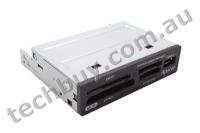
Apacer AE161 Internal Card Reader - CF, SD, MMC, MS, XD, USB2.0 - Black
| Interface |
USB 1.1 and 2.0 compliant |
| LEDS |
LED On: Flash Card is inserted
LED blink: Data is accessed |
| Socket |
Slot 1 |
CompactFlash Type I/II, IBM Microdrive, Magicstor |
| Slot 2 |
Secure Digital, miniSD, microSD (with adapter), MultiMediaCard, RS-MMC Card, MMCplus, MMCmobile, MMCmicro (with adapter) |
| Slot 3 |
Memory Stick Card, Memory Stick PRO, Memory Stick Duo, Memory Stick PRO Duo, MagicGate |
| Slot 4 |
SmartMedia, xD-Picture Card |
| Transfer rate |
Max. up to 480 Mbps |
| Case |
Metal |
| Card Supported |
CompactFlash : 4MB or higher
Microdrive: 340MB or higher
Magicstor:2.2GB
SmartMedia: up to 128MB
xD-Picture Card up to 1GB
MultiMediaCard: 8MB or higher
RS-MMC Card:64MB or higher
MMCplus:128MB or higher
MMCmobile:128MB or higher
MMCmicro (adapter): 128MB or higher
Secure Digital: 8MB or higher
miniSD:16MB or higher
microSD (adapter): 128MB or higher
Memory Stick Card: 4MB or higher
Memory Stick Duo: 8MB or higher
Memory Stick PRO: 128MB or higher
Memory Stick PRO Duo:128MB or higher
MagicGate:128MB or higher |
| Power |
About 100mA ( without flash cards ) from the motherboard USB connector. |
| Operating System Support |
Win 98/98SE(driver), 2000, ME, XP,
Mac OS 9.x (driver) or above, Linux OS 2.4 or above |
| Dimensions |
101.6 x 92x 25.4mm |
| Unit weight |
150g |
|
|
|
|
|
20/05
|
Acer X1260 DLP Portable Projector - XGA, 2000 Lumens, 2000;1 X1260
XGA, 2000ANSI, 2.3kg
The Acer X1260 delivers, with a host of nice-to-have features for superb value. Thanks to its native XGA (1024 x 768) resolution, 2000 ANSI Lumens brightness, 2000:1 contrast ratio, a 6-segment color wheel, and Acer ColorBoost and SmartFormat technologies, the Acer X1260 projects vivid hues and true blacks.
Product Specification
Projection System
DLP Technology
Resolution
Native XGA (1,024 x 768)
Maximum SXGA+ (1,400 x 1,050)
WXGA+ (1,440 x 900)
Computer Compatibility
IBM PC and Compatibles
Apple Macintosh, iMac, and VESA Standards
WXGA+ (1,440 x 900)
WXGA (1,280 x 800, 1,280 x 768)
SXGA+ (1,400 x 1,050)
SXGA (1,280 x 1,024)
XGA (1,024 x 768)
SVGA (800 x 600)
VGA (640 x 480)
Video Compatibility
NTSC (3.58/4.43)
PAL (B/D/G/H/I/M/N)
SECAM (B/D/G/K/K1/L)
HDTV (720p, 1080i)
EDTV (480p, 576p)
SDTV (480i, 576i)
Aspect Ratio
4:3 (Native), 16:9
Displayable Colours
16.7 Million Colours
Brightness
2,000 ANSI Lumens (Standard)
Projection Lens
F = 2.41 ~ 2.55, f = 21.79mm ~ 23.99mm
1:1.1 Manual Zoom and Manual Focus
Projection Screen Size (Diagonal)
23" (58cm) ~ 300" (762cm)
Projection Distance
3.3' (1.0m) ~ 39.0' (11.9m)
Throw Ratio
50"@2m (1.95 ~ 2.15:1)
Horizontal Scan Rate
31 ~ 80k Hz
Vertical Scan Rate
50 ~ 85 Hz
Lamp Type / Life
Osram 160 W user replaceable P-VIP lamp
4,000 Hours
Keystone Correction
+/-40 Degrees (Vertical )
Projection Mode
Front, Rear, Front-Ceiling, Rear-Ceiling
Audio
One Internal Speaker with 2 watts Output
IR Remote Control
IR remote control
Power Supply
AC input 100~240V auto-switching power supply
Power Consumption
255 Watts (Operation), <8 Watts (Standby)
Operating Temperature
5C ~ 35C / 41F ~ 95F
Input Interface
Analog RGB/Component Video (D-sub) x 1
Composite Video (RCA) x 1
S-Video (Mini DIN) x1
PC Audio (Stereo mini jack) x 1
Output Interface
Analog RGB (D-sub) x 1
Control Interface
USB (Type B) x 1
RS232 (Mini DIN) x 1
Weight and Dimensions
2.3kg
267 x 187 x 80 mm (10.5" x 7.4" x 3.1")
Compliance
C-Tick (AS/NZS 60950)
|
|
|
|
20/05
|
Adobe Photoshop CS3 Extended - Windows, Education Only Discover new dimensions in digital imaging
Get everything in Adobe Photoshop CS3 software and more with Photoshop CS3 Extended, which enables you to edit 3D and motion-based content and perform image analysis.
Top features
Nondestructive editing
Edit nondestructively with new Smart Filters, which let you visualize different image effects, and Smart Objects, which let you scale, rotate, and warp raster and vector graphics all without altering the original pixel data.
Rich painting and drawing toolset
Create or modify images with a wide assortment of professional, fully customizable paint settings, artistic brushes, and drawing tools.
Advanced compositing
Create more accurate composites by automatically aligning multiple Adobe Photoshop layers or images based on similar content. The Auto-align Layers command quickly analyzes details and moves, rotates, or warps layers to align them perfectly, and the Auto-blend Layers command blends the color and shading to create a smooth, editable result.
3D compositing and texture editing
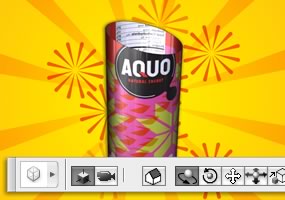
Easily render and incorporate rich 3D content into your 2D composites even edit existing textures on 3D models directly within Photoshop Extended and immediately see the results. Photoshop Extended supports common 3D interchange formats, including 3DS, OBJ, U3D, KMZ, and COLLADA, so you can import, view, and interact with most 3D models.
Movie Paint
Enhance video directly within Photoshop Extended. Now you can paint, add text, and clone over multiple frames of an imported video sequence.
2D and 3D measurement tools
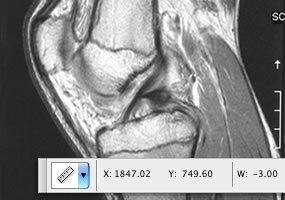
Extract quantitative information from images with new measurement tools. Easily calibrate or set the scale of an image, and then use any of the Photoshop Extended selection tools to define and calculate distance, perimeter, area, and other measurements. Record data points in a measurement log and export data, including histogram data, to a spreadsheet for further analysis.
Faster, more flexible asset management with Adobe Bridge CS3
Organize and manage images more efficiently with next-generation Adobe Bridge CS3 software, which now delivers improved performance, a Filter panel for easier searching, the ability to group multiple images under a single thumbnail, the Loupe tool, offline image browsing, and more.
Better raw-image processing
Process raw images with increased speed and superior conversion quality using the Photoshop Camera Raw plug-in, which now adds support for JPEG and TIFF formats; new tools including Fill Light and Dust Busting; compatibility with Adobe Photoshop Lightroom software; and support for over 150 camera models.
Enhanced Vanishing Point with 3D support
Edit in perspective on multiple surfaces even those connected at angles other than 90 degrees with the enhanced Vanishing Point, which also lets you measure in perspective; wrap graphics, images, and text around multiple planes; and output 2D planes as 3D models.
Wide range of supported formats
Import and export an even greater range of file formats, including PSD, BMP, DICOM, Cineon, JPEG, JPEG2000, OpenEXR, PNG, Targa, and TIFF.
System requirements
Note: Photoshop CS3 and Photoshop CS3 Extended have the same system requirements.
Windows
- Intel Pentium 4, Intel Centrino, Intel Xeon, or Intel Core Duo (or compatible) processor
- Microsoft Windows XP with Service Pack 2 or Windows Vista Home Premium, Business, Ultimate, or Enterprise (certified for 32-bit editions)
- 512MB of RAM
- 64MB of video RAM
- 1.5GB of available hard-disk space (additional free space required during installation)
- 1,024x768 monitor resolution
- DVD-ROM drive
- QuickTime 7 software required for multimedia features
- Internet or phone connection required for product activation
- Broadband Internet connection required for Adobe Stock Photos* and other services
Macintosh
- PowerPC G4 or G5 or multicore Intel processor
- Mac OS X v.10.4.8
- 512MB of RAM
- 64MB of video RAM
- 1.5GB of available hard-disk space (additional free space required during installation)
- 1,024x768 monitor resolution
- DVD-ROM drive
- QuickTime 7 software required for multimedia features
- Internet or phone connection required for product activation
- Broadband Internet connection required for Adobe Stock Photos* and other services
*Online services, including, but not limited to, Adobe Stock Photos and Acrobat Connect, may not be available in all countries, languages, and currencies. Availability of services is subject to change. Use of online services is governed by terms and conditions of a separate agreement and may be subject to additional fees.

|
|
|
|
20/05
|
Adobe Creative Suite 3 Design Standard - Windows, Education Only* Upgrade from Creative Suite (Standard or Premium), CS 1.0, CS 2.0, CS 2.3 Standard or Premium, or CS3 Design or Web bundle
WHAT ARE THE CREATIVE SUITE 3 DESIGN EDITIONS?
Adobe Creative Suite 3 Design Standard
Express and print your ideas with Adobe® Creative Suite® 3 Design Standard software, the indispensable toolkit for professional design and print production. Get all-new versions of Adobe’s essential tools for page layout, image editing, illustration, and Adobe PDF workflows — and integrated productivity features — all in a unified creative environment.
Combines Adobe InDesign® CS3, Photoshop® CS3, Illustrator® CS3, Acrobat® 8 Professional, Bridge CS3, Version Cue® CS3, and Device Central CS3.
Top features
All-new versions of essential creative tools
Experience a highly productive creative toolkit with Adobe InDesign CS3 for professional page layout, Adobe Photoshop CS3 for unrivaled image editing, Adobe Illustrator CS3 for inspired vector graphics creation, and Adobe Acrobat 8 Professional for efficient Adobe PDF workflows.
Unprecedented integration for exceptional productivity
Enjoy a consistent design experience across InDesign, Illustrator, and Photoshop with shared interface elements such as self-adjusting panels that dock out of your way when not in use. And use native file formats smoothly across software component to streamline design and production.
Support for the latest Macintosh and Windows systems
Get the most out of Design Standard on Intel based Macintosh systems and Microsoft Windows Vista computers. Work smoothly on legacy PowerPC based Macintosh and Windows XP systems as well.
Efficient, powerful page design with Adobe InDesign CS3
Explore more creative possibilities and experience new levels of productivity using InDesign CS3, which offers powerful features for creating graphically rich, complex documents; professional typographic controls; and robust, reliable printing.
Powerful color and printing capabilities
Print Photoshop composites, Illustrator artwork, and InDesign layouts with confidence thanks to robust color options, consistent color settings, and professional output controls for high-quality printing.
Exceptional native file format support
Open Photoshop images in Illustrator and Illustrator artwork in Photoshop, and place both types of native files, as well as Adobe PDF files, in InDesign layouts. Streamline your design and production processes in myriad ways using native file format support.
Reliable Adobe PDF workflows
Use Adobe PDF to create reliable and consistent final output, streamline print productionincluding automatically fixing mistakes found during preflightand automate processes using JDF.
Cross-media publishing
Contribute your assets to other, cross-media workflows. Hand off Photoshop image comps for use in web prototyping, preview Illustrator artwork as it might appear on a mobile device, and export InDesign layouts as XHTML for use by colleagues in web page layouts.
Visual media management in Adobe Bridge CS3
Efficiently organize, browse, locate, and preview assets with Adobe Bridge CS3, which offers faster performance; customizable workspaces; nondestructive batch-editing of TIFF, JPEG, and camera raw files; direct playback of Flash files; and direct access to useful services such as Adobe Stock Photos.
Shared features and services
Work more efficiently using a host of shared features and services, including Adobe Stock Photos for purchasing royalty-free images; Acrobat Connect for hosting web-based, interactive meetings; and Version Cue CS3 for workgroup file management.
System requirements
Design Standard
Windows
- Intel Pentium 4, Intel Centrino, Intel Xeon, or Intel Core Duo (or compatible) processor
- Microsoft Windows XP with Service Pack 2 or Windows Vista Home Premium, Business, Ultimate, or Enterprise (certified for 32-bit editions)
- 1GB of RAM
- 4GB of available hard-disk space (additional free space required during installation)
- 1,024x768 monitor resolution with 16-bit video card
- DVD-ROM drive
- QuickTime 7 software required for multimedia features
- Internet or phone connection required for product activation
- Broadband Internet connection required for Adobe Stock Photos* and other services
Macintosh
- PowerPC G4 or G5 or multicore Intel processor
- Mac OS X v.10.4.8, Java Runtime Environment 1.5 required for Adobe Version Cue CS3 Server
- 1GB of RAM
- 5.3GB of available hard-disk space (additional free space required during installation)
- 1,024x768 monitor resolution with 16-bit video card
- DVD-ROM drive
- QuickTime 7 software required for multimedia features
- Internet or phone connection required for product activation
- Broadband Internet connection required for Adobe Stock Photos* and other services

|
|
|
|
20/05
|
Creative Live! Cam Voice - 1.3MP Video, 4x Digital Zoom, Ultra Wide Angle, Adaptive Array Microphone, USB
For voice uninterrupted
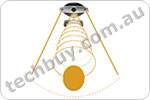
You can now sound your best with Creative Live! Cam Voice and its revolutionary Directional Live! Audio Technology. Its integrated Adaptive Array Microphones and Directional Live! Audio blocks out almost all unwanted surrounding noise, so all you hear is your voice - and nothing else. Live! Cam Voice's advanced CMOS sensor and high quality ultra-wide angle lens lets you capture large 1.3-megapixel videos, and snaps up to 5-megapixel photos1!
 |
Sound Your Best
Featuring Live! Audio technology, it reduces background noise and lets you transmit crystal clear voice. If you are in an extremely noisy environment, Directional Live! Audio and the Adaptive Array microphones work to eliminate noise even further, by removing ambient noise outside the webcam's field of view. |
 |
High quality 1.3-megapixel sensor
Capture high definition videos at true 1.3 megapixels easily. You can also take amazing photos at up to 5.0 megapixels1. |
 |
Ultra wide-angle lens
The high quality glass lens gives you an amazing 85 field of view. So the camera allows more people in the video frame at any one time. |
 |
Look Your Best
Enjoy smooth, vibrant video and sharp images with Live! View technology. Live! Cam Voice features a 1.3-megapixel sensor, intelligent auto exposure, and high quality glass lens. |
 |
Spice up your chats with Advanced Video FX
Have more fun by adding a wide range of special effects and backgrounds to your video chat with Advanced Video FX. |
 |
Smart Face Tracking, 4x digital zoom
With Smart Face Tracking activated, the camera automatically follows you as you move about, keeping you within the video always. It even tracks multiple persons, so everyone can get in on the conversation. |
 |
Certified high-speed USB 2.0
Experience smooth, full-motion digital video streams and top-quality images. Live! Cam Voice is also USB 1.1 compliant, which means it is perfectly compatible with your computer even if your PC has a lower USB connection. |
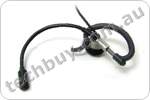 |
Creative Headset
Use the included Creative handsfree headset to chat in private whenever necessary. |
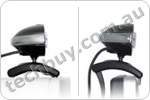 |
Multi-Attach Base
Attach Live! Cam Voice to almost anything - notebook displays, CRT monitors, Flat panel displays. Or let it rest comfortably on tables or other flat surfaces. |
 |
Make free video calls with Skype
Enjoy a 30min SkypeOut voucher and call anyone on traditional landlines or mobile phones for free! Skype also enables you to make free calls to anyone else on Skype, anywhere in the world. |
 |
Experience the all new and powerful Live! Cam Suite
Do more with Creative Live! Cam Suite! Edit and organise your photos easily, create fun photo calendars - the possibilities are virtually endless. Do all this and more with the included software suite. |
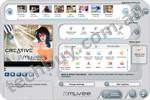 |
muvee autoProducer
Create videos easily and quickly! Its fantastic video editing technology enables you to produce professional videos in an amazingly short period of time. Simply shoot it, muvee it and share it! |
 |
Superior Video for Instant Messaging!
Live! Cam Voice works with Yahoo! Messenger, Skype, MSN Messenger and other compatible instant messaging services. |
1 Software enhanced.
| Feature |
Description |
| Sensor: |
1.3 Megapixel sensor |
| Lens: |
85 ultra wide-angle |
| Microphone: |
Built-in Adaptive Array Microphones |
| Highest Still Image Resolution: |
5 Megapixel 2560 X 1920 (software enhanced) |
| Highest Video Resolution: |
1.3 Megapixel 1280 X 960 |
| Focus: |
Fixed |
| Interface: |
High-Speed USB 2.0 (backward compatible with USB 1.1) |
| Zoom: |
4X Digital |
|
* The information here is for your reference only and all care has been taken to make sure that it is accurate. Please report any errors or omissions via our website, or consult your reseller or check the packaging to be certain. Pricing, availability, specifications and package contents are subject to change without prior notice and may differ according to different regions.
|
|
|
|
20/05
|
BenQ W20000 DLP Home Theatre Projector - 1920x1080 HD 1080p, 1200 Lumens, 20000;1
| W20000 |
|
 |
Ultra High Contrast for Cinema Class Performance
Turn it on and your home becomes a cinema.
Most home projectors cant give a crisp image when the scene turns overly dark or overly bright. Thats because they have a limited contrast ratio. The BenQ W5000 & W20000 is different. Built to deliver ultra-high contrast, this projector allows you to see visuals on-screen just as you would see them in real life. Because connoisseurs know the difference, this projector is built to world-class specifications.
Because Enjoyment Matters.
The BenQ W5000 & W20000 with Senseye technology brings you the best picture quality in 1080p Full HD, ultra-high contrast ratio, smooth video stream performance and HQV (Hollywood Quality Video) that renders standard definition material in Full HD-like video quality, and much more.
Contrast Enhancement
A Unique, Two-Step Image Enhancement Process: BenQs Dual Iris Technology.
When you are watching a really great movie, there are certain times when high contrast ratio can make all the difference, places like: the darkest reaches of outer-space, the skies high above the battlefield, a haunted house or inside an Egyptian pyramid. With high contrast ratio, everything is clear. You can see all of the details. Without it, youre just in the dark.
In order to provide you with the most detailed image possible, the BenQ W20000 enhances image contrast via its Dual Iris technology so that bright images become brighter and dark images become darker -- both with more detail and refined gradients between them. High contrast ratio means a higher level of viewing enjoyment. Heres how dual iris technology works:
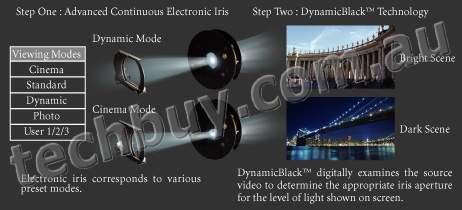
Step One: Advanced Continuous Electronic Iris An Electronic Iris with Different Preset Modes.
For optimal viewing, the BenQ W20000 comes with 4 viewing modes (Cinema, Dynamic, Standard, and Photo) that you can select, plus 3 memory slots that you can calibrate to your own preferred settings.
The advanced continuous electronic iris works like your own eye. It widens and narrows, letting out as much light as necessary to match the selected contrast range.
Step Two: DynamicBlack
Together with Texas Instruments DynamicBlack, BenQ contrast technology provides a second level of Iris control that enhances contrast based on the exact image being shown. Darkened scenes? No problem. DynamicBlack digitally examines source video to determine the appropriate iris aperture for the level of light present in a given scene and open and close the projector iris accordingly. When its darker, the iris closes to boost contrast. When its lighter, the iris will open. So, youll see everything.
Colour Enhancement
Enjoy True Colors, Even the Subtlest Hues.
We built this projector for AV Connoisseurs. Through our partnership with Texas Instruments and Philips, we have created the truest colors and best viewing experience possible.
BrilliantColor Performance
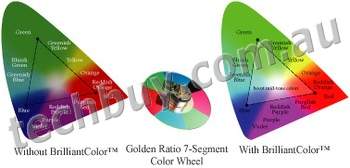 |
BenQs high-speed, 7-segment color wheel delivers the best balance between optimal brightness and color, while BrilliantColor technology boosts mid-tone colors to increase overall brightness to produce a more life-like picture. |
VIDI Lighting Technology Adjusts Light More Effectively.
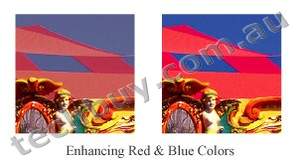
| Traditional projectors are weak on color performance for red & blue. Not so for the BenQ W20000. It uses the VIDI technology to produce more brightness by delivering more lumens on screen than competing systems and normal lamps. It also increases brightness by 15% for red & blue. With VIDI lighting, we can boost specific colors in different application modes for a stunning picture. |
 |
|
Full 4:4:4 Color Sampling. No Compression on the Video Source.
BenQ achieves greater color accuracy by handling each color signal in the video input individually, applying its brightness value directly in rendering the video. In contrast, regular projectors use a sampling process, which inevitably results in a loss of information about specific color signals and color distortion in the final projection image.
Clarity Enhancement
The BenQ W20000 Can Project Standard Definition Video in Full HD Clarity.
When you want to view images that are below the 1080p HD standard such as analog, 480i, 480p, 720i or 720p, our projector converts this content to deliver Full HD-like performance, ensuring that you get the best viewing experience possible.
Motion Optimization
An Ultra Smooth Video Stream
Elimates Jaggies
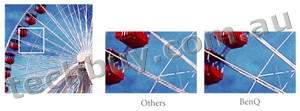 Regular projectors show blurs along edges, called jaggies , that lay along the angles of moving objects. BenQs advanced filtering technology can effectively handle this annoying artifact, even those lying at shallow angles of 5 to 7. Regular filtering technology can only adjust angles larger than 30 to 45.
Thoughtful Design
Every Detail Considered
Superior Connectivity
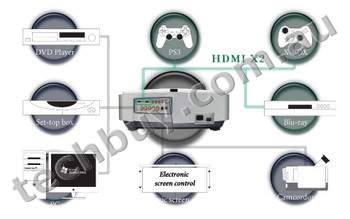
The W20000 is thoughtfully designed with two HDMI slots so that you wont have to swap cables each time you want to view digital content from a second source. When your movie is over, and you and your guests want to view something else, the transition from one enjoyment to the next will be effortless.
|
| Native Resolution |
1080p (1920 x 1080) |
| Projection System |
Texas Intrustments DLP Darkchip3 |
| Brightness |
1200 ANSI lumens |
| Lamp |
250W Up to 2000/3000 hours (Normal/Economic mode) |
| Contrast Ratio |
20000:1 |
| Weight |
9.6kg |
| Noise Level |
28/25 dB (Normal/Economic mode) |
| Resolutions Supported |
480p, 720p, 1080i, 1080p |
| Dimensions (WxHxD) |
19.4 x 7.1 x 16.5 inches (492 x 180 x 420 mm) |
| Image Size |
35" to 300" |
| Throw Ratio |
98"@4m (98"@13.12 feet) |
| Throw Distance |
Min: 2.00m ; Max:8.00m |
| Zoom Ratio |
1.2:1 |
| Lens |
F=2.4-2.7 f=38.9mm (wide) 46.6 (tele) mm |
| Display Colours |
Full 16.7 million colour palette |
| Aspect Ratio |
Anamorphic/ 4:3/Wide/Letter Box/ Real screen selectable |
| Horizontal Frequency (KHz) |
15-75kHz |
| Vertical Scan Rate |
50-85 HZ |
| Projection Position |
Front/Rear, Table/Ceiling |
| Input Terminals |
Analog RGB :BNC x 5 (shared)
Digital: HDMI (with HDCP)x 2
Composite Video: RCA x 1
S-Video: Mini DIN 4 pin x 1
Component Video 1: RCA x 3
Component Video 2: BNC x 3 (shared)
|
| Output Terminals |
12 Volt Trigger Out |
| Control Terminals |
RS232 8 Pin MINI DIN x 1 |
| Video Compatibility |
NTSC, PAL, SECAM, |
| Auto Switching Power Supply |
100 to 240 V AC, 50 to 60 Hz |
| Power Consumption |
370W (max) |
| On-Screen Display Language |
English/French/German/Italian/Spanish/Japanese/Russian/Dutch/ Simplified Chinese/Traditional Chinese |
| Preset Modes / Application Modes |
Cinema Mode
Dynamic Mode
Standard Mode
user 1
User 2
User 3 Gaming Mode |
| Features |
TI Darkchip3 DMD
Digital AV input (HDMI)
Full HDTV Native Resolution
Dust Proof with Air Filter
Powered vertical lens shift
Focus
Zoom
Faroudja DCDi Processing
BenQ Senseye Technology
PIP / POP
User Memory Setting
Motorised IRIS adjustment
3D Colour Management Full HD
|
| Color |
White |
| Accessories (Standard) |
User's Manual
Safety Manual
Remote Control
Batteries
Micro Dust Filter
Power Cords
Component Cable
|
|
|
|
|
|
Previous Page
|
Next Page
|
|




 Support Windows ReadyBoost