Camerafarm product archive #39818
| Image |
Date |
Product description |
Price |
Buy |
|
07/01
|
Lexmark 18L0032A #82 Ink Cartridge - Black Lexmark #82 Black Print Cartridge
Compatible with Z55, Z65, Z65n, X5150, X6150, X6170.
|


|
|
|
07/01
|
Lexmark 18L0042A #83 Ink Cartridge - Colour Lexmark 18L0042A #83 Colour Print Cartridge
Compatible with Z55, Z65, Z65n, X5150, X6150, X6170.
|
|
|
|
07/01
|
Adobe FontFolio 9 Retail MLP for 20 usersTHE COMPLETE TYPE SOLUTION FOR CREATIVE PROFESSIONALS
PI DATE: JANUARY 2008
PRODUCT : Adobe Font Folio 9.0
NO. OF USERS: 20 users
PKG TYPE : Retail
PLATFORM : Win & Mac
PRODUCT FEATURES:-
* Offers more than 2,750 typefaces from the Adobe Type Library in
PostScript Type 1 format
* Comes with a Lic that lets users install fonts on upto 20 computers
* Print to any output device attached either directly or via a Ntwk
* Inc the latest version of ATM Deluxe (along with a 20-computer lic), so
users can organise PostScript Type 1, OpenType & TrueType fonts
* Contains both Mac & Win version of fonts for users to take advantage
of cross platform compatibility
|
|
|
|
07/01
|
Logitech Security Camera, Outdoor - Add-On (961-000295) Add up to five additional cameras to monitor and protect your entire property. Using innovative HomePlug technology, the Outdoor Add-On Security Camera transmits encrypted video over existing electrical wires straight to your PC.
Easy setup gets you up and running fast.
Instant viewing: After setting up your Master System (sold separately) and installing the Logitech Command Center PC software, simply plug in your Add-On camera. Its ready to go.
No-hassle setup: No new wires to run. No network configuration.
See live footage or store it for later replay.
Automatic video storage: Intelligent camera detects motion recording video directly to your PCs hard drive for easy playback and archiving.
Powerful search and playback tools: Review stored video footage from prior hours, days, or weeks.
Intuitive Windows interface: Easily navigate and set your preferences. Motion-activated cell-phone and e-mail alerts: Quickly update you when youre on the go.
Expandable system: Monitor video for up to six cameras simultaneously.
Two viewing options when youre on the go.
Free remote viewing via the Internet: View live video from your WiLife accountanywhere, anytime.
Windows Mobile cell phone accessible: Check on your home or business even when youre on the go.
Mix-and-match versatility.
Expandable for maximum coverage: Add up to five additional Logitech Indoor, Outdoor, or Spy Add-On Cameras in any combination to any Logitech Master System.
Multiple outdoor mounting options: Mounts for walls, ceilings, and posts are available for optimum positioning.
NOTE: *Master System required.
|
|
|
|
07/01
|
Logitech Security Camera, Indoor - Master System (961-000292) Its all plug and play. Using innovative HomePlug technology, the Logitech Indoor Video Security Master System transmits encrypted video over existing electrical wires straight to your PC.
Easy setup gets you up and running fast.
Three simple steps: Install Logitech Command Center PC software, connect the USB receiver, and plug in the camera anywhere around the home or office. Installation takes 15 minutes.
No-hassle setup: No new wires to run, no network configuration.
See live footage or store it for later replay.
Automatic video storage: Intelligent camera detects motion, recording video directly to your PCs hard drive for easy playback and archiving.
Powerful search and playback tools: Review stored video footage from prior hours, days, or weeks.
Intuitive Windows interface: Easily navigate and set your preferences.
Motion-activated cell-phone and e-mail alerts: Quickly update you when youre on the go. Receive text or video messages if there is motion at your property.
Expandable system: Monitor video for up to six cameras simultaneously.
Two viewing options when youre on the go.
Free remote viewing via the Internet: View live video from your WiLife accountanywhere, anytime.
Windows Mobile cell phone accessible: Check on your home or business even when youre on the go.
Mix-and-match versatility.
Expandable for maximum coverage: Add up to five additional Logitech Indoor, Outdoor, or Spy Add-On Cameras in any combination to any Logitech Master System.
Multiple indoor-mounting options: Attach to a window (facing in or out), place on a desktop, or mount to a wall for optimum positioning.
Attractive design: Camera seamlessly fits in with home and office furniture.
|
|
|
|
07/01
|
Adobe Macromedia Flash Remoting MX - Retail, Windows - .NET and JAVA for 4 CPUs
Macromedia Flash Remoting MX - .NET and JAVA for 4 CPUs
Deliver data-driven Flash content
Macromedia Flash Remoting MX provides the connection between Macromedia Flash and your web application server, making it fast and easy to create Rich Internet Applications. With its powerful yet simple programming model, you can easily integrate rich Macromedia Flash content with applications built using Macromedia ColdFusion MX, Microsoft .NET, Java, and SOAP-based web services.
Get a tour of the features
Inside Macromedia Flash Remoting MX
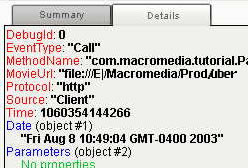
NetConnection Debugger
Use the NetConnection Debugger to easily inspect detailed requests and data while testing and debugging your applications.
Flash Remoting MX in Action
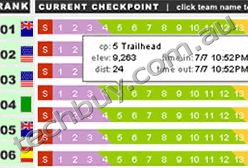
Subaru Primal Quest Site
Rigged with Macromedia Flash MX, Dreamweaver MX, and ColdFusion MX, Subaru Primal Quest manages and delivers live race information to teams, race administrators, fans, and syndication services over the Internet. Subaru Primal Quest:
Flash Remoting MX Highlights
Flash Remoting Updater
Download the free Updater to make sure you have the latest and greatest updates to Flash Remoting MX.
Flash Remoting Sample Applications
Macromedia Flash can be used to implement desktop-like capabilities in your website such as drilldown, datagrid sorting, and drag-and-drop.
Key Features
Lower Costs and Accelerate Development
- Easily Access Business Logic
- Simplify Your Team Workflow
- Streamline Your Testing And Debugging
- Continue to Use XML
Build Robust, Scalable, Rich Internet Applications
- Deploy in Your Native Application Server Environment
- Promote Well-Designed Applications
- Simplify Recordset Handling
- Use Built-In Application Server Features
Connect Flash to Leading Application Server Technologies
- Use Your Existing Web Application Server
- Easily Access Web Services From Macromedia Flash
- Deploy Consistently Across Platforms and Devices
System Requirements
Microsoft .NET Support
- Intel Pentium II processor or faster
- 256 MB RAM (512 recommended)
- 5 MB hard disk space
- Microsoft .NET Framework v1.0 SDK
- Windows 2000 Server SP2
- Windows XP Professional
- Macromedia Flash MX
- Macromedia Flash Player 6,0,47,0 or later
Java Support
- 256 MB RAM (512 recommended)
- 5 MB hard disk space
- Windows NT Server 4.0 SP6a
- Windows 2000 Server SP2
- Linux: Red Hat 7.3 or SuSE 7.3
- Unix: SPARC Solaris 2.7, 8
- J2EE 1.2, 1.3
- Servlet 2.2, 2.3
- Macromedia Flash MX
- Macromedia Flash Player 6,0,47,0 or later
|
|
|
|
07/01
|
Adobe Macromedia Flash Remoting MX - Retail, Windows - .NET and JAVA for 2 CPUs
Macromedia Flash Remoting MX - .NET and JAVA for 2 CPUs
Deliver data-driven Flash Content
Macromedia Flash Remoting MX provides the connection between Macromedia Flash and your web application server, making it fast and easy to create Rich Internet Applications. With its powerful yet simple programming model, you can easily integrate rich Macromedia Flash content with applications built using Macromedia ColdFusion MX, Microsoft .NET, Java, and SOAP-based web services.
Inside Macromedia Flash Remoting MX
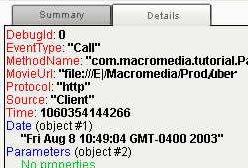
NetConnection Debugger
Use the NetConnection Debugger to easily inspect detailed requests and data while testing and debugging your applications.
Flash Remoting MX in Action
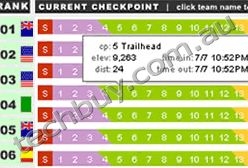
Subaru Primal Quest Site
Rigged with Macromedia Flash MX, Dreamweaver MX, and ColdFusion MX, Subaru Primal Quest manages and delivers live race information to teams, race administrators, fans, and syndication services over the Internet.Subaru Primal Quest:
Flash Remoting MX Highlights
Flash Remoting Updater
Download the free Updater to make sure you have the latest and greatest updates to Flash Remoting MX.
Flash Remoting Sample Applications
Macromedia Flash can be used to implement desktop-like capabilities in your website such as drilldown, datagrid sorting, and drag-and-drop.
Key Features
Lower Costs and Accelerate Development
- Easily Access Business Logic
- Simplify Your Team Workflow
- Streamline Your Testing And Debugging
- Continue to Use XML
Build Robust, Scalable, Rich Internet Applications
- Deploy in Your Native Application Server Environment
- Promote Well-Designed Applications
- Simplify Recordset Handling
- Use Built-In Application Server Features
Connect Flash to Leading Application Server Technologies
- Use Your Existing Web Application Server
- Easily Access Web Services From Macromedia Flash
- Deploy Consistently Across Platforms and Devices
System Requirements
Microsoft .NET Support
- Intel Pentium II processor or faster
- 256 MB RAM (512 recommended)
- 5 MB hard disk space
- Microsoft .NET Framework v1.0 SDK
- Windows 2000 Server SP2
- Windows XP Professional
- Macromedia Flash MX
- Macromedia Flash Player 6,0,47,0 or later
Java Support
- 256 MB RAM (512 recommended)
- 5 MB hard disk space
- Windows NT Server 4.0 SP6a
- Windows 2000 Server SP2
- Linux: Red Hat 7.3 or SuSE 7.3
- Unix: SPARC Solaris 2.7, 8
- J2EE 1.2, 1.3
- Servlet 2.2, 2.3
- Macromedia Flash MX
- Macromedia Flash Player 6,0,47,0 or later
|
|
|
|
07/01
|
Adobe Flash Media Streaming Server 3.5 - Windows, Retail FMS STREAM EDTN FMS STREAM EDTN ALP Adobe Full Box Product Version 3.5
Adobe Flash Media Streaming Server 3.5
Stream protected, high-quality live and on-demand video
Adobe Flash Media Streaming Server 3.5 software is a more secure and affordable step up from using progressive download to deliver video. It offers a superior video experience, with new features such as Dynamic Streaming, HTTP delivery support, and H.264 enhancements that allow for smooth streaming on the web to the Adobe Flash Player runtime, to mobile phones with Adobe Flash Lite 3 software, and to Adobe Media Player software.
What's new
Smoother streaming experience
Keep your viewers longer with a better viewing experience, no matter what their connection speed. Dynamic Streaming, in support of multibitrate streaming, is a new quality-of-service monitoring feature that lets you detect any changes in your viewer's bandwidth and smoothly switch between streams during playback helping to ensure a high-quality, uninterrupted stream.
Easier implementation
Get started right away with easier out-of-the-box deployment. Flash Media Streaming Server 3.5 makes it easy with prebuilt services for live and on-demand streaming, allowing you to start streaming high-quality, more secure video with a few clicks after you install the software.
See all features
Top features in Flash Media Streaming Server
- Dynamic Streaming
- Integrated HTTP server
- More secure content delivery
- Ready to stream right out of the box
- Unlimited bandwidth and users
- Major performance gains
- H.264 video and HE-AAC audio
- Live video support
- Mobile delivery to Flash Lite 3
- Logging
- Bandwidth detection
- Timeshifting seek
Features:
Dynamic Streaming
Keep your viewers longer with multibitrate streaming in Adobe Flash Media Streaming Server 3.5 software, offering a high-quality, uninterrupted viewing experience. This new quality-of-service monitoring feature uses standard H.264 and VP6 files and is ActionScript controlled.
Integrated HTTP server
Help ensure that your content is easily and reliably delivered, even when RTMP delivery is not supported (for example, in Japan). Use this integrated solution to deliver all components of your video application via HTTP when needed.
More secure content delivery
Lock down your high-definition content and communications with enhanced stream protection and server-side security. Encrypted H.264 streaming is now supported with the encrypted Real Time Messaging Protocol (RTMPE), you get higher performance at 128-bit encryption strength. Protect SWF files from being reused or modified, and help prevent unauthorized connections with improved SWF verification.
Ready to stream right out of the box
Get started right away with easier out-of-the-box deployment. Prebuilt services for live and on-demand streaming, combined with new documentation and an integrated Help system, allow you to start streaming high-quality, more secure video with a few clicks after you install Flash Media Streaming Server 3.5.
Unlimited bandwidth and users
Take advantage of single-server support with no restriction on the amount of bandwidth streamed or number of connected users. To provide even more capacity, upgrade to Flash Media Interactive Server 3.5, which features an Origin/Edge architecture with virtually unlimited scaling potential.
Major performance gains
Deliver more streams and users per server video streaming performance more than doubles in Flash Media Server 3.5. These performance and scaling enhancements, combined with new pricing, make high-quality, more secure Flash Media Server streaming an attractive alternative to progressive download.
H.264 video and HE-AAC audio
Enable up to 1080p HD delivery to the Adobe Flash Player and Adobe AIR runtimes, as well as Adobe Media Player software, with industry-standard H.264 video and HE-AAC audio streaming. Given the broad support of H.264 video in the industry, customers can leverage most of their existing encoded content without having to reencode, helping reduce the cost of delivery.
Live video support
Get robust, high-performance live streaming of H.264 and On2 VP6 video in conjunction with Adobe Flash Media Live Encoder 3.0 software, enabling you to deliver around-the-clock live video feeds for news, events, and social media sites and support a high volume of subscribers in real time.
Mobile delivery to Adobe Flash Lite 3
Deliver both live and video-on-demand streams to a growing number of mobile phones that support the Adobe Flash Lite 3 platform. The same video experience in the browser can now be delivered smoothly to mobile devices.
Logging
Help ensure that you have all the tools you need to track and generate reports on your audience's content usage thanks to W3C-compliant ASCII logs, a real-time usage monitor, and a complete API for server and stream events.
Network efficiency
Stream video using only the bandwidth required unlike progressive download since the only bits that are viewed are transferred to the client over the network.
Bandwidth detection
Detect the client connection speed and serve up video at the appropriate bit rate, with no "choose size of video" messages to your end users.
Timeshifting seek
Enable your viewers to immediately jump to any part of the video regardless of the length of the video or whether it has all been downloaded yet.
System Requirements and Languages
Supported operating systems
- Microsoft Windows Server 2003 with Service Pack 2 or Windows Server 2008
- Linux Red Hat 4 or 5.2
Adobe Flash Media Server 3.5 is 32-bit software that will run as 32-bit software on both 32- and 64-bit operating systems.
Hardware requirements
- 3.2GHz Intel Pentium 4 processor (dual Intel Xeon or faster recommended)
- 2GB of RAM (4GB recommended)
- 1Gb Ethernet card
Language versions
This product is available in the following languages:
|
|
|
|
07/01
|
Adobe Acrobat Capture 3 - Windows, Retail - Cluster 4 Processor Pack Adobe Acrobat Capture 3
Full Feature Set
Want to know more about what you can do with Adobe Acrobat Capture software? Read on to find detailed information about the program's key features.
Convert paper to PDF
- Acrobat Capture software lets you easily convert one scanned page or thousands to Portable Document Format (PDF), while preserving all the original fonts, formatting, and images.
- Use the new Software Development Kit (SDK) included on the application CD to customize Acrobat Capture for your own paper-to-PDF conversion system.
- Document capture vendors can help you automate big paper-to-PDF conversion projects, or scanning service bureaus can do the job for you.
Accurately perform OCR, font, and page recognition
Use Acrobat Capture to convert paper documents to your choice of formats:
- PDF Normal: for compact, searchable files - the ideal Web format.
- PDF Image: for a cross-platform image of the entire scanned page.
- PDF Image+Text: for an image of the entire scanned page with OCRed text hidden behind, creating a searchable bitmap - the ideal format for meeting legal requirements to preserve the look of the original scanned image.
- Other formats: HTML, ASCII, Rich Text Format (RTF), Microsoft Word version 6 for Windows, and Corel WordPerfect versions 5 and 6 for Windows.
- Convert paper documents to black-and-white, grayscale, and color files.
- Take advantage of enhanced page-layout recognition capability to convert forms, tables, and visually rich pages with lines and graphics to PDF.
- Recognize documents in eight languages: U.S. English, U.K. English, Dutch, French, German, Italian, Spanish, and Swedish.
- Schedule scanning and conversion at your convenience with delayed processing.
Choose from a variety of scanning options
- Most popular desktop and high-volume scanners are supported through ISIS and TWAIN drivers.
- Convert documents to PDF from common image formats, such as TIFF (including G3, G4, and LZW formats), PCX, BMP, and PDF Image.
- Scan and convert pages up to 27 inches by 27 inches.
- Scan and convert up to 20,000 pages in batch-processing mode. Contact Adobe to purchase the capability to process additional pages.
Fine-tune your files to optimize searchability using Acrobat Reviewer
- Replace bitmapped words with live text.
- Change the fonts and colors of your electronic file's text.
- Import and place images in your document.
- Save time by reviewing batches of files at a time before creating output.
- Maximize searchability by placing hidden key-words behind signatures, graphics, and illustrations.
View and enhance your electronic documents
- Use Adobe Reader software (included with Acrobat Capture 2.01 and freely available on Adobe's Web site) to view converted PDF files.
- Make your intranet or Web libraries easily navigable with Adobe Acrobat 4.0 software (available separately) by adding hypertext links, page thumbnails, annotations, video and sound clips, and more.
- Edit and enhance pages scanned and converted to HTML using Adobe GoLive or Adobe PageMill software (available separately).
- Edit word-processing output in Microsoft Word or WordPerfect.
Distribute files in a variety of ways
- Create libraries of PDF and HTML documents on the Web, and search them using popular intranet search engines.
- Publish converted documents on CD-ROM or distribute them attached to e-mail messages.
- Preserve your original paper documents' look and feel, complete with handwritten signatures and annotations, in PDF. Windows, Macintosh, and UNIX users can view and print them directly from within their Web browsers using free Adobe Reader software.
- Use PDF files to comply with government regulations requiring exact electronic copies of documentation.
Integrate Acrobat Capture with your existing software
- Use the new Adobe Acrobat Capture Software Development Kit (SDK) included on the application CD and the application programming interface (API) to integrate Acrobat Capture software with your document workflow software, fax and e-mail applications, scanning software, and more.
- Create a completely automated system for converting images to compact, searchable, Web-ready PDF files.
- Find out more about Adobe SDKs and the Solution Partner Program.
System requirements for Windows
- Intel Pentium or faster processor (Pentium III or faster recommended)
- Microsoft Windows NT 4.0 with Service Pack 3 or later, Windows 2000, or Windows XP
- 64MB of available RAM (128MB recommended)
- 86MB of available hard-disk space (127MB recommended)
- Display card that supports 1,024x768 resolution
- CD-ROM drive
- Adobe PostScript language printer (recommended)
- Parallel port (Personal Edition only)
|
|
|
|
07/01
|
Adobe Acrobat Capture 3 - Windows, Retail - Cluster 2 Processor Pack Adobe Acrobat Capture 3
Full Feature Set
Want to know more about what you can do with Adobe Acrobat Capture software? Read on to find detailed information about the program's key features.
Convert paper to PDF
- Acrobat Capture software lets you easily convert one scanned page or thousands to Portable Document Format (PDF), while preserving all the original fonts, formatting, and images.
- Use the new Software Development Kit (SDK) included on the application CD to customize Acrobat Capture for your own paper-to-PDF conversion system.
- Document capture vendors can help you automate big paper-to-PDF conversion projects, or scanning service bureaus can do the job for you.
Accurately perform OCR, font, and page recognition
Use Acrobat Capture to convert paper documents to your choice of formats:
- PDF Normal: for compact, searchable files - the ideal Web format.
- PDF Image: for a cross-platform image of the entire scanned page.
- PDF Image+Text: for an image of the entire scanned page with OCRed text hidden behind, creating a searchable bitmap - the ideal format for meeting legal requirements to preserve the look of the original scanned image.
- Other formats: HTML, ASCII, Rich Text Format (RTF), Microsoft Word version 6 for Windows, and Corel WordPerfect versions 5 and 6 for Windows.
- Convert paper documents to black-and-white, grayscale, and color files.
- Take advantage of enhanced page-layout recognition capability to convert forms, tables, and visually rich pages with lines and graphics to PDF.
- Recognize documents in eight languages: U.S. English, U.K. English, Dutch, French, German, Italian, Spanish, and Swedish.
- Schedule scanning and conversion at your convenience with delayed processing.
Choose from a variety of scanning options
- Most popular desktop and high-volume scanners are supported through ISIS and TWAIN drivers.
- Convert documents to PDF from common image formats, such as TIFF (including G3, G4, and LZW formats), PCX, BMP, and PDF Image.
- Scan and convert pages up to 27 inches by 27 inches.
- Scan and convert up to 20,000 pages in batch-processing mode. Contact Adobe to purchase the capability to process additional pages.
Fine-tune your files to optimize searchability using Acrobat Reviewer
- Replace bitmapped words with live text.
- Change the fonts and colors of your electronic file's text.
- Import and place images in your document.
- Save time by reviewing batches of files at a time before creating output.
- Maximize searchability by placing hidden key-words behind signatures, graphics, and illustrations.
View and enhance your electronic documents
- Use Adobe Reader software (included with Acrobat Capture 2.01 and freely available on Adobe's Web site) to view converted PDF files.
- Make your intranet or Web libraries easily navigable with Adobe Acrobat 4.0 software (available separately) by adding hypertext links, page thumbnails, annotations, video and sound clips, and more.
- Edit and enhance pages scanned and converted to HTML using Adobe GoLive or Adobe PageMill software (available separately).
- Edit word-processing output in Microsoft Word or WordPerfect.
Distribute files in a variety of ways
- Create libraries of PDF and HTML documents on the Web, and search them using popular intranet search engines.
- Publish converted documents on CD-ROM or distribute them attached to e-mail messages.
- Preserve your original paper documents' look and feel, complete with handwritten signatures and annotations, in PDF. Windows, Macintosh, and UNIX users can view and print them directly from within their Web browsers using free Adobe Reader software.
- Use PDF files to comply with government regulations requiring exact electronic copies of documentation.
Integrate Acrobat Capture with your existing software
- Use the new Adobe Acrobat Capture Software Development Kit (SDK) included on the application CD and the application programming interface (API) to integrate Acrobat Capture software with your document workflow software, fax and e-mail applications, scanning software, and more.
- Create a completely automated system for converting images to compact, searchable, Web-ready PDF files.
- Find out more about Adobe SDKs and the Solution Partner Program.
System requirements for Windows
- Intel Pentium or faster processor (Pentium III or faster recommended)
- Microsoft Windows NT 4.0 with Service Pack 3 or later, Windows 2000, or Windows XP
- 64MB of available RAM (128MB recommended)
- 86MB of available hard-disk space (127MB recommended)
- Display card that supports 1,024x768 resolution
- CD-ROM drive
- Adobe PostScript language printer (recommended)
- Parallel port (Personal Edition only)
|
|
|
|
07/01
|
Adobe Acrobat Capture 3 - Windows, Retail - Cluster 1 Processor Pack Adobe Acrobat Capture 3
Full Feature Set
Want to know more about what you can do with Adobe Acrobat Capture software? Read on to find detailed information about the program's key features.
Convert paper to PDF
- Acrobat Capture software lets you easily convert one scanned page or thousands to Portable Document Format (PDF), while preserving all the original fonts, formatting, and images.
- Use the new Software Development Kit (SDK) included on the application CD to customize Acrobat Capture for your own paper-to-PDF conversion system.
- Document capture vendors can help you automate big paper-to-PDF conversion projects, or scanning service bureaus can do the job for you.
Accurately perform OCR, font, and page recognition
Use Acrobat Capture to convert paper documents to your choice of formats:
- PDF Normal: for compact, searchable files - the ideal Web format.
- PDF Image: for a cross-platform image of the entire scanned page.
- PDF Image+Text: for an image of the entire scanned page with OCRed text hidden behind, creating a searchable bitmap - the ideal format for meeting legal requirements to preserve the look of the original scanned image.
- Other formats: HTML, ASCII, Rich Text Format (RTF), Microsoft Word version 6 for Windows, and Corel WordPerfect versions 5 and 6 for Windows.
- Convert paper documents to black-and-white, grayscale, and color files.
- Take advantage of enhanced page-layout recognition capability to convert forms, tables, and visually rich pages with lines and graphics to PDF.
- Recognize documents in eight languages: U.S. English, U.K. English, Dutch, French, German, Italian, Spanish, and Swedish.
- Schedule scanning and conversion at your convenience with delayed processing.
Choose from a variety of scanning options
- Most popular desktop and high-volume scanners are supported through ISIS and TWAIN drivers.
- Convert documents to PDF from common image formats, such as TIFF (including G3, G4, and LZW formats), PCX, BMP, and PDF Image.
- Scan and convert pages up to 27 inches by 27 inches.
- Scan and convert up to 20,000 pages in batch-processing mode. Contact Adobe to purchase the capability to process additional pages.
Fine-tune your files to optimize searchability using Acrobat Reviewer
- Replace bitmapped words with live text.
- Change the fonts and colors of your electronic file's text.
- Import and place images in your document.
- Save time by reviewing batches of files at a time before creating output.
- Maximize searchability by placing hidden key-words behind signatures, graphics, and illustrations.
View and enhance your electronic documents
- Use Adobe Reader software (included with Acrobat Capture 2.01 and freely available on Adobe's Web site) to view converted PDF files.
- Make your intranet or Web libraries easily navigable with Adobe Acrobat 4.0 software (available separately) by adding hypertext links, page thumbnails, annotations, video and sound clips, and more.
- Edit and enhance pages scanned and converted to HTML using Adobe GoLive or Adobe PageMill software (available separately).
- Edit word-processing output in Microsoft Word or WordPerfect.
Distribute files in a variety of ways
- Create libraries of PDF and HTML documents on the Web, and search them using popular intranet search engines.
- Publish converted documents on CD-ROM or distribute them attached to e-mail messages.
- Preserve your original paper documents' look and feel, complete with handwritten signatures and annotations, in PDF. Windows, Macintosh, and UNIX users can view and print them directly from within their Web browsers using free Adobe Reader software.
- Use PDF files to comply with government regulations requiring exact electronic copies of documentation.
Integrate Acrobat Capture with your existing software
- Use the new Adobe Acrobat Capture Software Development Kit (SDK) included on the application CD and the application programming interface (API) to integrate Acrobat Capture software with your document workflow software, fax and e-mail applications, scanning software, and more.
- Create a completely automated system for converting images to compact, searchable, Web-ready PDF files.
- Find out more about Adobe SDKs and the Solution Partner Program.
System requirements for Windows
- Intel Pentium or faster processor (Pentium III or faster recommended)
- Microsoft Windows NT 4.0 with Service Pack 3 or later, Windows 2000, or Windows XP
- 64MB of available RAM (128MB recommended)
- 86MB of available hard-disk space (127MB recommended)
- Display card that supports 1,024x768 resolution
- CD-ROM drive
- Adobe PostScript language printer (recommended)
- Parallel port (Personal Edition only)
|
|
|
|
07/01
|
Adobe Acrobat Capture 3 - Windows, Retail - 20,000 Print Processor Adobe Acrobat Capture 3 - 20,000 Print Processor
Full Feature Set
Want to know more about what you can do with Adobe Acrobat Capture software? Read on to find detailed information about the program's key features.
Convert paper to PDF
- Acrobat Capture software lets you easily convert one scanned page or thousands to Portable Document Format (PDF), while preserving all the original fonts, formatting, and images.
- Use the new Software Development Kit (SDK) included on the application CD to customize Acrobat Capture for your own paper-to-PDF conversion system.
- Document capture vendors can help you automate big paper-to-PDF conversion projects, or scanning service bureaus can do the job for you.
Accurately perform OCR, font, and page recognition
Use Acrobat Capture to convert paper documents to your choice of formats:
- PDF Normal: for compact, searchable files - the ideal Web format.
- PDF Image: for a cross-platform image of the entire scanned page.
- PDF Image+Text: for an image of the entire scanned page with OCRed text hidden behind, creating a searchable bitmap - the ideal format for meeting legal requirements to preserve the look of the original scanned image.
- Other formats: HTML, ASCII, Rich Text Format (RTF), Microsoft Word version 6 for Windows, and Corel WordPerfect versions 5 and 6 for Windows.
- Convert paper documents to black-and-white, grayscale, and color files.
- Take advantage of enhanced page-layout recognition capability to convert forms, tables, and visually rich pages with lines and graphics to PDF.
- Recognize documents in eight languages: U.S. English, U.K. English, Dutch, French, German, Italian, Spanish, and Swedish.
- Schedule scanning and conversion at your convenience with delayed processing.
Choose from a variety of scanning options
- Most popular desktop and high-volume scanners are supported through ISIS and TWAIN drivers.
- Convert documents to PDF from common image formats, such as TIFF (including G3, G4, and LZW formats), PCX, BMP, and PDF Image.
- Scan and convert pages up to 27 inches by 27 inches.
- Scan and convert up to 20,000 pages in batch-processing mode. Contact Adobe to purchase the capability to process additional pages.
Fine-tune your files to optimize searchability using Acrobat Reviewer
- Replace bitmapped words with live text.
- Change the fonts and colors of your electronic file's text.
- Import and place images in your document.
- Save time by reviewing batches of files at a time before creating output.
- Maximize searchability by placing hidden key-words behind signatures, graphics, and illustrations.
View and enhance your electronic documents
- Use Adobe Reader software (included with Acrobat Capture 2.01 and freely available on Adobe's Web site) to view converted PDF files.
- Make your intranet or Web libraries easily navigable with Adobe Acrobat 4.0 software (available separately) by adding hypertext links, page thumbnails, annotations, video and sound clips, and more.
- Edit and enhance pages scanned and converted to HTML using Adobe GoLive or Adobe PageMill software (available separately).
- Edit word-processing output in Microsoft Word or WordPerfect.
Distribute files in a variety of ways
- Create libraries of PDF and HTML documents on the Web, and search them using popular intranet search engines.
- Publish converted documents on CD-ROM or distribute them attached to e-mail messages.
- Preserve your original paper documents' look and feel, complete with handwritten signatures and annotations, in PDF. Windows, Macintosh, and UNIX users can view and print them directly from within their Web browsers using free Adobe Reader software.
- Use PDF files to comply with government regulations requiring exact electronic copies of documentation.
Integrate Acrobat Capture with your existing software
- Use the new Adobe Acrobat Capture Software Development Kit (SDK) included on the application CD and the application programming interface (API) to integrate Acrobat Capture software with your document workflow software, fax and e-mail applications, scanning software, and more.
- Create a completely automated system for converting images to compact, searchable, Web-ready PDF files.
- Find out more about Adobe SDKs and the Solution Partner Program.
System requirements for Windows
- Intel Pentium or faster processor (Pentium III or faster recommended)
- Microsoft Windows NT 4.0 with Service Pack 3 or later, Windows 2000, or Windows XP
- 64MB of available RAM (128MB recommended)
- 86MB of available hard-disk space (127MB recommended)
- Display card that supports 1,024x768 resolution
- CD-ROM drive
- Adobe PostScript language printer (recommended)
- Parallel port (Personal Edition only)
|
|
|
|
07/01
|
Adobe Acrobat Capture 3 - Windows, Retail - 100,000 Print Processor
Adobe Acrobat Capture 3 - 100,000 Print Processor
Full Feature Set
Want to know more about what you can do with Adobe Acrobat Capture software? Read on to find detailed information about the program's key features.
Convert paper to PDF
- Acrobat Capture software lets you easily convert one scanned page or thousands to Portable Document Format (PDF), while preserving all the original fonts, formatting, and images.
- Use the new Software Development Kit (SDK) included on the application CD to customize Acrobat Capture for your own paper-to-PDF conversion system.
- Document capture vendors can help you automate big paper-to-PDF conversion projects, or scanning service bureaus can do the job for you.
Accurately perform OCR, font, and page recognition
Use Acrobat Capture to convert paper documents to your choice of formats:
- PDF Normal: for compact, searchable files - the ideal Web format.
- PDF Image: for a cross-platform image of the entire scanned page.
- PDF Image+Text: for an image of the entire scanned page with OCRed text hidden behind, creating a searchable bitmap - the ideal format for meeting legal requirements to preserve the look of the original scanned image.
- Other formats: HTML, ASCII, Rich Text Format (RTF), Microsoft Word version 6 for Windows, and Corel WordPerfect versions 5 and 6 for Windows.
- Convert paper documents to black-and-white, grayscale, and color files.
- Take advantage of enhanced page-layout recognition capability to convert forms, tables, and visually rich pages with lines and graphics to PDF.
- Recognize documents in eight languages: U.S. English, U.K. English, Dutch, French, German, Italian, Spanish, and Swedish.
- Schedule scanning and conversion at your convenience with delayed processing.
Choose from a variety of scanning options
- Most popular desktop and high-volume scanners are supported through ISIS and TWAIN drivers.
- Convert documents to PDF from common image formats, such as TIFF (including G3, G4, and LZW formats), PCX, BMP, and PDF Image.
- Scan and convert pages up to 27 inches by 27 inches.
- Scan and convert up to 20,000 pages in batch-processing mode. Contact Adobe to purchase the capability to process additional pages.
Fine-tune your files to optimize searchability using Acrobat Reviewer
- Replace bitmapped words with live text.
- Change the fonts and colors of your electronic file's text.
- Import and place images in your document.
- Save time by reviewing batches of files at a time before creating output.
- Maximize searchability by placing hidden key-words behind signatures, graphics, and illustrations.
View and enhance your electronic documents
- Use Adobe Reader software (included with Acrobat Capture 2.01 and freely available on Adobe's Web site) to view converted PDF files.
- Make your intranet or Web libraries easily navigable with Adobe Acrobat 4.0 software (available separately) by adding hypertext links, page thumbnails, annotations, video and sound clips, and more.
- Edit and enhance pages scanned and converted to HTML using Adobe GoLive or Adobe PageMill software (available separately).
- Edit word-processing output in Microsoft Word or WordPerfect.
Distribute files in a variety of ways
- Create libraries of PDF and HTML documents on the Web, and search them using popular intranet search engines.
- Publish converted documents on CD-ROM or distribute them attached to e-mail messages.
- Preserve your original paper documents' look and feel, complete with handwritten signatures and annotations, in PDF. Windows, Macintosh, and UNIX users can view and print them directly from within their Web browsers using free Adobe Reader software.
- Use PDF files to comply with government regulations requiring exact electronic copies of documentation.
Integrate Acrobat Capture with your existing software
- Use the new Adobe Acrobat Capture Software Development Kit (SDK) included on the application CD and the application programming interface (API) to integrate Acrobat Capture software with your document workflow software, fax and e-mail applications, scanning software, and more.
- Create a completely automated system for converting images to compact, searchable, Web-ready PDF files.
- Find out more about Adobe SDKs and the Solution Partner Program.
System requirements for Windows
- Intel Pentium or faster processor (Pentium III or faster recommended)
- Microsoft Windows NT 4.0 with Service Pack 3 or later, Windows 2000, or Windows XP
- 64MB of available RAM (128MB recommended)
- 86MB of available hard-disk space (127MB recommended)
- Display card that supports 1,024x768 resolution
- CD-ROM drive
- Adobe PostScript language printer (recommended)
- Parallel port (Personal Edition only)
|
|
|
|
07/01
|
D-Link DCS-3110 Internet / Surveillance Camera for Business
Product Features
- 1/4 Megapixel CMOS Sensor
- Built-in Removable IR-cut Filter for Day & Night Feature
- CF Card Slot for Front-End Storage
- Real-Time MPEG-4 and MJPEG Compression
- Power over Ethernet (PoE) Built-in
- 3GPP Mobile Surveillance/SIP 2-Way Audio
Product Description High Resolution Surveillance
The D-Link DCS-3110 Fixed Network Camera is a high performance megapixel camera designed for professional surveillance and security applications. Equipped with a 1.3 Megapixel Progressive Scan CMOS sensor and a 6mm Lens, the DCS-3110 allows you to capture a wider field of view with a resolution of up to 1280 x 1024. The built-in ICR filter in the DCS-3110 provides automatic Day/Night functionality, adjusting the image from color during the day (and in low-light conditions) to monochrome at night (or in extremely poor lighting conditions). With features such as simultaneous MPEG-4/MJPEG streaming, multicast MPEG-4 streaming, PoE support, a built-in Compact Flash card slot, and connectivity to a variety of external devices, the DCS-3110 is an extremely versatile solution for high quality, high resolution viewing and reliable recording throughout the day.
Multiple Streaming
The DCS-3110 supports simultaneous streaming of MPEG-4 and MJPEG video to provide both high quality and bandwidth efficient compression formats. MJPEG delivers greater file integrity, making it ideal for detailed monitoring situations. MPEG-4 has smaller file sizes, making it more useful for extended recording periods or for use in low bandwidth networks. Additionally, the DCS-3110 supports multicast MPEG-4 streaming allowing users to view content by subscribing to a multicast IP address on the network.
Flexible Connectivity
The DCS-3110 includes digital input and output ports (one each) allowing connectivity to external devices such as IR sensors, switches, and alarm relays. It also comes with a RS-485 interface, providing connectivity to an optional Pan/Tilt enclosure, which effectively adds pan/tilt functionality to the DCS-3110. Additionally, a 12V interface provides power for an optional LED illuminator.
3GPP Mobile Surveillance
Support for 3GPP Mobile Surveillance* allows you to view a live video feed from your compatible Internet-ready mobile phone
with a 3GPP player installed. This extends your monitoring capability without requiring the use of a computer, allowing you to check your cameras video feed while on-the-go.
Additional Features
The DCS-3110 comes with a built-in microphone and audio ports allowing 2-way audio communication** when an external speaker is connected and even includes an audio switch to ensure privacy when needed. The DCS-3110 also comes with a built-in Samba client for NAS so there is no need for a direct connection to a PC or any other hardware or software to capture and transfer images. Equipped with 802.3af Power over Ethernet (PoE) support***, the DCS-3110 can receive both power and data over a single Ethernet cable, allowing you to place this camera in locations without a power outlet.
Convenient Management
The included D-Link D-ViewCam 2.0 software enables you to manage up to 32 network cameras, set e-mail alert notifications, set recording schedules, and trigger motion detection to record directly to your hard drive. D-ViewCam 2.0 also allows you to upload a floor plan of your business and create a realistic layout of where your cameras are located, further simplifying the management process.
* The mobile device must be Internet-ready. Support Real Time Streaming Protocol (RTSP) and be equipped with a 3G video player such as PacketVideo, Quicktime, or RealPlayer, and have Internet access.
** Use of audio or video equipment for recording the image or voice of a person without their knowledge and consent is prohibited in certain states or jurisdictions. The end-user assumes all liability for compliance with applicable state, local, and federal laws.
*** A PoE switch or router is required to provide power via the Ethernet connection
|
|
|
|
07/01
|
Rodenstock Orange 22 Filter - 72mm Rodenstock Orange 22 Filter - 72mm
Orange filters darken blue even more than yellow filters and also bluish-green and some green to create a very dramatic (cloud) atmosphere in landscape shots. With infrared b&w or color film, they are the most popular filters for magical effects.
|
|
|
|
07/01
|
Rodenstock Orange 22 Filter - 67mm Rodenstock Orange 22 Filter - 67mm
Orange filters darken blue even more than yellow filters and also bluish-green and some green to create a very dramatic (cloud) atmosphere in landscape shots. With infrared b&w or color film, they are the most popular filters for magical effects.
|
|
|
|
07/01
|
Rodenstock Orange 22 Filter - 62mm Rodenstock Orange 22 Filter - 62mm
Orange filters darken blue even more than yellow filters and also bluish-green and some green to create a very dramatic (cloud) atmosphere in landscape shots. With infrared b&w or color film, they are the most popular filters for magical effects.
|
|
|
|
Previous Page
|
Next Page
|
|