Camerafarm product archive #39264

Image Date Product description Price Buy
03/07

Apacer 8GB SDHC Card - Class 6

SDHC Class 6 Card
 
Compliant with latest SD Spec Ver 2.0
Extreme transfer rate for fast copying and downloading
Speed class: Class6 (6MB/s minimum performance)
Support ECC function to detect and correct errors
Product lifetime warranty
 
Apacer SDHC 4GB Class 6 Flash Cards Fastest in the Market

The 4GB Class 6 Apacer SD High Capacity (SDHC) flash cards support the newest SDHC compliant entertainment devices with a best in class 6MB/sec transfer rate and SD Card Association Spec Ver. 2.0 compliance. SDHC storage cards utilize the FAT 32 file system to offer large storage capacity and unmatched data transfer speed for SDHC compatible high-resolution cameras, camcorders and multimedia products.

With ECC error detection and correction to ensure data integrity, wear leveling for extended product life, a mechanical write protection switch to prevent accidental deletion or overwriting of valuable data, and auto stand-by and sleep modes to reduce power consumption and extend device battery life, Apacer SDHC Class 6 4GB flash cards deliver best in class speed and storage.

SD Classes, as defined by the SD Association, enable a host device to determine, prior to writing data, the specific attributes of a SDHC flash card to ensure optimized write speed. Different classes offer varying levels of storage capacity and card performance. Apacer SDHC Class 6 4GB flash cards conform to SD Association specified operating conditions, and at 6MB/sec, offer the highest data transfer speed currently possible for Class 6. Maximum speed is attained only when using a Class 6 SDHC flash card with a SDHC-compliant device. Class 6 SDHC flash cards are easily recognized by the SDHC Class 6 logo on the front of the card. To ensure the best performance, use only flash cards bearing the official SDHC Class 6 logo.
Notice
  • Look for the SDHC logo on the product or packaging of your device, or contact your device manufacturer for details on SDHC card support. Some SD 1.01/1.1 host devices can upgrade firmware so the device can support the SDHC card.
  • The actual available memory on the device is less than what is listed on the package. This is due to small discrepancies in file formats and algorithms used by various operating systems. In addition, a portion of memory space is reserved for system files and data sectors for better performance.

Compliant with latest SD Spec Ver 2.0
Adopts the newest standard from the SD Card Association for FAT 32 file system support and fulfill the high-resolution/capacity image/video needs.

Large storage capacity up to 4GB
Apacer SDHC Class 6 flash cards utilize the FAT 32 file system to offer the very large capacity and unmatched data transfer speed SDHC compatible high-resolution cameras, camcorders and multimedia products demand.

Extreme transfer rate for fast copying and downloading (Min. Data Transfer: Write 6MB/sec)
Apacer SDHC Class 6 4GB flash cards offer the highest data transfer speed currently possible for Class 6. Maximum speed is attained only when using a Class 6 SDHC flash card with a SDHC-compliant device.

Support CPRM technology
Apacer is legally certified to manufacture SD flash cards. Each card contains CPRM (Content Protection for Recordable Media). It is a type of digital ID to ensure compatibility with all SD Card Association certified digital devices such as cameras, cell phones and PDAs.
Support ECC function to detect and correct errors
Through the controller, it can auto detect errors and reclaim lost data. It helps ensure data is complete and helps avoid data loss.
Wear Leveling function to extend lifetime
Wear leveling function is designed to extend the product's life. As data is written, the controller writes data into each block evenly. Wear leveling automatically spreads this data writing over all memory blocks, not allowing any single block to be overused and worn out. This helps extend the lifetime of the flash card.
Support ISP mode to load the firmware
Support ISP mode to load, program and update F/W and compatibility.
Mechanical write protection switch
Mechanical write protection switch is a lock tab on the edge of the flash card. The mechanical write protection switch allows users to only read data, not write to the card. This helps prevent data from being deleted accidentally. The card also has a notch that protects the card from being inserted incorrectly (upside down). Helps protect the card and your device.
Auto Stand-by and Sleep Mode
Auto stand-by and sleep mode means when your device or camera goes into standby or sleep mode, the flash card will detect this and automatically go to stand-by mode. The host can further reduce power consumption by turning off the clock timing to the card. The card is ready when it is accessed again.
RoHS compliant
Adopts lead-free manufacturing to meet EU requirements and reduce the pollution.
Product lifetime warranty
Apacer provides Product Lifetime warranty for users.
 
  • Compliant with SD Spec Ver 2.0
  • File format: FAT 32
  • Capacities: 4 GB
  • Speed Class: Class 6(6 MB/sec minimum performance)
  • Operating voltage: 3.3 V
  • Dimensions: 24 x 32 x 2.1 mm
  • Weight: 2g
  • Link contains in-depth information about this product Link contains a picture of this product    NA  
    03/07

    Apacer 4GB SDHC Card - Class 6

    SDHC Class 6 Card
     
    Compliant with latest SD Spec Ver 2.0
    Extreme transfer rate for fast copying and downloading
    Speed class: Class6 (6MB/s minimum performance)
    Support ECC function to detect and correct errors
    Product lifetime warranty
     
    Apacer SDHC 4GB Class 6 Flash Cards Fastest in the Market
    The 4GB Class 6 Apacer SD High Capacity (SDHC) flash cards support the newest SDHC compliant entertainment devices with a best in class 6MB/sec transfer rate and SD Card Association Spec Ver. 2.0 compliance. SDHC storage cards utilize the FAT 32 file system to offer large storage capacity and unmatched data transfer speed for SDHC compatible high-resolution cameras, camcorders and multimedia products.

    With ECC error detection and correction to ensure data integrity, wear leveling for extended product life, a mechanical write protection switch to prevent accidental deletion or overwriting of valuable data, and auto stand-by and sleep modes to reduce power consumption and extend device battery life, Apacer SDHC Class 6 4GB flash cards deliver best in class speed and storage.

    SD Classes, as defined by the SD Association, enable a host device to determine, prior to writing data, the specific attributes of a SDHC flash card to ensure optimized write speed. Different classes offer varying levels of storage capacity and card performance. Apacer SDHC Class 6 4GB flash cards conform to SD Association specified operating conditions, and at 6MB/sec, offer the highest data transfer speed currently possible for Class 6. Maximum speed is attained only when using a Class 6 SDHC flash card with a SDHC-compliant device. Class 6 SDHC flash cards are easily recognized by the SDHC Class 6 logo on the front of the card. To ensure the best performance, use only flash cards bearing the official SDHC Class 6 logo.
    Notice
    • Look for the SDHC logo on the product or packaging of your device, or contact your device manufacturer for details on SDHC card support. Some SD 1.01/1.1 host devices can upgrade firmware so the device can support the SDHC card.
    • The actual available memory on the device is less than what is listed on the package. This is due to small discrepancies in file formats and algorithms used by various operating systems. In addition, a portion of memory space is reserved for system files and data sectors for better performance.

    Compliant with latest SD Spec Ver 2.0
    Adopts the newest standard from the SD Card Association for FAT 32 file system support and fulfill the high-resolution/capacity image/video needs.

    Large storage capacity up to 4GB
    Apacer SDHC Class 6 flash cards utilize the FAT 32 file system to offer the very large capacity and unmatched data transfer speed SDHC compatible high-resolution cameras, camcorders and multimedia products demand.

    Extreme transfer rate for fast copying and downloading (Min. Data Transfer: Write 6MB/sec)
    Apacer SDHC Class 6 4GB flash cards offer the highest data transfer speed currently possible for Class 6. Maximum speed is attained only when using a Class 6 SDHC flash card with a SDHC-compliant device.

    Support CPRM technology
    Apacer is legally certified to manufacture SD flash cards. Each card contains CPRM (Content Protection for Recordable Media). It is a type of digital ID to ensure compatibility with all SD Card Association certified digital devices such as cameras, cell phones and PDAs.
    Support ECC function to detect and correct errors
    Through the controller, it can auto detect errors and reclaim lost data. It helps ensure data is complete and helps avoid data loss.
    Wear Leveling function to extend lifetime
    Wear leveling function is designed to extend the product's life. As data is written, the controller writes data into each block evenly. Wear leveling automatically spreads this data writing over all memory blocks, not allowing any single block to be overused and worn out. This helps extend the lifetime of the flash card.
    Support ISP mode to load the firmware
    Support ISP mode to load, program and update F/W and compatibility.
    Mechanical write protection switch
    Mechanical write protection switch is a lock tab on the edge of the flash card. The mechanical write protection switch allows users to only read data, not write to the card. This helps prevent data from being deleted accidentally. The card also has a notch that protects the card from being inserted incorrectly (upside down). Helps protect the card and your device.
    Auto Stand-by and Sleep Mode
    Auto stand-by and sleep mode means when your device or camera goes into standby or sleep mode, the flash card will detect this and automatically go to stand-by mode. The host can further reduce power consumption by turning off the clock timing to the card. The card is ready when it is accessed again.
    RoHS compliant
    Adopts lead-free manufacturing to meet EU requirements and reduce the pollution.
    Product lifetime warranty
    Apacer provides Product Lifetime warranty for users.
     
  • Compliant with SD Spec Ver 2.0
  • File format: FAT 32
  • Capacities: 4 GB
  • Speed Class: Class 6(6 MB/sec minimum performance)
  • Operating voltage: 3.3 V
  • Dimensions: 24 x 32 x 2.1 mm
  • Weight: 2g
  • Link contains in-depth information about this product Link contains a picture of this product    NA  
    03/07

    Apacer 8GB SDHC Card - Class 2

    SDHC Class 2 Card
     
    Compliant with latest SD Spec Ver 2.0
    Large storage capacity up to 8GB
    Speed class: Class2 (2MB/s minimum performance)
    Support ECC function to detect and correct errors
    Product lifetime warranty
     
    Apacer SDHC 4/8GB Class 2 flash cards offer highest capacity in market

    Break free from limited storage with the new 4GB/8GB Class 2 Apacer SD High Capacity (SDHC) flash cards. With the largest storage capacity currently available on the market at 8GB, a 2MB/sec data transfer rate and SD Card Association Spec Ver. 2.0 compliance, these SDHC flash cards utilize the FAT 32 file system to offer the large storage SDHC compatible high-resolution cameras, camcorders and multimedia products demand.

    SD Classes, as defined by the SD Association, enable a host device to determine, prior to writing data, the specific attributes of a SDHC flash card to ensure optimized write speed. Different classes offer varying levels of storage capacity and card performance. With ECC error detection and correction to ensure data integrity, wear leveling to extend product life, a mechanical write protection switch to prevent accidental deletion and overwriting of valuable data, and auto stand-by and sleep modes to reduce power consumption and extend device battery life, Apacer SDHC 4/8GB Class 2 flash cards offer best in class performance and storage capacity.

    Apacer Class 2 SDHC flash cards conform to SD Association specified operating conditions, and meet all SDHC compatible host device requirements. Maximum speed is attained only when using an Apacer Class 2 SDHC flash card with a SDHC-compliant device. Class 2 SDHC flash cards are easily recognized by the SDHC Class 2 logo on the front of the card. To ensure the best performance, use only flash cards with the official SDHC Class 2 logo.
    Notice
    • Look for the SDHC logo on the product or packaging of your device, or contact your device manufacturer for details on SDHC card support. Some SD 1.01/1.1 host devices can upgrade firmware so the device can support the SDHC card.
    • The actual available memory on the device is less than what is listed on the package. This is due to small discrepancies in file formats and algorithms used by various operating systems. In addition, a portion of memory space is reserved for system files and data sectors for better performance.
    Compliant with latest SD Spec Ver 2.0
    Adopts the newest standard from the SD Card Association for FAT 32 file system support and fulfill the high-resolution/capacity image/video needs.
    Large storage capacity up to 8GB
    Apacer SDHC Class2 flash cards utilize the FAT 32 file system to offer the very large capacity and unmatched data transfer speed SDHC compatible high-resolution cameras, camcorders and multimedia products demand.

    High transfer rate for fast copying and downloading(Min. Data Transfer: Write 2MB/sec)
    Apacer SDHC Class2 4/8GB flash cards offer the highest data transfer speed currently possible for Class 2. Maximum speed is attained only when using a Class2 SDHC flash card with a SDHC-compliant device.

    Support CPRM technology
    Apacer is legally certified to manufacture SD flash cards. Each card contains CPRM (Content Protection for Recordable Media). It is a type of digital ID to ensure compatibility with all SD Card Association certified digital devices such as cameras, cell phones and PDAs.
    Support ECC function to detect and correct errors
    Through the controller, it can auto detect errors and reclaim lost data. It helps ensure data is complete and helps avoid data loss.
    Wear Leveling function to extend lifetime
    Wear leveling function is designed to extend the product's life. As data is written, the controller writes data into each block evenly. Wear leveling automatically spreads this data writing over all memory blocks, not allowing any single block to be overused and worn out. This helps extend the lifetime of the flash card.
    Support ISP mode to load the firmware
    Support ISP mode to load, program and update F/W and compatibility.
    Mechanical write protection switch
    Mechanical write protection switch is a lock tab on the edge of the flash card. The mechanical write protection switch allows users to only read data, not write to the card. This helps prevent data from being deleted accidentally. The card also has a notch that protects the card from being inserted incorrectly (upside down). Helps protect the card and your device.
    Auto Stand-by and Sleep Mode
    Auto stand-by and sleep mode means when your device or camera goes into standby or sleep mode, the flash card will detect this and automatically go to stand-by mode. The host can further reduce power consumption by turning off the clock timing to the card. The card is ready when it is accessed again.
    RoHS compliant
    Adopts lead-free manufacturing to meet EU requirements and reduce the pollution.
    Product lifetime warranty
    Apacer provides Product Lifetime warranty for users.
     
  • Compliant with SD Spec Ver 2.0
  • File format: FAT 32
  • Capacities: 4 GB / 8GB
  • Speed Class: Class 2(2 MB/sec minimum performance)
  • Operating voltage: 3.3 V
  • Dimensions: 24 x 32 x 2.1 mm
  • Weight: 2g
  • Link contains in-depth information about this product Link contains a picture of this product    NA  
    03/07

    Apacer 4GB SDHC Card - Class 2

    SDHC Class 2 Card
     
    Compliant with latest SD Spec Ver 2.0
    Large storage capacity up to 8GB
    Speed class: Class2 (2MB/s minimum performance)
    Support ECC function to detect and correct errors
    Product lifetime warranty
     
    Apacer SDHC 4/8GB Class 2 flash cards offer highest capacity in market
    Break free from limited storage with the new 4GB/8GB Class 2 Apacer SD High Capacity (SDHC) flash cards. With the largest storage capacity currently available on the market at 8GB, a 2MB/sec data transfer rate and SD Card Association Spec Ver. 2.0 compliance, these SDHC flash cards utilize the FAT 32 file system to offer the large storage SDHC compatible high-resolution cameras, camcorders and multimedia products demand.

    SD Classes, as defined by the SD Association, enable a host device to determine, prior to writing data, the specific attributes of a SDHC flash card to ensure optimized write speed. Different classes offer varying levels of storage capacity and card performance. With ECC error detection and correction to ensure data integrity, wear leveling to extend product life, a mechanical write protection switch to prevent accidental deletion and overwriting of valuable data, and auto stand-by and sleep modes to reduce power consumption and extend device battery life, Apacer SDHC 4/8GB Class 2 flash cards offer best in class performance and storage capacity.

    Apacer Class 2 SDHC flash cards conform to SD Association specified operating conditions, and meet all SDHC compatible host device requirements. Maximum speed is attained only when using an Apacer Class 2 SDHC flash card with a SDHC-compliant device. Class 2 SDHC flash cards are easily recognized by the SDHC Class 2 logo on the front of the card. To ensure the best performance, use only flash cards with the official SDHC Class 2 logo.
    Notice
    • Look for the SDHC logo on the product or packaging of your device, or contact your device manufacturer for details on SDHC card support. Some SD 1.01/1.1 host devices can upgrade firmware so the device can support the SDHC card.
    • The actual available memory on the device is less than what is listed on the package. This is due to small discrepancies in file formats and algorithms used by various operating systems. In addition, a portion of memory space is reserved for system files and data sectors for better performance.
    Compliant with latest SD Spec Ver 2.0
    Adopts the newest standard from the SD Card Association for FAT 32 file system support and fulfill the high-resolution/capacity image/video needs.
    Large storage capacity up to 8GB
    Apacer SDHC Class2 flash cards utilize the FAT 32 file system to offer the very large capacity and unmatched data transfer speed SDHC compatible high-resolution cameras, camcorders and multimedia products demand.
    High transfer rate for fast copying and downloading(Min. Data Transfer: Write 2MB/sec)
    Apacer SDHC Class2 4/8GB flash cards offer the highest data transfer speed currently possible for Class 2. Maximum speed is attained only when using a Class2 SDHC flash card with a SDHC-compliant device.

    Support CPRM technology
    Apacer is legally certified to manufacture SD flash cards. Each card contains CPRM (Content Protection for Recordable Media). It is a type of digital ID to ensure compatibility with all SD Card Association certified digital devices such as cameras, cell phones and PDAs.
    Support ECC function to detect and correct errors
    Through the controller, it can auto detect errors and reclaim lost data. It helps ensure data is complete and helps avoid data loss.
    Wear Leveling function to extend lifetime
    Wear leveling function is designed to extend the product's life. As data is written, the controller writes data into each block evenly. Wear leveling automatically spreads this data writing over all memory blocks, not allowing any single block to be overused and worn out. This helps extend the lifetime of the flash card.
    Support ISP mode to load the firmware
    Support ISP mode to load, program and update F/W and compatibility.
    Mechanical write protection switch
    Mechanical write protection switch is a lock tab on the edge of the flash card. The mechanical write protection switch allows users to only read data, not write to the card. This helps prevent data from being deleted accidentally. The card also has a notch that protects the card from being inserted incorrectly (upside down). Helps protect the card and your device.
    Auto Stand-by and Sleep Mode
    Auto stand-by and sleep mode means when your device or camera goes into standby or sleep mode, the flash card will detect this and automatically go to stand-by mode. The host can further reduce power consumption by turning off the clock timing to the card. The card is ready when it is accessed again.
    RoHS compliant
    Adopts lead-free manufacturing to meet EU requirements and reduce the pollution.
    Product lifetime warranty
    Apacer provides Product Lifetime warranty for users.
     
  • Compliant with SD Spec Ver 2.0
  • File format: FAT 32
  • Capacities: 4 GB / 8GB
  • Speed Class: Class 2(2 MB/sec minimum performance)
  • Operating voltage: 3.3 V
  • Dimensions: 24 x 32 x 2.1 mm
  • Weight: 2g
  • Link contains in-depth information about this product Link contains a picture of this product    NA  
    03/07

    Acer PD727 DLP Desktop Projector - XGA, 4000 Lumens, 2500:1

    PD727
    DLP technology (Digital Light Processing) - Professional series

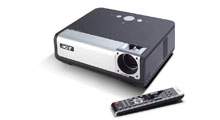
    The impressive PD727 is a high brightness projector that adds a whisper to ambient noise level, while proving leading image projection with high rate of colour convergence. The PD727 is ideally suited for use in conference rooms and other venues for large audiences. All Acer Projectorscome with a free carry bag.

    Product Specification
    Specifications
    Projection System
    DLP technology
     
    Resolution
    Native XGA (1.024 x 768), Maximum SXGA (1.600 x 1.200)
     
    Computer Compatibility
    IBM PC and Compatibles, Apple Macintosh, iMac, and VESA Standards SXGA, SVGA, VGA (resizing)
     
    Video Compatibility
    NTSC (3.58/4.43), PAL (B/D/G/H/I/M/N), SECAM (B/D/G/K/K1/L), HDTV (720p, 1080i) EDTV (480p, 576p), SDTV (480i, 576i)
     
    Aspect Ratio
    4:3 (Negative), 16.9
     
    Contrast Ratio
    2500:1
     
    Displayable Colours
    16.7 Million Colours
     
    Brightness
    4,000 ANSI Lumens (Standard), 3,200 ANSI Lumens (ECO)
     
    Projection Lens
    F/2.4 - 2.6, f=28.0mm - 33.6mm, 1:1.2 Manual Zoom and Manual Focus
     
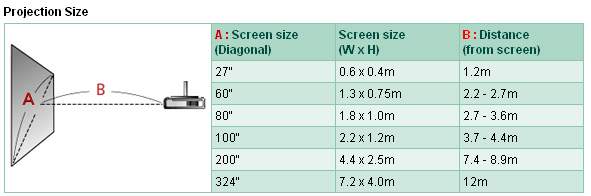
    Projection Screen Size (Diagonal)
    24.6" (0.625m) - 300" (7.62m)
     
    Projection Distance
    3.94" (1.2m) - 40" (12.2m)
     
    Throw Ratio
    49" @ 2m
     
    Lamp Life
    2,000 Hours (Standard), 3,000 Hours (ECO)
     
    Keystone Correction
    +/- 16 Degrees
     
    Audio
    2 Internal Speakers, each with 3 watts output
     
    Weight (kg)
    4.0kg
     
    Dimensions
    350 x 282 x 119mm
     
    Digital Zoom
    Yes
     
    Power Saving
    AC Input 100-240V auto-switching power supply
     
    Power Consumption
    385 watts
     
    Operating Temperature
    5-35 Degrees
     
    Noise Level
    30 dBA (Standard Mode), 31 dBA (ECO Mode)
    Link contains in-depth information about this product Link contains a picture of this product    NA  
    03/07

    IBM Lenovo 256MB USB2.0 Memory Key

    Get portable storage the size of your thumb ! A new design connects the body of the memory key to your key chain more securely. The Lenovo USB 2.0 Memory Key family of products are portable compact memory devices that allow the exchange of information between systems via a functional USB port.
     
    Features & Benefits
    • Designed so the memory key body connects directly to a key chain to help prevent accidental loss
    • Improved encryption algorithm (AES) does not slow down data transfer performance in private partitions
    • Security and partition software allows users to password protect and partition any portion of the storage area
    • Fast 13MB/sec read and 7MB/sec write speeds in both public and private partitions
    • Plug-and-play ready -- no batteries, software or drivers required
    • Software write protection protects data from being accidentally overwritten
    • Great for file transfer, sharing or backup between systems without the need for a floppy disk
    • Supports bootability with appropriate system BIOS and bootable files. Bootability is useful for applications such as system testing and diagnostic utilities (not included)
    • Backed by Lenovo's limited warranty with renowned Service and Support available from IBM
    Link contains in-depth information about this product Link contains a picture of this product    NA  
    03/07

    Adobe Photoshop Elements 5 + Premiere Elements 3 - Windows

    Complete photo and video editing made easy

    Adobe Photoshop Elements 5.0 plus Adobe Premiere Elements 3.0 software combines two powerful yet easy-to-use products to deliver the most complete photo and video editing solution. Entertain friends with unique cinematic slide shows and dramatic freeze-frame effects, create personalized DVDs, and easily share on the web. 

    Reasons to buy

    Adobe Photoshop Elements 5.0 plus Adobe Premiere Elements 3.0 software combines two powerful yet easy-to-use products to deliver the most complete photo and video editing solution.

    Combine photos and videos in entertaining new ways

    Put photo slide shows in motion

    Create a traditional photo slide show, and then add video-style effects and transitions and add motion to your text. Preview the slide show in full screen and then burn it to DVD to share with family and friends.

    Put photo slide shows in motion


    Do more with individual video frames

    Capture a single video frame, add text, graphics, and other enhancements, and then put the frame back in your movie for a fun or dramatic freeze-frame effect. Or grab a video frame and create a personalized DVD cover for your movie.

    Do more with individual video frames


    Include treasured memories in your videos

    Add visual depth and variety to your videos by including scanned old photographs and digital still photos.

    Include treasured memories in your videos

    Back to top

    Bring out the best in your photos

    Instantly fix common flaws or perform advanced editing

    Fix common flaws with a click and edit with less fuss; perfect your photos with advanced options; and have fun with artistic compositing and special effects.

    Instantly fix common flaws


    Show photos in creative, entertaining ways

    Make customized photo creations using themed layouts for everything from albums to postcards, scrapbook pages to DVD covers, and use Flash technology to animate your photos and create interactive web galleries. Take advantage of Intel Viiv technology to show photos and slide shows on your TV (requires a Media Center PC), edit photos from your mobile phone, and take photos with you on handheld devices.

    Devices


    Easily find and view your photos and video clips

    Keep your photos and video clips at your fingertips with faster, easier downloading, custom tagging, powerful search options, and viewing choices that let you sort and find your photos the way that works best for you. Take advantage of built-in photo services that let you upload photos and photo creations to the web, order prints, and more from within Photoshop Elements.

    Categorize

    Back to top

    Bring your home videos to life

    Get started quickly creating home videos and DVDs

    Get started quickly with helpful moviemaking options: Move footage from your camera to DVD in two simple steps, or drop it into the new Sceneline to rearrange clips and add transitions with drag-and-drop ease.

    Movie-making options


    Wow your audience with amazing effects

    Dazzle your audience with effects, transitions, and animations that are professional-quality yet easy to apply, so you can develop your signature style and never run out of options.

    Dazzling effects


    Share your videos virtually anywhere

    Show your video to any audience, on the web, mobile phones, handheld devices, or VHS. Even share personalized DVDs with menus that come alive with your photos, video clips, and music.

    System requirements

    Adobe Photoshop Elements

    • Intel Pentium 4 or Intel Celeron (or compatible) 1.3GHz processor (dual-core processors and those with Hyper-Threading Technology supported)
    • Microsoft Windows Vista (32-bit only), Windows XP, or Windows Media Center Edition (XP and MCE require Service Pack 2)
    • Windows XP: 256MB of RAM (512MB recommended)
    • Windows Vista: 512MB of RAM (1GB recommended)
    • 1.5GB of available hard-disk space
    • Color monitor with 16-bit color video card
    • 1,024x768 monitor resolution at 96dpi or less
    • Display driver compatible with Microsoft DirectX 9 or later
    • CD-ROM drive

    Adobe Premiere Elements

    • Intel Pentium (or compatible) 1.3GHz processor with SSE2 support; 3GHz required for HDV
    • Microsoft Windows Vista (32-bit only), Windows XP, or Windows Media Center Edition (XP and MCE require Service Pack 2)
    • Windows Vista: 1GB of RAM; 2GB required for HDV
    • Windows XP and MCE: 512MB of RAM; 1GB required for HDV
    • 4.5GB of available hard-disk space
    • Color monitor with 16-bit color video card
    • 1,024x768 monitor resolution
    • Display and sound drivers compatible with Microsoft DirectX 9 or later
    • DVD-ROM drive (compatible DVD burner required to burn DVDs)
    • DV/i.LINK/FireWire/IEEE 1394 interface to connect a Digital 8 or DV camcorder, or a USB2 interface to connect a DV-via-USB-compatible DV camcorder (other video devices supported via the Media Downloader)

    Adobe Premiere Elements import/export formats supported:

    MPEG-1, MPEG-2, MPEG-4, H.264, DV, AVI, Windows Media, QuickTime, JVC Everio MOD (import only), 3GP, ASF (import only), WAV, WMA (import only), Dolby Digital stereo, PSD (import only), JPEG, PNG (import only), DVD

     
    Link contains in-depth information about this product Link contains a picture of this product    NA  
    03/07

    Adobe Photoshop Elements 5 - Windows

    Bring out the best in your photos

    Adobe Photoshop Elements 5.0 software combines power and simplicity so you can do more with your photos. Instantly fix flaws or adjust color and lighting with new advanced controls. Quickly drop your photos into customizable layouts and show off your creativity with dynamic web photo galleries created using Flash technology. And view all your photos and video clips in one convenient place.

    Make your photos look their best

    Instantly fix common flaws

    Make quick fixes

    Perform a full range of common photo adjustments including color, contrast, and lighting in the convenient Quick Fix mode.

    Get realistic skin tones

    Easily adjust skin tones for a more natural look, even in poorly lit photos.

    Say goodbye to red eye

    Photoshop Elements eliminates red eye automatically as you download photos from your camera. Or you can remove red eye from individual shots without even clicking on the photo.

    Correct lens distortion

    Easily correct camera lens distortion at photo edges and keystone effects that exaggerate perspective.

    Sharpen blurred edges

    Get crisper-looking photos even remove blurring caused by low lighting conditions.

    Preserve image quality

    Shrink photos and then scale them back to original size while still maintaining complete image quality.

    Compare changes in before and after views

    Instantly see the effects of adjustments you make with before and after views in Quick Fix mode.

    Correct color effortlessly

    Compare a range of color variations side by side with your original photo, and select the best choice with a single click.

    Rotate and crop

    Turn photos right side up and crop out unwanted areas quickly and accurately.

    Perform advanced editing

    Fine-tune exposure

    Get the perfect exposure with the new color curves adjustment that makes it even easier to fine-tune color, brightness, and contrast.

    Quickly retouch specific areas

    Easily select by brushing over any element of your photo to make a range of adjustments to a specific area or object.

    Brush away flaws

    Easily brush away wrinkles and unwanted objects using the Spot Healing Brush for instant results and the Healing Brush for finer control.

    Control color temperature and tint

    Get the best overall color possible with easy slider controls for color temperature and tint.

    Easily adjust shadows and highlights

    Rescue poorly lit photos by lightening shadows and reducing the glare of highlights.

    Adjust specific areas

    Adjust the exposure of specific areas in your photos using professional darkroom tools like dodge, burn, and sponge.

    Benefit from 16-bit support

    Get truer, higher quality results with support for 16-bit color.

    Enjoy enhanced support for working with raw files

    Get the highest quality results by editing the raw image files from your digital camera. Photoshop Elements now supports an even greater selection of digital camera models.

    Convert raw files to Digital Negative

    Enjoy a lifetime of access to your raw files by converting them to universal DNG format, which means youll be able to open and use your highest quality photo files without worrying about proprietary camera formats.

    Learn advanced techniques

    Spark your imagination and master advanced techniques by following the steps in How-To guides.

    Be creative in less time

    Start editing sooner with a quick-launching Editor mode.

    See the full color range

    Adjust the color range of any photo and see real-time changes in the Histogram palette.

    Artistically enhance photos

    Create dramatic black-and-whites

    Convert your color originals to rich, elegant black-and-whites by choosing from a variety of options.

    Give photos extra dimension

    Add depth with drop shadows, bevels, glows, and other effects, which are automatically applied to any element placed on a layer.

    Convert to sepia

    Give your photos a classic look by instantly converting them to sepia tone.

    Instantly apply multiple effects

    Stylize your photos with hundreds of cool special effects. Easily mix multiple effects, change their order, and preview them in the Filter Gallery.

    Apply colored filters

    Create real-world photographic effects by applying tint filters that simulate colored filters on a camera.

    Simulate painting

    Transform your photos with realistic paintbrush effects to simulate oils, watercolors, charcoals, pastels, and different canvas textures.

    Add surreal effects

    Have fun liquifying your photos by easily twisting, warping, stretching, and pulling different areas.

    Create composites

    Combine photos with control

    Place a friend on a mountaintop, add ancestors to a family portrait, and create other fun combinations using flexible layers.

    Easily isolate objects from backgrounds

    Quickly separate an object from its background even in complex, textured areas and instantly remove rough edges.

    Erase backgrounds

    Magically remove backgrounds, leaving foregrounds untouched.

    Easily assemble panoramas

    Create seamless horizontal or vertical panoramas by automatically stitching together multiple photos with Adobe Photomerge: technology.

    Try anything

    Experiment without worry, knowing you can instantly undo or redo multiple steps in one click.

    Add text and graphics

    Tell your story in stylized text

    Type titles and labels right onto your photos and edit them at any time. Easily choose typefaces from the enhanced font menu.

    Instantly add shapes

    Decorate your photos with geometric shapes, symbols, stamps, and thought bubbles from the built-in library, or draw your own.

    Add decorative edges

    Crop your photos into fun shapes with a single click of the Cookie Cutter, or frame them with hundreds of decorative edge designs.

    From the creators of Adobe Photoshop

    Use industry-leading technology

    Create top-quality images with software based on industry-leading Adobe Photoshop software. Professionals have relied on it for more than a decade.

    Process batches of photos at once

    Save hours of effort by automatically processing batches of photos. Remove red eye, rename, resize, convert formats, adjust levels, add text, and more.

    Make the most of Windows XP

    Take advantage of the full power and speed of your Windows XP system.

    Show photos in creative, entertaining ways

    Get started quickly with flexible layout options

    Express your ideas with themed layouts

    Find inspiration in professionally designed, color-coordinated layouts that make it easy to create a finished piece in minutes.

    Create with drag-and-drop simplicity

    Drop photos into flexible layouts, drag to resize images, and move photos anywhere on the page with complete ease.

    Create exactly the look you envision

    Customize any element of your layout, adjusting colors, adding graphical elements, and adding text or effects such as drop shadows and glows.

    Find the perfect frame

    Set off your photos with more than 100 included frames, from traditional to elegant to avant-garde.

    Enjoy more creation options

    Make an even wider variety of photo creations with new CD and DVD covers, more scrapbook page layouts, and photo book layouts for professionally bound books you can order online.

    Create and save multipage documents

    Find, open, and edit your albums and scrapbooks more easily than ever. The contents of each book are now saved all together in one complete document.

    Share your photos in exciting new ways

    Animate your photos

    Go beyond traditional slide shows by sharing photos in your choice of animated galleries created using Flash technology, including a spinning carousel and a book with pages that turn.

    Display your best photos in a dynamic gallery

    Take advantage of Flash technology to share your photos in a dynamic web gallery.

    Create fun Flipbooks

    Easily turn a series of still photos into an eye-catching Flipbook. For example, take a sequence of action shots using the burst mode on your digital camera, and then let Photoshop Elements string them together to create a sense of motion.

    Entertain friends with a custom slide show

    Easily tell a story

    In just a few clicks, create an entertaining slide show, complete with captions.

    Dazzle your audience with special effects

    Captivate family and friends with documentary-style pan and zoom effects, amazing transitions, and clip art decorations.

    Set the mood with sound

    Personalize your slide show by adding narration and multiple tracks of your favorite music now with easier controls.

    Conveniently share photos and photo creations and order prints online

    Share with family and friends using built-in photo services

    Take advantage of built-in photo services that let you upload photos and photo creations to the web, order prints, and more from within Photoshop Elements.

    Share your animated photo creations on the web

    Easily upload your creations and Flash based photo galleries to the web from directly within Photoshop Elements.

    Map your memories

    Relive memories by viewing and sharing your photos displayed on an interactive map in the exact locations where they were taken (works with United States addresses only). Even upload your map to the web for easy sharing.

    Order photo postage stamps

    Make your special mail unforgettable by turning your favorite photos into real, customized U.S. postage stamps! Theyre perfect for baby announcements, wedding invitations, and more.

    Order prints online with one click

    Turn your digital pictures into professional-quality Kodak prints with one-click printing, or create a memorable hardbound photo book. Both are delivered directly to your door.

    Show virtually everywhere

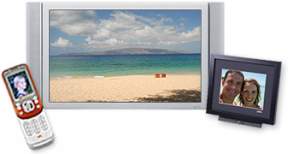
    View photos on your TV

    Take advantage of compatibility with Intel Viiv technology to show photos and slide shows on your TV (requires a Media Center PC).

    Share photos on mobile phones and handheld devices

    Easily download and edit photos from your mobile phone, and then send them to friends.

    Send personalized photo e-mails

    Send photos within a themed e-mail with captions and backgrounds that help you better tell your story. Photoshop Elements automatically optimizes your photos so they download quickly, look great, and wont overload your friends mailboxes.

    Animate photos for the web

    Liven up your website by turning photos into GIF animations that you can preview within Photoshop Elements.

    Create your own calendars, cards, and albums

    Create a years worth of memories

    Admire your photos throughout the year or create the perfect year-end gift by printing a custom wall calendar.

    Send a greeting card

    Celebrate any event with a personalized printed greeting card that features your own photo and message. Use themed templates or create your own.

    Assemble an album

    Create great-looking albums, ready to print. Just choose from a variety of themes and add your own captions.

    Enjoy flexible print options

    Make the most of your photo paper

    Quickly drop your photos into Picture Packages that let you print photos from your desktop printer in a variety of flexible layouts.

    Instantly add captions

    Add captions, dates, or other text to your print layouts with just a few clicks.

    Print contact sheets and labels

    Instantly print a contact sheet of your photos for future reference, or print sheets of labels using standard layouts.

    Easily find and view your photos and video clips

    Easily download and organize your photos

    Download instantly

    With a single click, transfer photos from your memory card to your computer according to preset preferences so you can get back to shooting sooner.

    Instantly organize by date

    Download photos from your camera and Photoshop Elements automatically puts them in the order you took them.

    Organize by time

    Organize photos more easily by automatically tagging groups of related photos according to the time they were taken.

    Automatically divide scanned photos

    Save time by scanning several photos at once. Photoshop Elements automatically divides, straightens, and saves each photo separately.

    Forget about renaming

    Youll never have to rename another file or folder, and you can organize your library the way you want so your photos are always at your fingertips.

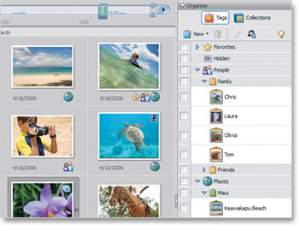
    Categorize by tagging

    Easily tag photos with keywords that represent favorite people, places, or events. You can instantly view every photo youve ever taken of Amy, for example, by simply clicking on her tag.

    Find every face

    Instantly find all of your photos that contain faces so you can tag photos of friends and family for easy sorting.

    Group photos into collections

    Place your family, work, or vacation photos into collections to keep them together for special projects.

    See every version

    Quickly find and view all the previously saved versions of a photo by simply clicking to expand its Version Set in the Organizer.

    View photos the way you want

    See all your photos and video clips in one place

    View your photos and video clips in one convenient location whether theyre stored on your hard drive or on CD automatically organized by date.

    View photos faster

    Scroll through your collection and view your photos faster, even when your library grows to 50,000 photos or more.

    Pick your best shot

    Zero in on the best of many similar photos while viewing them side by side using Photo Compare.

    View photos full screen

    Flip through photos in full-screen mode so its easy to rate your favorites, rotate them, and mark them for printing.

    Put your favorites on top

    Cut down on clutter by having Photoshop Elements automatically stack similar photos on top of one another.

    Know where your photos are

    Already created folders on your hard drive? Easily access your photos and add, delete, or move folders using the Folder View.

    Quickly find any photo

    Find photos from a special day

    Flip through photos taken on a special day using the convenient Date View. Browse by day, week, month, or year.

    View photos by time period

    View photos taken over a specific time period by clicking the intuitive Timeline.

    Search by metadata

    Quickly find and preview any photo, no matter where its stored, with expanded metadata search parameters, including f-stop, digital camera model, and exposure values.

    Pinpoint your search

    Complex searches are quick and easy with the power of keyword tags. Instantly find photos that show only Jack, but not Jack and Jill, for instance.

    Search by usage

    Find photos youve used in a slide show, sent as photo e-mail, put on a greeting card or calendar, or used any other way.

    Search for similar photos

    Automatically find photos that share common characteristics, such as color, shape, pattern, or composition.

    Archive photos for safekeeping

    Back up photos online

    Back up your photo collection online, on CD, or both with the integrated online backup service provided by one of the nations leading document security specialists.

    Back up and restore with ease

    Easily back up your entire photo library with no additional software required. Save time and disc space with multiple-session CD burning, which burns only the most recently added photos each time you back up. Built-in reminders notify you so you wont forget. And you can view the contents of your photo archive on any computer, whether or not it has Photoshop Elements software installed.

    System requirements

    Windows

    • Intel Pentium 4 or Intel Celeron (or compatible) 1.3GHz processor (dual-core processors and those with Hyper-Threading Technology supported)
    • Microsoft Windows Vista (32-bit only), Windows XP, or Windows Media Center Edition (XP and MCE require Service Pack 2)
    • Windows XP: 256MB of RAM (512MB recommended)
    • Windows Vista: 512MB of RAM (1GB recommended)
    • 1.5GB of available hard-disk space
    • Color monitor with 16-bit color video card
    • 1,024x768 monitor resolution at 96dpi or less
    • Display driver compatible with Microsoft DirectX 9 or later
    • CD-ROM drive
     
    Link contains in-depth information about this product Link contains a picture of this product    NA  
    03/07

    Adobe Premiere Elements 3 - Windows

    Bring your home videos to life

    Adobe Premiere Elements 3.0 software makes creating and sharing impressive home videos a snap. Burn your footage to DVD in two simple steps, complete with a DVD menu and scene index, or easily assemble your movie by rearranging clips with drag-and-drop simplicity. And share your movies on DVD, the web, mobile phones, and virtually anywhere else.

    Easily create home videos and DVDs

    Get started quickly

    Import from virtually any device

    Easily import video, audio, and still images from virtually any media device, including HDV and DVD camcorders, web cameras (WDM analog), MPEG-4 video recorders, and select mobile phones.

    Enjoy native HDV support

    Capture and edit HDV footage in its native format.

    Create DVDs in two steps

    Go from camera to DVD, complete with menu and scene index, in two easy steps.

    Save work in progress

    Easily transfer a project and all its media to another computer, or archive it to edit later.

    Easily create your video

    Easily assemble your video clips in the Sceneline

    Assemble your video faster in the Sceneline, a new alternative to the Timeline that lets you quickly drag and drop to rearrange thumbnails of your clips or add transitions and effects. Its as easy as making a photo slide show.

    Edit and preview in one convenient placethe Monitor window

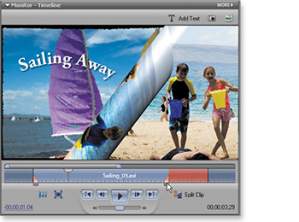
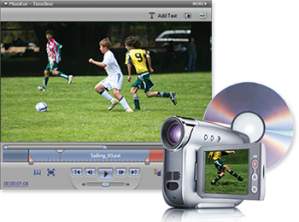
    Edit and view your movie in one convenient place, the Monitor window, where you can easily trim and split clips, drop filters and effects on a frame, create fun picture-in-picture effects, type text right on the screen, and preview in full screen.

    Have fun with stop-motion animation

    Try your hand at animation! Use Stop Motion Capture to create your own time-lapse movies, claymations, and other animations.

    View edits in real time

    Why wait? See edits and effects as you make them.

    Easily delete the bad stuff

    Easily delete unwanted scenes and the Timeline automatically adjusts for you.

    Enjoy full-screen previews

    Preview your movie full screen as you work with just the click of a button.

    Feel free to experiment

    Try anything! With Auto Save, multiple undos, and the History panel, you can always go back to a previous version.

    Fine-tune your audio

    Create a rich, full soundtrack for your video with Dolby Digital stereo, up to 99 audio tracks, and precise waveform controls.

    Work at professional speed

    Edit as fast as you can with support for multiple processors, advanced multi-threading technology, and Hyper-Threading Technology on the latest Intel Pentium based Windows XP systems.

    Be in complete control

    Take advantage of a flexible workspace

    Focus on telling your story with a flexible workspace that automatically resizes and adjusts to your needsno need to click around to open and close panels.

    Find tools at your fingertips

    No more searching! With the Properties panel, see the filters and effects youve applied to any frame so you can quickly reproduce or change them.

    Direct it all

    Move images, graphics, and text around the screen with advanced control over opacity, position, rotation, and scale.

    Zero in on your work

    Easily zoom in on details of your project, or zoom out for an overview of your entire timeline.

    Get help every step of the way

    See how its done

    Get coaching each step of the way with detailed how-to moviemaking guides.

    Learn more at your own pace

    Learn the ropes of moviemaking by visiting Adobe.com for free tutorials, helpful hints, and more.

    Wow your audience with amazing effects

    Add TV-style effects and transitions

    Add dazzling effects

    Choose from hundreds of amazing special effects that you can customize and use again.

    Use eye-catching transitions

    Creatively move from one scene to the next with hundreds of transitions, including dissolves, fades, and wipes. Even create your own.

    Sneak-preview effects

    Save time and eliminate guesswork by clicking thumbnails that let you preview effects and transitions before you apply them.

    Enhance with text, graphics, and audio

    Narrate your stories

    Tell the story in your own voice by adding narration to your video.

    Create terrific titles

    Choose from a set of world-class Adobe fonts designed to look good on video. Then add shadows, glows, and other effects to make them unique.

    Add artistic flair

    Make your video more dynamic with moving text and graphics. Use preset TV-style effects, or customize effects to create your own look.

    Credit your cast and crew

    Roll credits in more than 100 professionally designed templates.

    Set the mood with music

    Add your favorite music and easily edit your video to match the beat.

    Refine your audio

    Add emphasis to scenes by adjusting the volume of individual audio tracks and balancing the existing audio with background music.

    Share your videos anywhere

    Easily create dynamic, personalized DVDs

    Build dynamic, personalized DVD menus

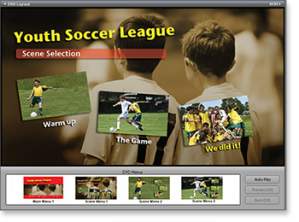
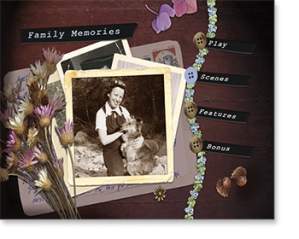
    Design custom DVD menus from scratch, or choose from dozens of menu templates that you can personalize with your own images and audio. Add moving backgrounds, move and resize buttons, edit text, and more.

    Save time with automatic scene indexes

    Automatically create scene indexes or chapters for your DVD menu with links that correspond to your video clips.

    Preview before you burn

    Make sure your movie is just as you envisioned it by watching a full-screen preview on your computeror by previewing it on your TVbefore burning to DVD.

    Burn your final video to DVD in a snap

    Fit hours of video on a single- or dual-layer DVD thats optimized for best results.

    Share your video in a variety of ways

    Share on the web

    Share your movie with family and friends on the web.

    Share on mobile phones and handheld devices

    Show your finished movies on virtually any handheld deviceincluding mobile phones, Apple iPods, and PSP (PlayStation Portable) systems.

    Play on VCRs

    Save your movie to VHS for playback on standard videocassette recorders.

    Show on any screen

    Create and see your video in traditional TV (4:3) or widescreen (16:9) format. A single click converts your video to NTSC or PAL for a worldwide audience.

    Get the highest quality possible

    Count on quality playback

    Let Adobe Premiere Elements automatically save your video on DVD at maximum quality for smooth, reliable playback.

    Enjoy rich Dolby Digital sound

    Give your audience high-quality sound by automatically converting audio to industry-standard Dolby Digital stereo. Dolby technology compresses your audio while maintaining high fidelity, allowing you to burn more video onto a single disc without sacrificing sound quality.

    System requirements

    Windows

    • Intel Pentium (or compatible) 1.3GHz processor with SSE2 support; 3GHz required for HDV
    • Microsoft Windows Vista (32-bit only), Windows XP, or Windows Media Center Edition (XP and MCE require Service Pack 2)
    • Windows Vista: 1GB of RAM; 2GB required for HDV
    • Windows XP and MCE: 512MB of RAM; 1GB required for HDV
    • 4.5GB of available hard-disk space
    • Color monitor with 16-bit color video card
    • 1,024x768 monitor resolution
    • Display and sound drivers compatible with Microsoft DirectX 9 or later
    • DVD-ROM drive (compatible DVD burner required to burn DVDs)
    • DV/i.LINK/FireWire/IEEE 1394 interface to connect a Digital 8 or DV camcorder, or a USB2 interface to connect a DV-via-USB-compatible DV camcorder (other video devices supported via the Media Downloader)

    Supported import/export formats include

    • MPEG-1, MPEG-2, MPEG-4, H.264, DV, AVI, Windows Media, QuickTime, JVC Everio MOD (import only), 3GP, ASF (import only), WAV, WMA (import only), Dolby Digital Stereo, PSD (import only), JPEG, PNG (import only), DVD
     
    Link contains in-depth information about this product Link contains a picture of this product    NA  
    Previous Page Next Page