Camerafarm product archive #39659
| Image |
Date |
Product description |
Price |
Buy |
|
01/08
|
Microsoft Expression Media 2 - Windows/Mac DVD - Upgrade
Microsoft Expression Media 2 Features
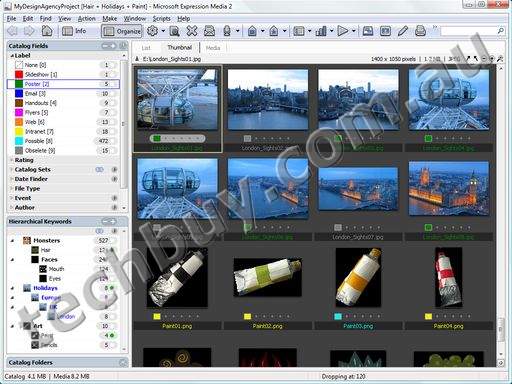
Catalog Media VisuallyExpression Media enables you to create visual databases of media, called catalogs, containing references of up to 128,000 files per catalog. Store your files anywhere: shared folders, CDs, hard drives, or DVDs, and use integrated search tools to can find them in secondsExpression Media will keep track of them all. 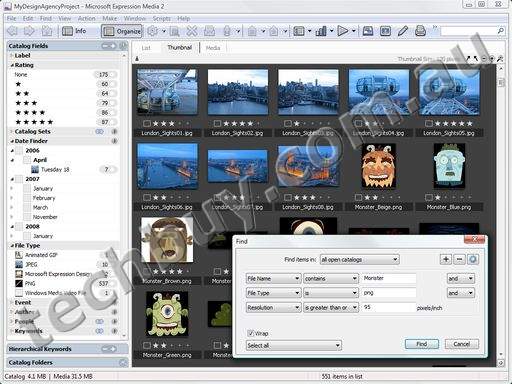
Offline WorkflowEven when your originals are offline, Expression Media's visual catalogs allow you to browse, search, and annotate your assets. 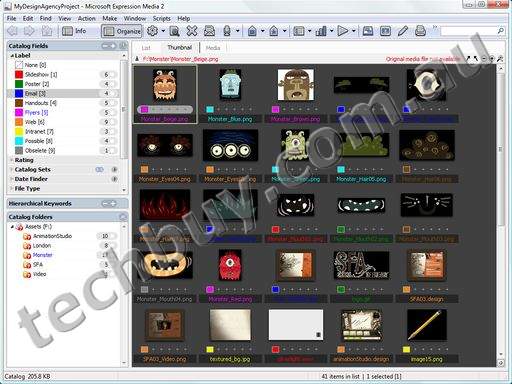
Organize Quickly
Drag-and-drop organizer allows you to quickly and easily import, organize, annotate and classify large volumes of your digital media files. Expression Media includes file system integration features, such as automatic synchronization and folder watching.
Browse and Play Media (100+ formats)
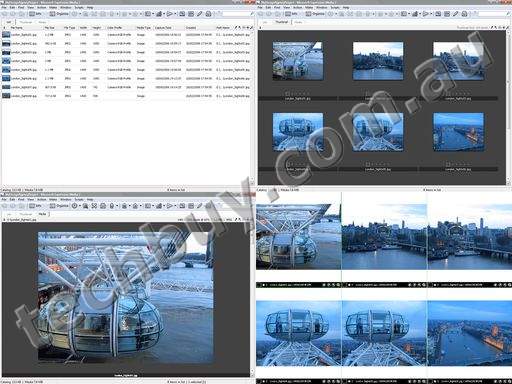
Five different views to review images, listen to music or watch movies: List, Thumbnail, Media, Lightbox and Slide Show. Search and sort media by any criteria and even rename media files and folders directly within Expression Media.
Review, Compare, Edit and Enhance
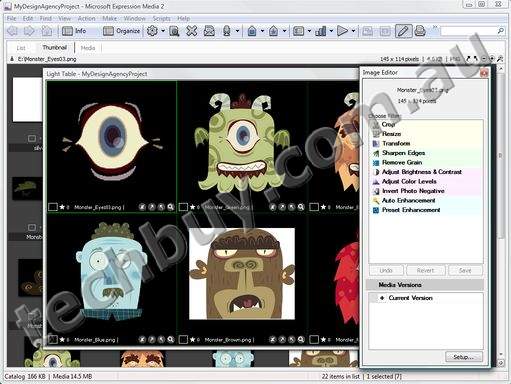
Select up to six files to compare side-by-side in full screen view. Built-in Image Editor provides a wide array of tools, from cropping and red-eye removal to creating duotones and adjusting color balance and several auto enhancements for quick and easy touch ups of your images. Includes support for built-in color profiles for greater color accuracy throughout the creative process.
Add and Edit MetadataExtract or create thumbnail and preview images from your digital files for quick visual cataloging. Import or export, add or edit metadata from those files for fast searching and sorting. Utilize industry standard metadata formats like EXIF, IPTC, and XMP for faultless interchange with other creative applications. 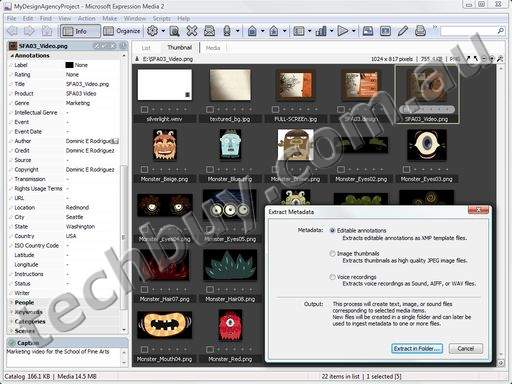
Print, Repurpose, and ConvertProduce high-quality contact sheets and prints of any size and layout. Easy WYSIWYG printing with annotations, grids, headers and footers. Perform single or batch conversions of images, movies and audio files to a variety of formats, including for use in Microsoft Silverlight experiences (Windows only feature). 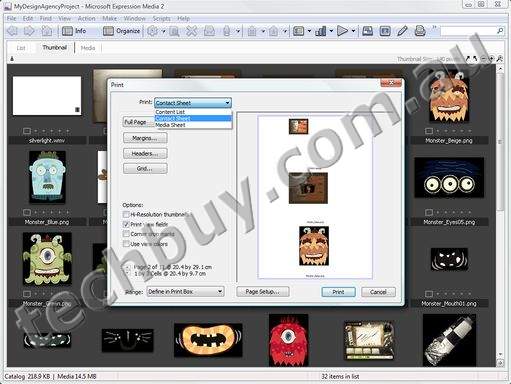
Present and SharePublish and distribute media with cross-platform slide shows, video, and Web galleries, or quickly export media into multiple formats for delivery to your client. Use professionally designed templates, or modify them to suit your own style with customized timings, grids, transitions and even enhanced audio playback for background soundtracks. Effortlessly distribute your catalogs for viewing by anyone with the freely-downloaded Expression Media Reader. 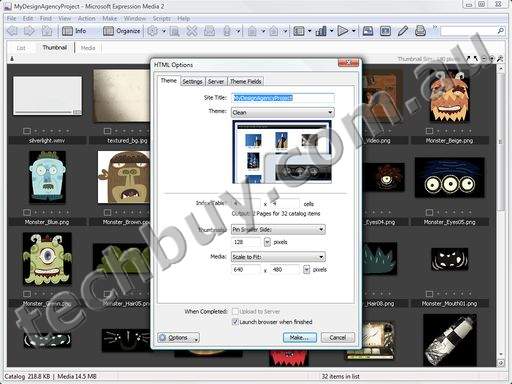
Archive and BackupArchive and backup all your prized digital media files, folders and catalogs to CD, DVD, hard disk or any mountable volume. 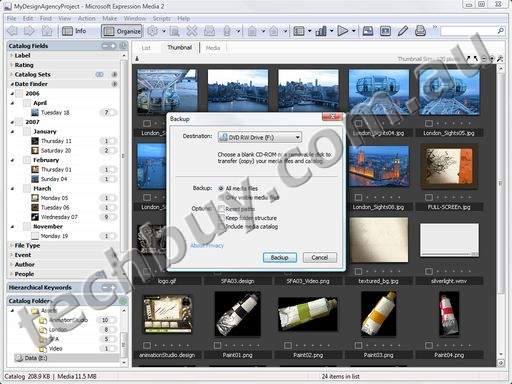
Automate Tasks and WorkflowNearly every feature can be batched making your workflow efficient and cost effective. The flexible, streamlined automation tools make organizing, editing, repurposing, distributing and archiving digital images nearly effortless. Expression Media also has rich scripting capabilities, and can also be easily integrated with third-party application and tools. 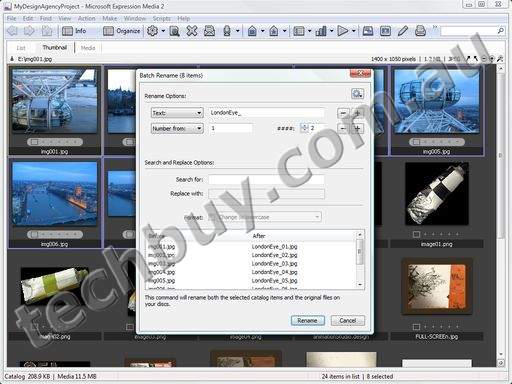
System Requirements
To use Microsoft Expression Media 2, you need:
Microsoft Windows based PCs
- Microsoft Windows XP with Service Pack 2 or Windows Vista operating system
- PC with 1 GHz or faster processor
- 1 GB of RAM or more
- 100 MB of available hard-disk space
- Support for Microsoft DirectX 9.0 graphics with Windows Vista Display Driver Model (WDDM) Driver, 128 MB of graphics RAM or more, Pixel Shader 2.0 in hardware, 32-bits per pixel
- Windows Imaging Components (WIC) is required. Some WIC codecs are from third parties and may have unique system requirements. Some WIC codecs may not be available for Windows XP or 64-bit version of Windows operating systems
- DVD-Rom drive
- 1024 x 768 or higher--resolution monitor with 24-bit color
- Some product features require Adobe Reader 7.0 or later, and Apple QuickTime 7.3.1 or later
- Internet functionality requires Internet access (additional fees may apply)
- Actual requirements and product functionality may vary based on your system configuration and operating system.
Apple Macintosh computers
To use Microsoft Expression Media 2 with Apple Macintosh computers, you need:
- Mac OS X version 10.4 or later
- PowerPC or Intel processor
- 512 MB of RAM or more
- 100 MB of available hard disk space
- Monitor set to Millions of Colors
- Apple QuickTime 7.3.1 or later
- Internet functionality requires Internet access (additional fees may apply)
- Actual requirements and product functionality may vary based on your system configuration and operating system
|


|
|
|
01/08
|
Microsoft Expression Media 2 - Windows/Mac DVD
Microsoft Expression Media 2 Features
Catalog Media VisuallyExpression Media enables you to create visual databases of media, called catalogs, containing references of up to 128,000 files per catalog. Store your files anywhere: shared folders, CDs, hard drives, or DVDs, and use integrated search tools to can find them in secondsExpression Media will keep track of them all.
Offline WorkflowEven when your originals are offline, Expression Media's visual catalogs allow you to browse, search, and annotate your assets.
Organize Quickly
Drag-and-drop organizer allows you to quickly and easily import, organize, annotate and classify large volumes of your digital media files. Expression Media includes file system integration features, such as automatic synchronization and folder watching.
Browse and Play Media (100+ formats)
Five different views to review images, listen to music or watch movies: List, Thumbnail, Media, Lightbox and Slide Show. Search and sort media by any criteria and even rename media files and folders directly within Expression Media.
Review, Compare, Edit and Enhance
Select up to six files to compare side-by-side in full screen view. Built-in Image Editor provides a wide array of tools, from cropping and red-eye removal to creating duotones and adjusting color balance and several auto enhancements for quick and easy touch ups of your images. Includes support for built-in color profiles for greater color accuracy throughout the creative process.
Add and Edit MetadataExtract or create thumbnail and preview images from your digital files for quick visual cataloging. Import or export, add or edit metadata from those files for fast searching and sorting. Utilize industry standard metadata formats like EXIF, IPTC, and XMP for faultless interchange with other creative applications.
Print, Repurpose, and ConvertProduce high-quality contact sheets and prints of any size and layout. Easy WYSIWYG printing with annotations, grids, headers and footers. Perform single or batch conversions of images, movies and audio files to a variety of formats, including for use in Microsoft Silverlight experiences (Windows only feature).
Present and SharePublish and distribute media with cross-platform slide shows, video, and Web galleries, or quickly export media into multiple formats for delivery to your client. Use professionally designed templates, or modify them to suit your own style with customized timings, grids, transitions and even enhanced audio playback for background soundtracks. Effortlessly distribute your catalogs for viewing by anyone with the freely-downloaded Expression Media Reader.
Archive and BackupArchive and backup all your prized digital media files, folders and catalogs to CD, DVD, hard disk or any mountable volume.
Automate Tasks and WorkflowNearly every feature can be batched making your workflow efficient and cost effective. The flexible, streamlined automation tools make organizing, editing, repurposing, distributing and archiving digital images nearly effortless. Expression Media also has rich scripting capabilities, and can also be easily integrated with third-party application and tools.
System Requirements
To use Microsoft Expression Media 2, you need:
Microsoft Windows based PCs
- Microsoft Windows XP with Service Pack 2 or Windows Vista operating system
- PC with 1 GHz or faster processor
- 1 GB of RAM or more
- 100 MB of available hard-disk space
- Support for Microsoft DirectX 9.0 graphics with Windows Vista Display Driver Model (WDDM) Driver, 128 MB of graphics RAM or more, Pixel Shader 2.0 in hardware, 32-bits per pixel
- Windows Imaging Components (WIC) is required. Some WIC codecs are from third parties and may have unique system requirements. Some WIC codecs may not be available for Windows XP or 64-bit version of Windows operating systems
- DVD-Rom drive
- 1024 x 768 or higher--resolution monitor with 24-bit color
- Some product features require Adobe Reader 7.0 or later, and Apple QuickTime 7.3.1 or later
- Internet functionality requires Internet access (additional fees may apply)
- Actual requirements and product functionality may vary based on your system configuration and operating system.
Apple Macintosh computers
To use Microsoft Expression Media 2 with Apple Macintosh computers, you need:
- Mac OS X version 10.4 or later
- PowerPC or Intel processor
- 512 MB of RAM or more
- 100 MB of available hard disk space
- Monitor set to Millions of Colors
- Apple QuickTime 7.3.1 or later
- Internet functionality requires Internet access (additional fees may apply)
- Actual requirements and product functionality may vary based on your system configuration and operating system
|
|
|
|
01/08
|
Microsoft Expression Media 2 - Windows/Mac DVD - Academic Edition
Microsoft Expression Media 2 Features
Catalog Media VisuallyExpression Media enables you to create visual databases of media, called catalogs, containing references of up to 128,000 files per catalog. Store your files anywhere: shared folders, CDs, hard drives, or DVDs, and use integrated search tools to can find them in secondsExpression Media will keep track of them all.
Offline WorkflowEven when your originals are offline, Expression Media's visual catalogs allow you to browse, search, and annotate your assets.
Organize Quickly
Drag-and-drop organizer allows you to quickly and easily import, organize, annotate and classify large volumes of your digital media files. Expression Media includes file system integration features, such as automatic synchronization and folder watching.
Browse and Play Media (100+ formats)
Five different views to review images, listen to music or watch movies: List, Thumbnail, Media, Lightbox and Slide Show. Search and sort media by any criteria and even rename media files and folders directly within Expression Media.
Review, Compare, Edit and Enhance
Select up to six files to compare side-by-side in full screen view. Built-in Image Editor provides a wide array of tools, from cropping and red-eye removal to creating duotones and adjusting color balance and several auto enhancements for quick and easy touch ups of your images. Includes support for built-in color profiles for greater color accuracy throughout the creative process.
Add and Edit MetadataExtract or create thumbnail and preview images from your digital files for quick visual cataloging. Import or export, add or edit metadata from those files for fast searching and sorting. Utilize industry standard metadata formats like EXIF, IPTC, and XMP for faultless interchange with other creative applications.
Print, Repurpose, and ConvertProduce high-quality contact sheets and prints of any size and layout. Easy WYSIWYG printing with annotations, grids, headers and footers. Perform single or batch conversions of images, movies and audio files to a variety of formats, including for use in Microsoft Silverlight experiences (Windows only feature).
Present and SharePublish and distribute media with cross-platform slide shows, video, and Web galleries, or quickly export media into multiple formats for delivery to your client. Use professionally designed templates, or modify them to suit your own style with customized timings, grids, transitions and even enhanced audio playback for background soundtracks. Effortlessly distribute your catalogs for viewing by anyone with the freely-downloaded Expression Media Reader.
Archive and BackupArchive and backup all your prized digital media files, folders and catalogs to CD, DVD, hard disk or any mountable volume.
Automate Tasks and WorkflowNearly every feature can be batched making your workflow efficient and cost effective. The flexible, streamlined automation tools make organizing, editing, repurposing, distributing and archiving digital images nearly effortless. Expression Media also has rich scripting capabilities, and can also be easily integrated with third-party application and tools.
System Requirements
To use Microsoft Expression Media 2, you need:
Microsoft Windows based PCs
- Microsoft Windows XP with Service Pack 2 or Windows Vista operating system
- PC with 1 GHz or faster processor
- 1 GB of RAM or more
- 100 MB of available hard-disk space
- Support for Microsoft DirectX 9.0 graphics with Windows Vista Display Driver Model (WDDM) Driver, 128 MB of graphics RAM or more, Pixel Shader 2.0 in hardware, 32-bits per pixel
- Windows Imaging Components (WIC) is required. Some WIC codecs are from third parties and may have unique system requirements. Some WIC codecs may not be available for Windows XP or 64-bit version of Windows operating systems
- DVD-Rom drive
- 1024 x 768 or higher--resolution monitor with 24-bit color
- Some product features require Adobe Reader 7.0 or later, and Apple QuickTime 7.3.1 or later
- Internet functionality requires Internet access (additional fees may apply)
- Actual requirements and product functionality may vary based on your system configuration and operating system.
Apple Macintosh computers
To use Microsoft Expression Media 2 with Apple Macintosh computers, you need:
- Mac OS X version 10.4 or later
- PowerPC or Intel processor
- 512 MB of RAM or more
- 100 MB of available hard disk space
- Monitor set to Millions of Colors
- Apple QuickTime 7.3.1 or later
- Internet functionality requires Internet access (additional fees may apply)
- Actual requirements and product functionality may vary based on your system configuration and operating system
|
|
|
|
01/08
|
Microsoft Expression Blend 2 - Windows DVD - Upgrade
Microsoft Expression Blend 2 Features
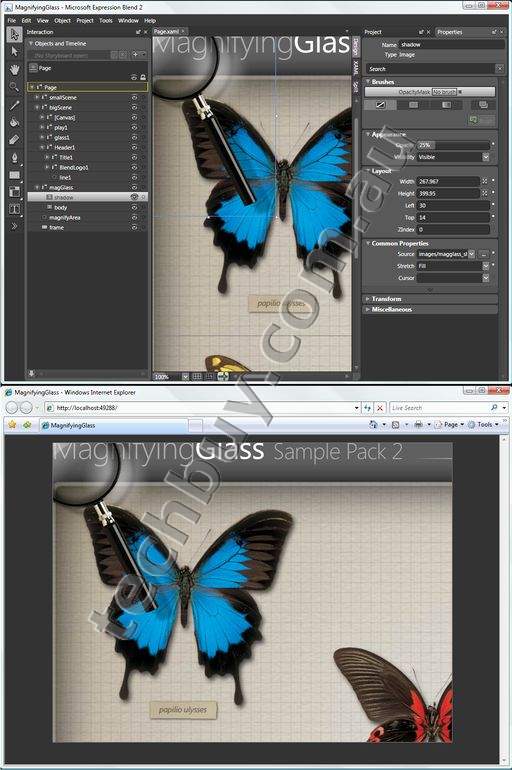
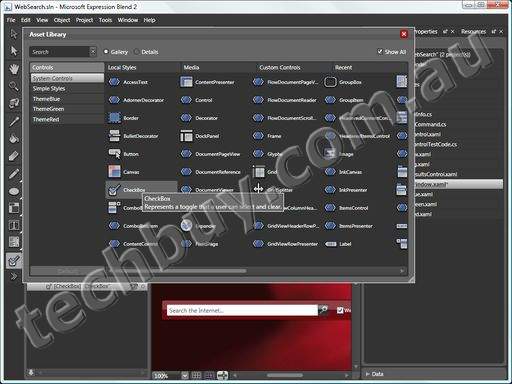
Modern InterfaceEnjoy Expression Blend's uniquely scalable, design oriented interface built using the Windows Presentation Foundation (WPF) and concentrate on the process of design instead of digging through nested menus and rearranging floating palettes that are always in the way. Expression Blend's interface maximizes the space for your work and includes features such as a dynamically filterable Properties panel to help you find what you're looking for instantly. 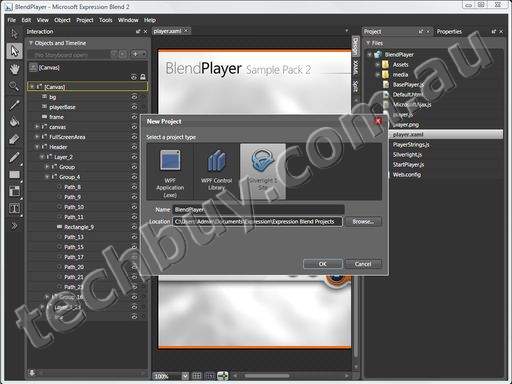
Design for Desktop and Web
Leverage the full power of WPF on the desktop and Silverlight on the internet to provide your audience with big-impact, high-performance user experiences that drive brand recognition and repeat use.
WYSIWYG Design Surface
Composite your vector and bitmap artwork, video, audio, rich text, controls, and containers, and create custom vector elements using sophisticated layout and snapping tools with real-time feedback. Make immediate creative decisions based on live previews of interface elements including those dynamically bound to each other or to external data sources.
Over 30 Controls and Containers
Add standard controls such as buttons, scroll bars, list boxes, menus, radio buttons, and checkboxes-or composite multiple control elements together to form compound controls. Expand your interface by including advanced controls and layout functions, such as ready-made gridsplitters, ink canvases, treeviews, expanders, sliders, rich text boxes, tab controls, and toolbars. Design adaptive layouts using containers that automatically handle scaling and re-positioning of content and controls. (Desktop only)
Professional TimelineExpression Blend has a world-class timeline that is based on time instead of abstract frames. Animate individual properties of objects along one or more timelines by setting property keyframes, using onscreen motion path editing for precise trajectory control. 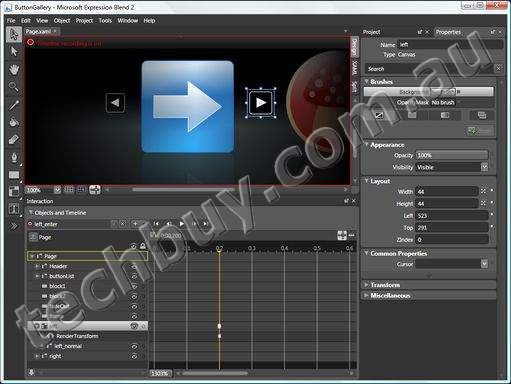
Styling and CustomizationExpression Blend includes versions of the standard Windows controls that are easy to visually style and customize enabling applications that are a perfect fit for their purpose. Add animation, graphics, 3D, and video as design elements to any control, including interactive, state-based effects. Define your own reusable custom styles or apply standard Windows themes then drag and drop to reuse your styles and templates across screens and projects. 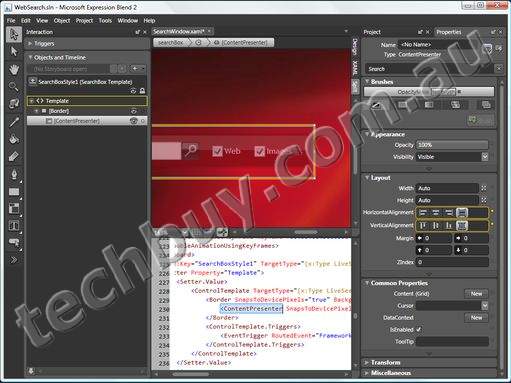
True 3DImport geometry from leading 3D authoring tools, or create models directly in Expression Blend. Then easily manipulate and animate in true 3D, using camera position, surface materials, z-space animation, and surface texture mapping. (Desktop only) 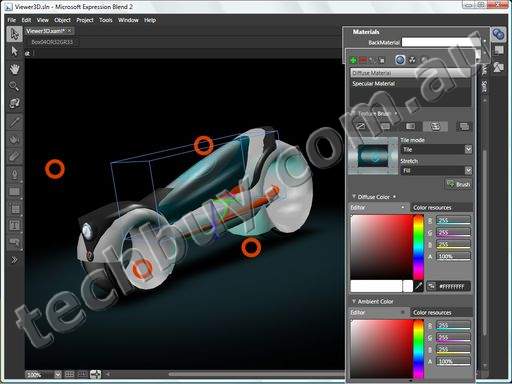
DatabindingBind your interface elements to each other, to user input, or to data from Web services and .NET objects, so that your interface updates dynamically and your application comes to life even before writing code. (Desktop only) 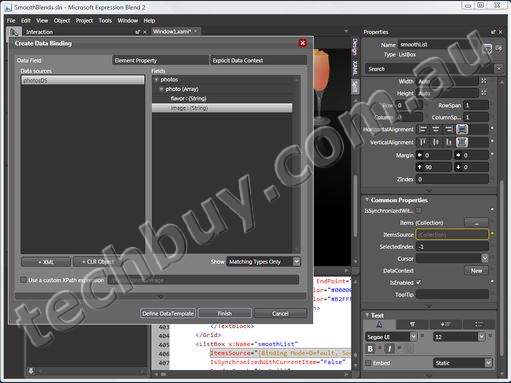
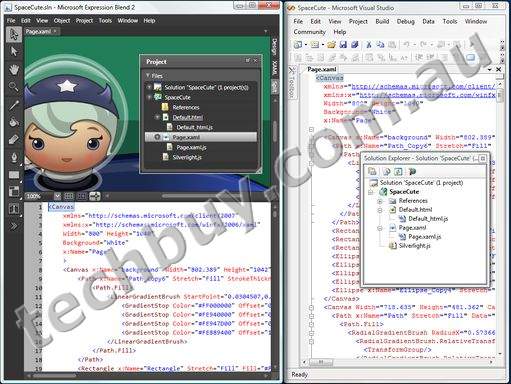
XAMLDirectly edit XAML code in either code or split view complete with colored syntax highlighting. All changes on the design surface are directly reflected in the code view and vice versa so you maintain total control of the details of your design. 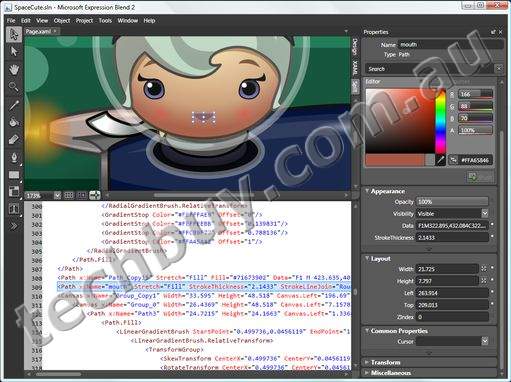
Visual Studio IntegrationProductivity is enhanced by seamlessly sharing projects, Silverlight, WPF, as well as in-progress XAML designs with Visual Studio. This enables designers and developers to quickly build and test iterative revisions of the application's functionality and design, as well as allowing enhanced development capabilities - debugging, Web services design, and enterprise application lifecycle management, without impacting your design freedom. 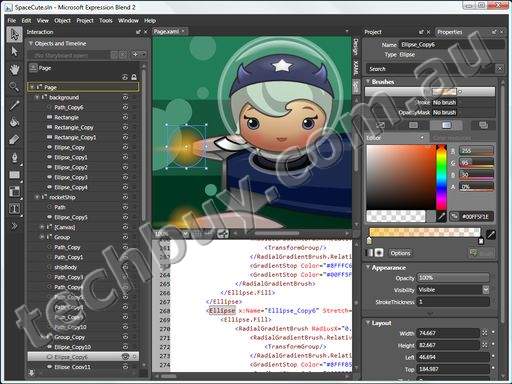
System Requirements
To use Microsoft Expression Blend 2, you need:
- Microsoft Windows XP with Service Pack 2 or Windows Vista operating system
- PC with 1 GHz or faster processor
- 512 MB of RAM or more
- 350 MB of available hard-disk space
- Support for Microsoft DirectX 9.0 graphics with Windows Vista Display Driver Model (WDDM) Driver, 128 MB of graphics RAM or more, Pixel Shader 2.0 in hardware, 32-bits per pixel
- DVD-ROM drive
- 1024 x 768 or higher-resolution monitor with 24-bit color
- Actual requirements and product functionality may vary based on your system configuration and operating system.
|
|
|
|
01/08
|
Microsoft Expression Blend 2 - Windows DVD
Microsoft Expression Blend 2 Features
Modern InterfaceEnjoy Expression Blend's uniquely scalable, design oriented interface built using the Windows Presentation Foundation (WPF) and concentrate on the process of design instead of digging through nested menus and rearranging floating palettes that are always in the way. Expression Blend's interface maximizes the space for your work and includes features such as a dynamically filterable Properties panel to help you find what you're looking for instantly.
Design for Desktop and Web
Leverage the full power of WPF on the desktop and Silverlight on the internet to provide your audience with big-impact, high-performance user experiences that drive brand recognition and repeat use.
WYSIWYG Design Surface
Composite your vector and bitmap artwork, video, audio, rich text, controls, and containers, and create custom vector elements using sophisticated layout and snapping tools with real-time feedback. Make immediate creative decisions based on live previews of interface elements including those dynamically bound to each other or to external data sources.
Over 30 Controls and Containers
Add standard controls such as buttons, scroll bars, list boxes, menus, radio buttons, and checkboxes-or composite multiple control elements together to form compound controls. Expand your interface by including advanced controls and layout functions, such as ready-made gridsplitters, ink canvases, treeviews, expanders, sliders, rich text boxes, tab controls, and toolbars. Design adaptive layouts using containers that automatically handle scaling and re-positioning of content and controls. (Desktop only)
Professional TimelineExpression Blend has a world-class timeline that is based on time instead of abstract frames. Animate individual properties of objects along one or more timelines by setting property keyframes, using onscreen motion path editing for precise trajectory control.
Styling and CustomizationExpression Blend includes versions of the standard Windows controls that are easy to visually style and customize enabling applications that are a perfect fit for their purpose. Add animation, graphics, 3D, and video as design elements to any control, including interactive, state-based effects. Define your own reusable custom styles or apply standard Windows themes then drag and drop to reuse your styles and templates across screens and projects.
True 3DImport geometry from leading 3D authoring tools, or create models directly in Expression Blend. Then easily manipulate and animate in true 3D, using camera position, surface materials, z-space animation, and surface texture mapping. (Desktop only)
DatabindingBind your interface elements to each other, to user input, or to data from Web services and .NET objects, so that your interface updates dynamically and your application comes to life even before writing code. (Desktop only)
XAMLDirectly edit XAML code in either code or split view complete with colored syntax highlighting. All changes on the design surface are directly reflected in the code view and vice versa so you maintain total control of the details of your design.
Visual Studio IntegrationProductivity is enhanced by seamlessly sharing projects, Silverlight, WPF, as well as in-progress XAML designs with Visual Studio. This enables designers and developers to quickly build and test iterative revisions of the application's functionality and design, as well as allowing enhanced development capabilities - debugging, Web services design, and enterprise application lifecycle management, without impacting your design freedom.
System Requirements
To use Microsoft Expression Blend 2, you need:
- Microsoft Windows XP with Service Pack 2 or Windows Vista operating system
- PC with 1 GHz or faster processor
- 512 MB of RAM or more
- 350 MB of available hard-disk space
- Support for Microsoft DirectX 9.0 graphics with Windows Vista Display Driver Model (WDDM) Driver, 128 MB of graphics RAM or more, Pixel Shader 2.0 in hardware, 32-bits per pixel
- DVD-ROM drive
- 1024 x 768 or higher-resolution monitor with 24-bit color
- Actual requirements and product functionality may vary based on your system configuration and operating system.
|
|
|
|
01/08
|
Microsoft Expression Blend 2 - Windows DVD - Academic Edition
Microsoft Expression Blend 2 Features
Modern InterfaceEnjoy Expression Blend's uniquely scalable, design oriented interface built using the Windows Presentation Foundation (WPF) and concentrate on the process of design instead of digging through nested menus and rearranging floating palettes that are always in the way. Expression Blend's interface maximizes the space for your work and includes features such as a dynamically filterable Properties panel to help you find what you're looking for instantly.
Design for Desktop and Web
Leverage the full power of WPF on the desktop and Silverlight on the internet to provide your audience with big-impact, high-performance user experiences that drive brand recognition and repeat use.
WYSIWYG Design Surface
Composite your vector and bitmap artwork, video, audio, rich text, controls, and containers, and create custom vector elements using sophisticated layout and snapping tools with real-time feedback. Make immediate creative decisions based on live previews of interface elements including those dynamically bound to each other or to external data sources.
Over 30 Controls and Containers
Add standard controls such as buttons, scroll bars, list boxes, menus, radio buttons, and checkboxes-or composite multiple control elements together to form compound controls. Expand your interface by including advanced controls and layout functions, such as ready-made gridsplitters, ink canvases, treeviews, expanders, sliders, rich text boxes, tab controls, and toolbars. Design adaptive layouts using containers that automatically handle scaling and re-positioning of content and controls. (Desktop only)
Professional TimelineExpression Blend has a world-class timeline that is based on time instead of abstract frames. Animate individual properties of objects along one or more timelines by setting property keyframes, using onscreen motion path editing for precise trajectory control.
Styling and CustomizationExpression Blend includes versions of the standard Windows controls that are easy to visually style and customize enabling applications that are a perfect fit for their purpose. Add animation, graphics, 3D, and video as design elements to any control, including interactive, state-based effects. Define your own reusable custom styles or apply standard Windows themes then drag and drop to reuse your styles and templates across screens and projects.
True 3DImport geometry from leading 3D authoring tools, or create models directly in Expression Blend. Then easily manipulate and animate in true 3D, using camera position, surface materials, z-space animation, and surface texture mapping. (Desktop only)
DatabindingBind your interface elements to each other, to user input, or to data from Web services and .NET objects, so that your interface updates dynamically and your application comes to life even before writing code. (Desktop only)
XAMLDirectly edit XAML code in either code or split view complete with colored syntax highlighting. All changes on the design surface are directly reflected in the code view and vice versa so you maintain total control of the details of your design.
Visual Studio IntegrationProductivity is enhanced by seamlessly sharing projects, Silverlight, WPF, as well as in-progress XAML designs with Visual Studio. This enables designers and developers to quickly build and test iterative revisions of the application's functionality and design, as well as allowing enhanced development capabilities - debugging, Web services design, and enterprise application lifecycle management, without impacting your design freedom.
System Requirements
To use Microsoft Expression Blend 2, you need:
- Microsoft Windows XP with Service Pack 2 or Windows Vista operating system
- PC with 1 GHz or faster processor
- 512 MB of RAM or more
- 350 MB of available hard-disk space
- Support for Microsoft DirectX 9.0 graphics with Windows Vista Display Driver Model (WDDM) Driver, 128 MB of graphics RAM or more, Pixel Shader 2.0 in hardware, 32-bits per pixel
- DVD-ROM drive
- 1024 x 768 or higher-resolution monitor with 24-bit color
- Actual requirements and product functionality may vary based on your system configuration and operating system.
|
|
|
|
01/08
|
Microsoft Expression Encoder 2 - Windows DVD - Upgrade
Microsoft Expression Encoder 2 Features
Fastest Path to SilverlightWith more than a dozen built in Silverlight media player templates, Expression Encoder offers the fastest way to publish media assets to the web in a Silverlight experience. Add a custom publishing plug-in to deliver finished content directly to your server or service. 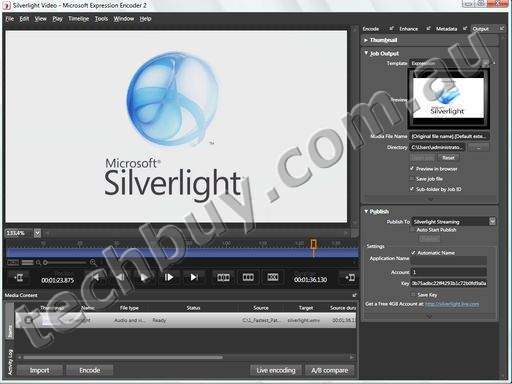
Cuts EditingMake simple edits to clips directly in Expression Encoder. Cut out setup noise, mistakes or surprises from your video. 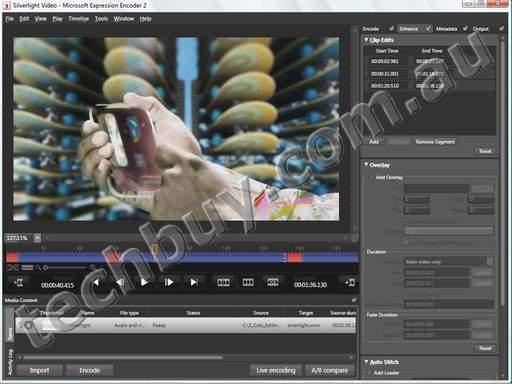
VC-1 QualityVC-1 is a SMPTE (Society of Motion Picture and Television Engineers) standard codec that is a part of both HD-DVD and Blu-ray high definition optical disc specifications. Expression Encoder v2 supports the newest VC-1 encoder features offering greater control, higher quality and multi-core, multi-processor performance improvements for your Silverlight media experiences. 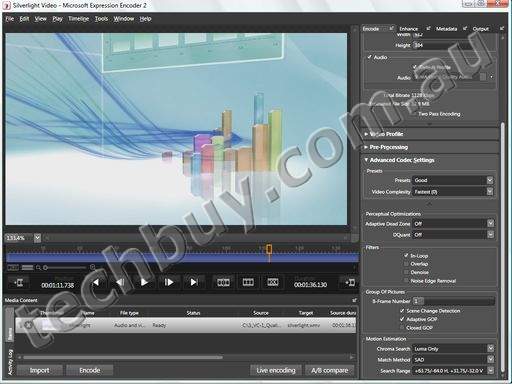
LIVE!Live events offer a great way to deliver news, marketing or demo content to your customers in real-time. Expression Encoder offers simple setup and easy to use switching interface for mixing live and file-based content in your live production. 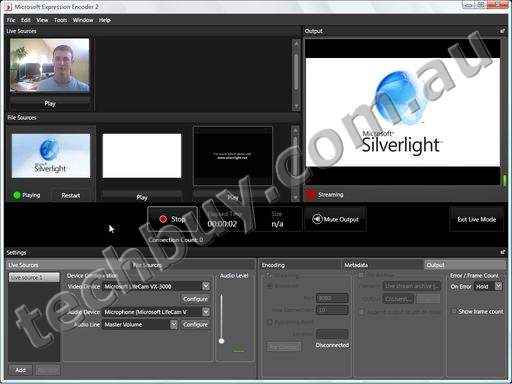
Encoding for EveryoneEncoding has traditionally been a specialist's task. Finished video projects were thrown over a wall to a compression expert, using a specialized application to fine tune media for final delivery. Expression Encoder provides an artist friendly user interface and easy to use presets to enable everyone in the media production workflow to encode consistent, high-quality Silverlight experiences. 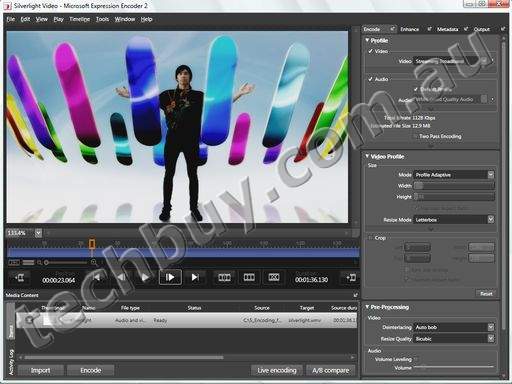
Flexible File Import SupportImport files from the content creation application of your choice. AVI, QuickTime, MPEG and any codec with a DirectShow decoder can be imported into Expression Encoder and output as a WMV, ready for Silverlight. 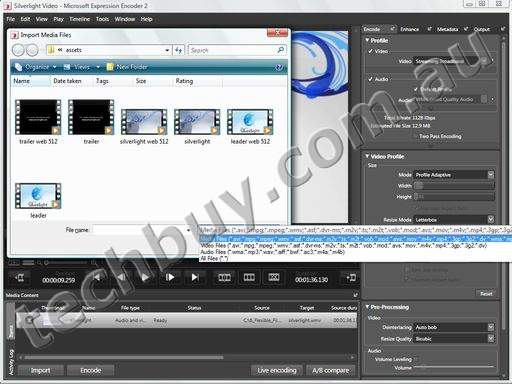
Intelligent EncodingImport existing WMV content, make edits and add fades. Expression Encoder will identify changes to the source file and only re-encode the modified sections of the file and not the entire clip, saving time and maintaining compression quality. 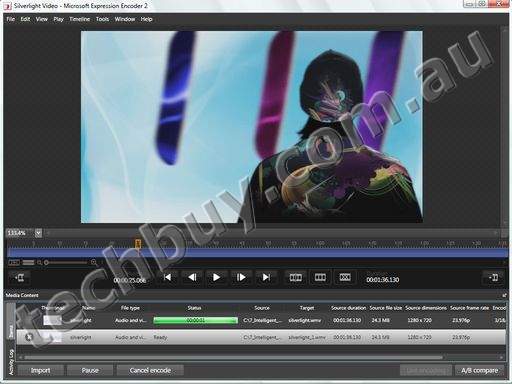
Mark Your MediaWatermark videos with still or animated overlays to define ownership or branding on viral videos. Add pre-roll advertising or legal disclaimers at the beginning and end of your video for total control of the viewing experience. 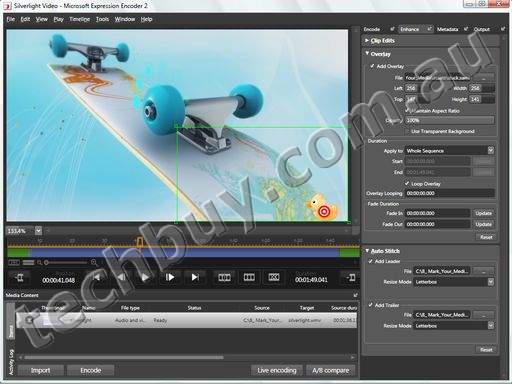
ControlUse the new Expression Encoder Object Model to access our encoding engine from other applications or processes. Use job presets to save multiple settings in an encoding job and apply these settings as a batch process via the Object Model or the command line.
Expression Media IntegrationUse the powerful asset management tools to find and preview video and audio clips in Expression Media and then drag and drop the right clips to Expression Encoder for final output. 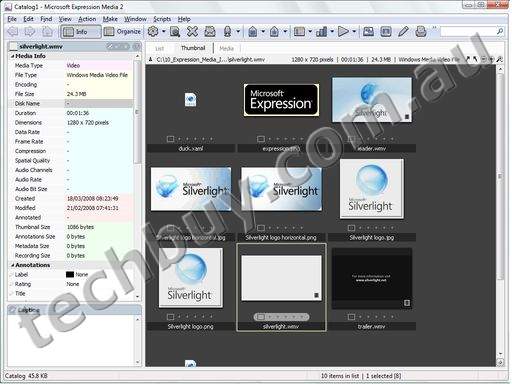
System Requirements
To use Microsoft Expression Encoder 2, you need:
- Microsoft Windows XP with Service Pack 2 or Windows Vista operating system
- PC with 1 GHz or faster processor
- 1 GB of RAM or more
- 1 GB of available hard-disk space
- Support for Microsoft DirectX 9.0 graphics with Windows Vista Display Driver Model (WDDM) Driver, 128 MB of graphics RAM or more, Pixel Shader 2.0 in hardware, 32-bits per pixel
- DVD-ROM drive
- 1024 x 768 or higher-resolution monitor with 24-bit color
- Internet functionality requires Internet access (additional fees may apply)
- Actual requirements and product functionality may vary based on your system configuration and operating system.
|
|
|
|
01/08
|
Microsoft Expression Encoder 2 - Windows DVD
Microsoft Expression Encoder 2 Features
Fastest Path to SilverlightWith more than a dozen built in Silverlight media player templates, Expression Encoder offers the fastest way to publish media assets to the web in a Silverlight experience. Add a custom publishing plug-in to deliver finished content directly to your server or service.
Cuts EditingMake simple edits to clips directly in Expression Encoder. Cut out setup noise, mistakes or surprises from your video.
VC-1 QualityVC-1 is a SMPTE (Society of Motion Picture and Television Engineers) standard codec that is a part of both HD-DVD and Blu-ray high definition optical disc specifications. Expression Encoder v2 supports the newest VC-1 encoder features offering greater control, higher quality and multi-core, multi-processor performance improvements for your Silverlight media experiences.
LIVE!Live events offer a great way to deliver news, marketing or demo content to your customers in real-time. Expression Encoder offers simple setup and easy to use switching interface for mixing live and file-based content in your live production.
Encoding for EveryoneEncoding has traditionally been a specialist's task. Finished video projects were thrown over a wall to a compression expert, using a specialized application to fine tune media for final delivery. Expression Encoder provides an artist friendly user interface and easy to use presets to enable everyone in the media production workflow to encode consistent, high-quality Silverlight experiences.
Flexible File Import SupportImport files from the content creation application of your choice. AVI, QuickTime, MPEG and any codec with a DirectShow decoder can be imported into Expression Encoder and output as a WMV, ready for Silverlight.
Intelligent EncodingImport existing WMV content, make edits and add fades. Expression Encoder will identify changes to the source file and only re-encode the modified sections of the file and not the entire clip, saving time and maintaining compression quality.
Mark Your MediaWatermark videos with still or animated overlays to define ownership or branding on viral videos. Add pre-roll advertising or legal disclaimers at the beginning and end of your video for total control of the viewing experience.
ControlUse the new Expression Encoder Object Model to access our encoding engine from other applications or processes. Use job presets to save multiple settings in an encoding job and apply these settings as a batch process via the Object Model or the command line.
Expression Media IntegrationUse the powerful asset management tools to find and preview video and audio clips in Expression Media and then drag and drop the right clips to Expression Encoder for final output.
System Requirements
To use Microsoft Expression Encoder 2, you need:
- Microsoft Windows XP with Service Pack 2 or Windows Vista operating system
- PC with 1 GHz or faster processor
- 1 GB of RAM or more
- 1 GB of available hard-disk space
- Support for Microsoft DirectX 9.0 graphics with Windows Vista Display Driver Model (WDDM) Driver, 128 MB of graphics RAM or more, Pixel Shader 2.0 in hardware, 32-bits per pixel
- DVD-ROM drive
- 1024 x 768 or higher-resolution monitor with 24-bit color
- Internet functionality requires Internet access (additional fees may apply)
- Actual requirements and product functionality may vary based on your system configuration and operating system.
|
|
|
|
01/08
|
Microsoft Expression Encoder 2 - Windows DVD - Academic Edition
Microsoft Expression Encoder 2 Features
Fastest Path to SilverlightWith more than a dozen built in Silverlight media player templates, Expression Encoder offers the fastest way to publish media assets to the web in a Silverlight experience. Add a custom publishing plug-in to deliver finished content directly to your server or service.
Cuts EditingMake simple edits to clips directly in Expression Encoder. Cut out setup noise, mistakes or surprises from your video.
VC-1 QualityVC-1 is a SMPTE (Society of Motion Picture and Television Engineers) standard codec that is a part of both HD-DVD and Blu-ray high definition optical disc specifications. Expression Encoder v2 supports the newest VC-1 encoder features offering greater control, higher quality and multi-core, multi-processor performance improvements for your Silverlight media experiences.
LIVE!Live events offer a great way to deliver news, marketing or demo content to your customers in real-time. Expression Encoder offers simple setup and easy to use switching interface for mixing live and file-based content in your live production.
Encoding for EveryoneEncoding has traditionally been a specialist's task. Finished video projects were thrown over a wall to a compression expert, using a specialized application to fine tune media for final delivery. Expression Encoder provides an artist friendly user interface and easy to use presets to enable everyone in the media production workflow to encode consistent, high-quality Silverlight experiences.
Flexible File Import SupportImport files from the content creation application of your choice. AVI, QuickTime, MPEG and any codec with a DirectShow decoder can be imported into Expression Encoder and output as a WMV, ready for Silverlight.
Intelligent EncodingImport existing WMV content, make edits and add fades. Expression Encoder will identify changes to the source file and only re-encode the modified sections of the file and not the entire clip, saving time and maintaining compression quality.
Mark Your MediaWatermark videos with still or animated overlays to define ownership or branding on viral videos. Add pre-roll advertising or legal disclaimers at the beginning and end of your video for total control of the viewing experience.
ControlUse the new Expression Encoder Object Model to access our encoding engine from other applications or processes. Use job presets to save multiple settings in an encoding job and apply these settings as a batch process via the Object Model or the command line.
Expression Media IntegrationUse the powerful asset management tools to find and preview video and audio clips in Expression Media and then drag and drop the right clips to Expression Encoder for final output.
System Requirements
To use Microsoft Expression Encoder 2, you need:
- Microsoft Windows XP with Service Pack 2 or Windows Vista operating system
- PC with 1 GHz or faster processor
- 1 GB of RAM or more
- 1 GB of available hard-disk space
- Support for Microsoft DirectX 9.0 graphics with Windows Vista Display Driver Model (WDDM) Driver, 128 MB of graphics RAM or more, Pixel Shader 2.0 in hardware, 32-bits per pixel
- DVD-ROM drive
- 1024 x 768 or higher-resolution monitor with 24-bit color
- Internet functionality requires Internet access (additional fees may apply)
- Actual requirements and product functionality may vary based on your system configuration and operating system.
|
|
|
|
01/08
|
HP Internal 16-in-1 Media Card Reader Kit - Inc. PCI Card
- Compatible with 3.5" or 5.25" Drive BaysPRODUCT : HP 16-in-1 Media Card Reader with PCI Card
MEDIA TYPES : CF Type I/II, Mem Stick, Mem Stick PRO, Microdrive, MMC,
MMC+, MMC Mobile, SD Mem Card, SmartMedia Card, Mem Stick
Duo, Mem Stick Select, xD-Picture Card, Mem Stick PRO Duo,
miniSD, RS-MMC
COMPAT SLOTS: 1x PCI
COMPAT BAYS : 1x 5.25 inch; 1x 3.5 inch
COMPAT : HP dx5150 MT, HP dx5150 SFF
HP dc7600 CMT, HP dc7600 SFF
HP dx2200 MT
* HP 16-in-1 Media Card Reader with PCI Card lets users read & write files
from the computer to different types of media
* Accommodates 16 types of media as well as pass through USB 2.0 port
* Files can be copied, edited & stored & can be transferred at speeds of
upto 480Mbps
|
|
|
|
Previous Page
|
Next Page
|
|