Camerafarm product archive #39700
| Image |
Date |
Product description |
Price |
Buy |
|
11/09
|
Stofen Omni Bounce Bounce EZ for Canon and others Stofen Omni Bounce Bounce EZ
suits:
Canon - 540EZ - 550EX and others
| |
OMNI-BOUNCE:
The Omni-Bounce creates a Diffused Bare Bulb Effect.
Living even coverage across the entire frame, with lenses from 15mm to 200mm in the 35mm format. (And equal in other formats as well.)
The Omni-Bounce creates a Diffused Bare Bulb Effect. Giving even coverage across the entire frame, with lenses from 15mm to 200mm in the 35mm format. (And equal in other formats as well.)
The Omni-Bounce is easy to use and goes onto and off of your flash in seconds with custom fitting, except UNI, and No Velcro.
Designed for years of service with out the bulk of some other Diffusers, it is small enough to fit easily into your gadget bag or pocket. 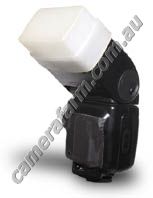 How the Sto-Fen Omni works!
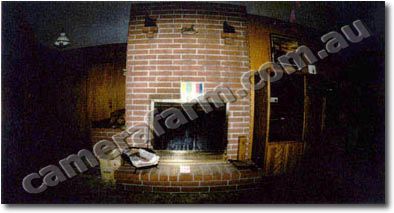
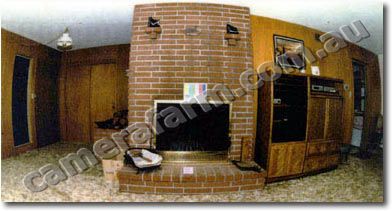
| With Omni-Bounce on the Flash Unit |
 |
Flash with the Omni-Bounce installed and tilted to 45 degrees gives a nice soft wrap around of light with a soft shadow behind the subject. |
| Straight on Flash (Without the Omni-Bounce) |
 |
Flash straight on without the Omni-Bounce causes the light to go forward only and creates a harsh shadow behind the subject. |
| |
The camera was on a tripod to maintain distance and position.
The film used was 100 ISO Color negative.
The lens used on a Nikon FE-2 was the 16mm f/2.8 Nikon full frame fisheye, (Which accounts for the curvature of the image) that allows the true effect of the straight on flash to be seen.
The room is 30 feet wide and the Flash & Camera were ten feet from the fireplace.
Both shots were made with the Vivitar set on the Red Auto Mode at f/4. The OMNI shot had the flash head tilted to 45 degrees
|


|
|
|
11/09
|
Stofen Omni Bounce Bounce C for Canon - Nikon - Minolta - Vivitar - Nissin Stofen Omni Bounce Bounce C
suits:
Canon - 380EX
Nikon - SB24/SB25/SB26
Minolta - 5200/5400xi/
Metz - 40MZ2
Vivitar - 2500/273/5500
Nissin - 400PZ
| |
OMNI-BOUNCE:
The Omni-Bounce creates a Diffused Bare Bulb Effect.
Living even coverage across the entire frame, with lenses from 15mm to 200mm in the 35mm format. (And equal in other formats as well.)
The Omni-Bounce creates a Diffused Bare Bulb Effect. Giving even coverage across the entire frame, with lenses from 15mm to 200mm in the 35mm format. (And equal in other formats as well.)
The Omni-Bounce is easy to use and goes onto and off of your flash in seconds with custom fitting, except UNI, and No Velcro.
Designed for years of service with out the bulk of some other Diffusers, it is small enough to fit easily into your gadget bag or pocket. How the Sto-Fen Omni works!
| With Omni-Bounce on the Flash Unit |
| |
Flash with the Omni-Bounce installed and tilted to 45 degrees gives a nice soft wrap around of light with a soft shadow behind the subject. |
| Straight on Flash (Without the Omni-Bounce) |
| |
Flash straight on without the Omni-Bounce causes the light to go forward only and creates a harsh shadow behind the subject. |
| |
The camera was on a tripod to maintain distance and position.
The film used was 100 ISO Color negative.
The lens used on a Nikon FE-2 was the 16mm f/2.8 Nikon full frame fisheye, (Which accounts for the curvature of the image) that allows the true effect of the straight on flash to be seen.
The room is 30 feet wide and the Flash & Camera were ten feet from the fireplace.
Both shots were made with the Vivitar set on the Red Auto Mode at f/4. The OMNI shot had the flash head tilted to 45 degrees
|
|
|
|
11/09
|
Stofen Omni Bounce Bounce B for canon 420/430EZ Stofen Omni Bounce Bounce B
suits Canon 420/430EZ
| |
OMNI-BOUNCE:
The Omni-Bounce creates a Diffused Bare Bulb Effect.
Living even coverage across the entire frame, with lenses from 15mm to 200mm in the 35mm format. (And equal in other formats as well.)
The Omni-Bounce creates a Diffused Bare Bulb Effect. Giving even coverage across the entire frame, with lenses from 15mm to 200mm in the 35mm format. (And equal in other formats as well.)
The Omni-Bounce is easy to use and goes onto and off of your flash in seconds with custom fitting, except UNI, and No Velcro.
Designed for years of service with out the bulk of some other Diffusers, it is small enough to fit easily into your gadget bag or pocket. How the Sto-Fen Omni works!
| With Omni-Bounce on the Flash Unit |
| |
Flash with the Omni-Bounce installed and tilted to 45 degrees gives a nice soft wrap around of light with a soft shadow behind the subject. |
| Straight on Flash (Without the Omni-Bounce) |
| |
Flash straight on without the Omni-Bounce causes the light to go forward only and creates a harsh shadow behind the subject. |
| |
The camera was on a tripod to maintain distance and position.
The film used was 100 ISO Color negative.
The lens used on a Nikon FE-2 was the 16mm f/2.8 Nikon full frame fisheye, (Which accounts for the curvature of the image) that allows the true effect of the straight on flash to be seen.
The room is 30 feet wide and the Flash & Camera were ten feet from the fireplace.
Both shots were made with the Vivitar set on the Red Auto Mode at f/4. The OMNI shot had the flash head tilted to 45 degrees
|
|
|
|
11/09
|
HP Express Photo Paper, Glossy - 5x7" Size, 220 Sheets - Q8688A MEDIA TYPE: Glossy Paper
MEDIA QTY: 220 sheets
MEDIA SIZE: 5" x 7"
COMPATIBILITY: HP Photosmart Kiosk
* HP Photosmart Express Glossy Paper 5x7
* Contains 220 sheets of 5x7 product specifically developed for the HP Photosmart Kiosk
|

|
|
|
11/09
|
HP CB325WA #564XL Ink Cartridge - Yellow, 750 Pages - For HP B109A/B109N/B110A/B209A/C309A/C309G/C5380/C6380/D5460 Printer
| Overview and features |
Product description
|
Print lab-quality photos and laser-quality documents, using HP Vivera inks. Photos dry instantly and resist smudges when using HP Advanced Photo Paper. Get affordable printing with 5 individual inks and optional high-capacity cartridges.
|
|
|
| Printing specifications |
Colour(s) of print cartridges
|
Yellow
|
Page yield (photo)
|
750 pages
|
| Dimensions / weight / warranty |
Warranty
|
6 Months Limited Warranty (Return to HP/Dealer) |
Compatible Printers:
HP Photosmart All-in-One Printer - B109a (Q8433A)
HP Photosmart C5380 All-in-One Printer (Q8291A)
HP Photosmart C6380 All-in-One Printer (CD028A)
HP Photosmart D5460 Printer (Q8421A)
HP Photosmart Plus All-in-One Printer - B209a (CD035A)
HP Photosmart Premium All-in-One Printer - C309g (CD055A)
HP Photosmart Premium Fax All-in-One Printer - C309a (CC335A)
HP Photosmart Wireless All-in-One Printer - B109n (Q8444A)
HP Photosmart Wireless e-All-in-One Printer - B110a (CN245A)
|
|
|
|
11/09
|
HP CB324WA #564XL Ink Cartridge - Magenta, 750 Pages - For HP B109A/B109N/B110A/B209A/C309A/C309G/C5380/C6380/D5460 Printer
| Overview and features |
Product description
|
Print lab-quality photos and laser-quality documents, using HP Vivera inks. Photos dry instantly and resist smudges when using HP Advanced Photo Paper. Get affordable printing with 5 individual inks and optional high-capacity cartridges.
|
|
|
| Printing specifications |
Colour(s) of print cartridges
|
Magenta
|
Page yield (photo)
|
750 pages
|
| Dimensions / weight / warranty |
Warranty
|
6 Months Limited Warranty (Return to HP/Dealer) |
Compatible Printers:
HP Photosmart All-in-One Printer - B109a (Q8433A)
HP Photosmart C5380 All-in-One Printer (Q8291A)
HP Photosmart C6380 All-in-One Printer (CD028A)
HP Photosmart D5460 Printer (Q8421A)
HP Photosmart Plus All-in-One Printer - B209a (CD035A)
HP Photosmart Premium All-in-One Printer - C309g (CD055A)
HP Photosmart Premium Fax All-in-One Printer - C309a (CC335A)
HP Photosmart Wireless All-in-One Printer - B109n (Q8444A)
HP Photosmart Wireless e-All-in-One Printer - B110a (CN245A)
|
|
|
|
11/09
|
HP CB323WA #564XL Ink Cartridge - Cyan, 750 Pages - For HP B109A/B109N/B110A/B209A/C309A/C309G/C5380/C6380/D5460 Printer
|
|

|
|
11/09
|
Stofen Omni Bounce 60 suits Metz 60 Series Stofen Omni Bounce 60
suits Metz 60 Series
| |
OMNI-BOUNCE:
The Omni-Bounce creates a Diffused Bare Bulb Effect.
Living even coverage across the entire frame, with lenses from 15mm to 200mm in the 35mm format. (And equal in other formats as well.)
The Omni-Bounce creates a Diffused Bare Bulb Effect. Giving even coverage across the entire frame, with lenses from 15mm to 200mm in the 35mm format. (And equal in other formats as well.)
The Omni-Bounce is easy to use and goes onto and off of your flash in seconds with custom fitting, except UNI, and No Velcro.
Designed for years of service with out the bulk of some other Diffusers, it is small enough to fit easily into your gadget bag or pocket. How the Sto-Fen Omni works!
| With Omni-Bounce on the Flash Unit |
| |
Flash with the Omni-Bounce installed and tilted to 45 degrees gives a nice soft wrap around of light with a soft shadow behind the subject. |
| Straight on Flash (Without the Omni-Bounce) |
| |
Flash straight on without the Omni-Bounce causes the light to go forward only and creates a harsh shadow behind the subject. |
| |
The camera was on a tripod to maintain distance and position.
The film used was 100 ISO Color negative.
The lens used on a Nikon FE-2 was the 16mm f/2.8 Nikon full frame fisheye, (Which accounts for the curvature of the image) that allows the true effect of the straight on flash to be seen.
The room is 30 feet wide and the Flash & Camera were ten feet from the fireplace.
Both shots were made with the Vivitar set on the Red Auto Mode at f/4. The OMNI shot had the flash head tilted to 45 degrees
|
|
|
|
11/09
|
Stofen Omni Bounce suits Metz 45 Series Stofen Omni Bounce 45
suits Metz 45 Series
| |
OMNI-BOUNCE:
The Omni-Bounce creates a Diffused Bare Bulb Effect.
Living even coverage across the entire frame, with lenses from 15mm to 200mm in the 35mm format. (And equal in other formats as well.)
The Omni-Bounce creates a Diffused Bare Bulb Effect. Giving even coverage across the entire frame, with lenses from 15mm to 200mm in the 35mm format. (And equal in other formats as well.)
The Omni-Bounce is easy to use and goes onto and off of your flash in seconds with custom fitting, except UNI, and No Velcro.
Designed for years of service with out the bulk of some other Diffusers, it is small enough to fit easily into your gadget bag or pocket. How the Sto-Fen Omni works!
| With Omni-Bounce on the Flash Unit |
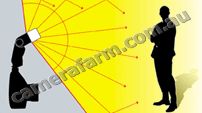 |
Flash with the Omni-Bounce installed and tilted to 45 degrees gives a nice soft wrap around of light with a soft shadow behind the subject. |
| Straight on Flash (Without the Omni-Bounce) |
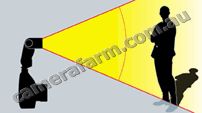 |
Flash straight on without the Omni-Bounce causes the light to go forward only and creates a harsh shadow behind the subject. |
| |
The camera was on a tripod to maintain distance and position.
The film used was 100 ISO Color negative.
The lens used on a Nikon FE-2 was the 16mm f/2.8 Nikon full frame fisheye, (Which accounts for the curvature of the image) that allows the true effect of the straight on flash to be seen.
The room is 30 feet wide and the Flash & Camera were ten feet from the fireplace.
Both shots were made with the Vivitar set on the Red Auto Mode at f/4. The OMNI shot had the flash head tilted to 45 degrees
|
|
|
|
11/09
|
HP CB322WA #564XL Ink Cartridge - Photo Black - For HP C5380, C6380, D5460
| Overview & Specifications |

| Overview and features |
Overview
|
Print lab-quality photos and laser-quality documents, using HP Vivera inks. Photos dry instantly and resist smudges when using HP Advanced Photo Paper. Get affordable printing with 5 individual inks and optional high-capacity cartridges.
|
|
|
| Printing specifications |
Colour(s) of print cartridges
|
Photo black
|
Page yield (photo)
|
290 4 x 6-in photos, 390 L-size photos
|
| Dimensions / weight / warranty |
Warranty
|
6 Months Limited Warranty (Return to HP/Dealer) |
Compatible Printers:
C5380, C6380, D5460
|
|
|
|
11/09
|
HP CB321WA #564XL Ink Cartridge - Black, 800 Pages - For HP B109A/B109N/B110A/B209A/C309A/C309G/C5380/C6380/D5460 Printer
| Overview and features |
Product description
|
Print lab-quality photos and laser-quality documents, using HP Vivera inks. Photos dry instantly and resist smudges when using HP Advanced Photo Paper. Get affordable printing with 5 individual inks and optional high-capacity cartridges.
|
|
|
| Printing specifications |
Colour(s) of print cartridges
|
Black
|
Page yield (photo)
|
800 pages
|
| Dimensions / weight / warranty |
Warranty
|
6 Months Limited Warranty (Return to HP/Dealer) |
Compatible Printers:
HP Photosmart All-in-One Printer - B109a (Q8433A)
HP Photosmart C5380 All-in-One Printer (Q8291A)
HP Photosmart C6380 All-in-One Printer (CD028A)
HP Photosmart D5460 Printer (Q8421A)
HP Photosmart Plus All-in-One Printer - B209a (CD035A)
HP Photosmart Premium All-in-One Printer - C309g (CD055A)
HP Photosmart Premium Fax All-in-One Printer - C309a (CC335A)
HP Photosmart Wireless All-in-One Printer - B109n (Q8444A)
HP Photosmart Wireless e-All-in-One Printer - B110a (CN245A)
|
|
|
|
11/09
|
HP CB320WA #564 Ink Cartridge - Yellow, 300 Pages - For HP B109A/B109N/B110A/B209A/C309A/C309G/C5380/C6380/D5460 Printer
|
|
|
|
11/09
|
HP CB319WA #564 Ink Cartridge - Magenta, 300 Pages - For HP B109A/B109N/B110A/B209A/C309A/C309G/C5380/C6380/D5460 Printer
|
|
|
|
11/09
|
HP CB318WA 564 Original Ink Cartridge - Cyan
|
|
|
|
11/09
|
HP CB317WA #564 Ink Cartridge - Photo Black - For HP PSD5460/PSC5380/PSC6380 Printer
|
|
|
|
11/09
|
HP CB316WA 564 Original Ink Cartridge - Black
|
|
|
|
11/09
|
Adobe PhotoShop Elements 7 and Premier Elements 7 Bundle Pack - Retail New Adobe Photoshop Elements 7 & Adobe Premiere Elements 7 software with Photoshop.com Plus** membership combines two powerful yet easy-to-use products, so you can do so much more with your photos and videos. Easily create extraordinary photos and incredible movies, use them together in cinematic slide shows and other creations, and stay connected with your favorite people and memories.
- Stay connected with family, friends, and memories
- Easily combine photos and videos in entertaining ways
- Create extraordinary photos and tell amazing stories
- Easily make movies and get incredible results
Stay connected with family, friends, and memories
Extend the capabilities of your Adobe Photoshop Elements 7 & Adobe Premiere Elements 7 software and stay connected with your favorite people and memories with Photoshop.com Plus** membership.

Get fresh inspiration just when you need it New
Show off your shooting skills with an ongoing supply of tutorials, seasonal artwork, movie themes, and more delivered regularly to your software.

Backup your memories automatically, no scheduling required New
Help protect your photos and videos from computer loss and hard drive crashes with automatic online backup and 20GB of storage that's up to 15,000 photos or four hours of DVD-quality video (or a combination of both).

Set the scene anywhere New
Access your photos, movies, and video clips virtually anywhere you are.

Share photo memories with your favorite people New
Create public or private online galleries for family and friends to enjoy. And get new sharing templates delivered regularly to your software.
Easily combine photos and videos in entertaining ways
Adobe Photoshop Elements 7 & Adobe Premiere Elements 7 software combines two powerful yet easy-to-use products at a great value, so you can tell amazing stories with photos and videos. Easily create extraordinary photos and incredible movies, and use them together in cinematic slide shows and more.

Add cinematic flair to photo slide shows Enhanced
Create a traditional photo slide show, and then add video-style effects, transitions, motion graphics, and more. You can also use new InstantMovie to automatically put your slide shows in motion. Preview slide shows in full screen and then burn them to disc or upload them to the web to share with family and friends.
View it in action
View example
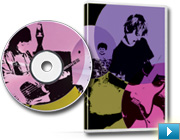
Do more with individual video frames
Capture a single video frame; add text, graphics, and other enhancements; and then put the frame back in your movie for a fun or dramatic freeze-frame effect. Or use it to create a personalized disc cover for your movie.
View it in action
View example
Create extraordinary photos and tell amazing stories
Adobe Photoshop Elements 7 software combines power and simplicity so you can make ordinary photos extraordinary, tell your stories in personalized creations, and easily find and view all your photos.
Select and apply with a single stroke New
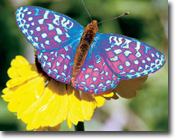
Simultaneously select a specific photo area and apply incredible effects with a single stroke of new Adobe Smart Brush. Improve lighting, add rich textures, and more with eight libraries of over 50 sophisticated effects.

Quickly clean your scene of unwanted elements New
You took five shots of your subject, but pedestrians and cars distract from the scene in every one. Now, see only what you want to see in your photos use new Adobe Photomerge Scene Cleaner to simply brush away any elements that changed positions between photos and create a single perfect composite.
Easily make movies and get incredible results
With Adobe Premiere Elements 7 software, it's easy to make incredible movies. Get started quickly with automated moviemaking options, add knockout visuals and sound, and share your movies everywhere.
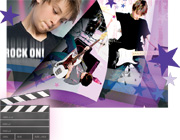
Create a polished movie instantly New
Create polished movies with no effort using creative techniques from Hollywood directors. Just choose a theme and new InstantMovie automatically edits together your best clips with coordinated music, titles, effects, and transitions. You can even customize the final result if you wish.
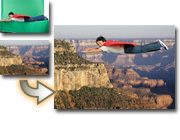
Easily put your subject in a new setting New
Composite video with entertaining results. Use new Adobe Videomerge technology to cleanly extract your moving subject from a solid-color background and then drop it into a new setting for a fun or creative twist.
|
|
|
|
11/09
|
Acer Replacement Lamp for P5270 Projector - 4,000hourReplacement Lamp for P5270 Projector - 4,000hour
|
|
|
|
11/09
|
Acer X1160Z DLP Projector - WXGA+, 2000 Lumens, 2000;1
Acer X1160Z combines extra portability and excellent colour reproduction to form the ultimate presentation tool. The Acer X1160Z is well suited for the most demanding Multimedia presentation applications
Product Specification
Projection System
DLP Technology
Resolution
Native SVGA (800 x 600)
Maximum SXGA (1,280 x 1,024)
WXGA+ (1,440 x 900)
Computer Compatibility
IBM PC and Compatibles
Apple Macintosh
iMac, and VESA Standards
WXGA+ (1,440 x 900)
WXGA (1,280 x 800, 1,280 x 768)
SXGA (1,280 x 1,024)
XGA (1,024 x 768)
SVGA (800 x 600)
VGA (640 x 480)
Video Compatibility
NTSC (3.58/4.43)
PAL (B/D/G/H/I/M/N)
SECAM (B/D/G/K/K1/L)
HDTV (720p, 1080i)
EDTV (480p, 576p)
SDTV (480i, 576i)
Aspect Ratio
4:3 (Native), 16:9
Displayable Colours
16.7 Million Colours
Brightness
2,000 ANSI Lumens (Standard)
Projection Lens
F = 2.41, f = 21.79mm 23.99mm 1:1.1 Manual Focus
Projection Screen Size (Diagonal)
25" (64cm) ~ 300" (762cm)
Projection Distance
3.3' (1.0m) ~ 39.0' (11.9m)
Throw Ratio
50"@2m (1.95 ~ 2.15:1)
Horizontal Scan Rate
31k 69k Hz
Vertical Scan Rate
50 ~ 85 Hz
Lamp Type / Life
160 W user replaceable P-VIP lamp
4,000 Hours
Keystone Correction
+/-40 Degrees (Vertical )
Projection Mode
Front, Rear, Front-Ceiling, Rear-Ceiling
IR Remote Control
IR remote control
Power Supply
AC input 100~240V auto-switching power supply
Power Consumption
255 Watts
Operating Temperature
5 35 Degrees
Noise Level
33 dBA (Standard mode)
Input Interface
Analog RGB/Component Video (D-sub) x 1
Composite Video (RCA) x 1
S-Video (Mini DIN) x1
Control Interface
USB (Type B) x 1
Weight and Dimensions
2.3kg
267 x 187 x 80 mm (10.5" x 7.4" x 3.1")
Compliance
C-Tick (AS/NZS 60950)
Standard Warranty
2 year return to base
|
|
|
|
11/09
|
Hoya 58mm Close Up + 1 Filter
 |
|
|
|
CLOSE-UP No.3
|
A world of new creativity
The CLOSE-UP No.3 lens turns a normal lens into a macro by reducing the lens, minimum focusing distance. Depth-of-field is shallow so use as small an aperture as possible. CLOSE-UP NO.3 offers a world of new creativity. |
|
With CLOSE-UP No.3 Filter Without Filter
|
|
|
|
11/09
|
Hoya 55mm Close Up + 1 Filter
|
|
|
|
CLOSE-UP No.3
|
A world of new creativity
The CLOSE-UP No.3 lens turns a normal lens into a macro by reducing the lens, minimum focusing distance. Depth-of-field is shallow so use as small an aperture as possible. CLOSE-UP NO.3 offers a world of new creativity. |
|
With CLOSE-UP No.3 Filter Without Filter
|
|
|
|
11/09
|
Hoya 52mm Close Up + 1 Filter
|
|
|
|
CLOSE-UP No.3
|
A world of new creativity
The CLOSE-UP No.3 lens turns a normal lens into a macro by reducing the lens, minimum focusing distance. Depth-of-field is shallow so use as small an aperture as possible. CLOSE-UP NO.3 offers a world of new creativity. |
|
With CLOSE-UP No.3 Filter Without Filter
|
|
|
|
Previous Page
|
Next Page
|
|